Ok, my first time. I am in the process of combining several remotes into my RCU810.
For my old dolby prologic receiver (Pioneer RX-760), the original remote no longer works. On the 810, I have been using amp, code 0030 plus a few learned buttons for source, surround, radio.
My question is how do I make an upgrade that combines them? I understand how to copy data for the learned codes into the KM spreadsheet, but I dont know the amp 0030 codes that control standard functions like volume, numbers and power.
In fact all of my devices (TV,DVD,CD,VCR,DD,digital receiver) use standard codes combined with some learned buttons. How do I go about programming them all in?
create upgrade using some learned/some preset?
Moderator: Moderators
There is no simple way to extract the details about builtin setup codes.
If you still have the original remotes, you use learning to figure out the details for each key and then build a complete upgrade.
Many builtin setup codes are documented in the Advanced Code List here at hifi-remote.
There are a large number of Pioneer receiver upgrade files in the Audio section of the FIle Section. One of them should work with your receiver. You can use the information you have from your learned signals to find one that is consistent with that.
If you still have the original remotes, you use learning to figure out the details for each key and then build a complete upgrade.
Many builtin setup codes are documented in the Advanced Code List here at hifi-remote.
There are a large number of Pioneer receiver upgrade files in the Audio section of the FIle Section. One of them should work with your receiver. You can use the information you have from your learned signals to find one that is consistent with that.
-- Greg
Original RemoteMaster developer
JP1 How-To's and Software Tools
The #1 Code Search FAQ and it's answer (PLEASE READ FIRST)
Original RemoteMaster developer
JP1 How-To's and Software Tools
The #1 Code Search FAQ and it's answer (PLEASE READ FIRST)
-
The Robman
- Site Owner
- Posts: 22056
- Joined: Fri Aug 01, 2003 9:37 am
- Location: Chicago, IL
- Contact:
Here's a KM file that re-created audio/0030 as it appears in the RCU810:
https://www.hifi-remote.com/forums/dload ... le_id=3748
Just FYI, all the setup codes in the RCU810 are offset by 17, so this code appears as audio/0013 in most other JP1 remotes.
Note, I have included all the other functions from the audio/0013 code list in there also.
https://www.hifi-remote.com/forums/dload ... le_id=3748
Just FYI, all the setup codes in the RCU810 are offset by 17, so this code appears as audio/0013 in most other JP1 remotes.
Note, I have included all the other functions from the audio/0013 code list in there also.
Rob
www.hifi-remote.com
Please don't PM me with remote questions, post them in the forums so all the experts can help!
www.hifi-remote.com
Please don't PM me with remote questions, post them in the forums so all the experts can help!
-
The Robman
- Site Owner
- Posts: 22056
- Joined: Fri Aug 01, 2003 9:37 am
- Location: Chicago, IL
- Contact:
Why, I just created the upgrade for you, all you need to do is plug in the values from the buttons that you learned.
Rob
www.hifi-remote.com
Please don't PM me with remote questions, post them in the forums so all the experts can help!
www.hifi-remote.com
Please don't PM me with remote questions, post them in the forums so all the experts can help!
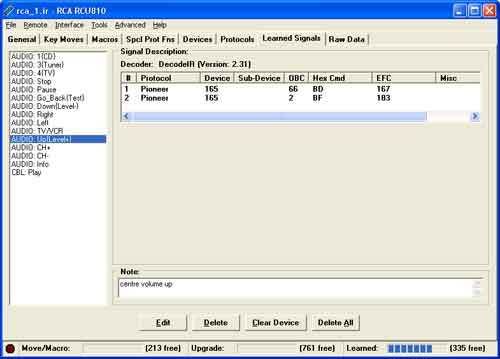
Ok, so when I go to enter my learned functions into KM, how do I deal with 2 value buttons like this? I have also put the .ir file in the diagnosis section: https://www.hifi-remote.com/forums/dload ... le_id=3757
-
Capn Trips
- Expert
- Posts: 3989
- Joined: Fri Oct 03, 2003 6:56 am
Actually, you uploaded an the .ir file, not the .txt file, but that's beside the point.
Your decodes are either single command using device 164 or 165 or double command, using device 165 for both parts. If you look at the "Protocol Help" Worksheet in KM, you will see several different Pioneer protocols described. The only one that will allow you to combine all of these signals into a single device upgrade is Pioneer 3Dev.
FIRST you should go to the "Functions" Worksheet and select "OBC" at the top of column A. This will basically switch the EFC and OBC columns in KM, since you need to be in OBC mode for this protocol.
SECOND, you should go to the "Setup" Worksheet and change the protocol from "Pioneer" to "Pioneer 3DEV". You will notice that the device codes just beneath it will already have 165, 165, and 164 selected as the defaults.
THIRD, add the codes you learned, following the guidance in the Help section, for those functions that use two-part commands, column C will require and entry like "1 002" for the Up command you displayed above. The Device 164 codes should be entered as regular OBCs in column B, but then you need to put a "3" in Column C for those.
Add all of the functions you can learn to that upgrade, assign the functions to buttons as you wish, and you're ready to copy and paste the upgrade into IR for further uploading to your remote.
Your decodes are either single command using device 164 or 165 or double command, using device 165 for both parts. If you look at the "Protocol Help" Worksheet in KM, you will see several different Pioneer protocols described. The only one that will allow you to combine all of these signals into a single device upgrade is Pioneer 3Dev.
So following this advice,Pioneer 3DEV:
If the functions for your device use one of up to three different
device codes, and some of the functions even send a two-part
signal as described above, then you need to use the "Pioneer 3DEV"
protocol.
Enter the three device codes, and then, on the Functions sheet,
enter the command codes in the regular OBC/EFC column.
In the byte2 column enter a "1", "2", or "3" to indicate which
device code to use. If this particular function uses a two-part
signal, put a space after the device code number and then enter
the EFC or OBC.
For example, if device code 1 is 130, and the ENTER button sends a
two-part signal where the first part is device 130, command 123,
and the second part is device 130, command 133, you would enter
123 in the OBC/EFC column, and then "1 133" in the byte2 column.
NOTE: While this protocol supports both OBC's and EFC's, this
version is LSB, where most of the other Pioneer protocols are LSB-
COMP, so the EFC's will be different. Therefore, it is STONGLY
recommended that you use OBC's when setting up the Pioneer 3DEV
protocol.
FIRST you should go to the "Functions" Worksheet and select "OBC" at the top of column A. This will basically switch the EFC and OBC columns in KM, since you need to be in OBC mode for this protocol.
SECOND, you should go to the "Setup" Worksheet and change the protocol from "Pioneer" to "Pioneer 3DEV". You will notice that the device codes just beneath it will already have 165, 165, and 164 selected as the defaults.
THIRD, add the codes you learned, following the guidance in the Help section, for those functions that use two-part commands, column C will require and entry like "1 002" for the Up command you displayed above. The Device 164 codes should be entered as regular OBCs in column B, but then you need to put a "3" in Column C for those.
Add all of the functions you can learn to that upgrade, assign the functions to buttons as you wish, and you're ready to copy and paste the upgrade into IR for further uploading to your remote.
Beginners - Read this thread first
READ BEFORE POSTING or your post will be DELETED!
Remotes: OFA XSight Touch, AR XSight Touch
TVs: LG 65" Smart LED TV; Samsung QN850BF Series - 8K UHD Neo QLED LCD TV
RCVR: Onkyo TX-SR875; Integra DTR 40.3
DVD/VCR: Pioneer DV-400VK (multi-region DVD), Sony BDP-S350 (Blu-ray), Toshiba HD-A3 (HD-DVD), Panasonic AG-W1 (Multi-system VCR);
Laserdisc: Pioneer CLD-D704.
Amazon Firestick
tape deck: Pioneer CT 1380WR (double cassette deck)
(But I still have to get up for my beer)
READ BEFORE POSTING or your post will be DELETED!
Remotes: OFA XSight Touch, AR XSight Touch
TVs: LG 65" Smart LED TV; Samsung QN850BF Series - 8K UHD Neo QLED LCD TV
RCVR: Onkyo TX-SR875; Integra DTR 40.3
DVD/VCR: Pioneer DV-400VK (multi-region DVD), Sony BDP-S350 (Blu-ray), Toshiba HD-A3 (HD-DVD), Panasonic AG-W1 (Multi-system VCR);
Laserdisc: Pioneer CLD-D704.
Amazon Firestick
tape deck: Pioneer CT 1380WR (double cassette deck)
(But I still have to get up for my beer)
Ok, I have taken that file (Amp/0013) added my learned funtions, and assigned them to buttons. I pasted the hex and added the new device. I assigned the amp/1030 to my AUD button and uploaded to the remote. I think I got all that correct, right?
That did not work. Did I do something wrong with the offset?
When I try on the remote to assign the AUD button to device amp/1030, it is not found. amp/1013 is found, and correctly operates all the learned functions I put in to the upgrade. However the 0030 buttons do not work. I have to reassign the AUD back to 0030 to get them to work.
So changing the learned functions into an upgrade worked, but combining them with the preset 0030 functions from Rob's file did not.
new .txt file: https://www.hifi-remote.com/forums/dload ... le_id=3765
That did not work. Did I do something wrong with the offset?
When I try on the remote to assign the AUD button to device amp/1030, it is not found. amp/1013 is found, and correctly operates all the learned functions I put in to the upgrade. However the 0030 buttons do not work. I have to reassign the AUD back to 0030 to get them to work.
So changing the learned functions into an upgrade worked, but combining them with the preset 0030 functions from Rob's file did not.
new .txt file: https://www.hifi-remote.com/forums/dload ... le_id=3765
-
Capn Trips
- Expert
- Posts: 3989
- Joined: Fri Oct 03, 2003 6:56 am
The "offset" Rob discussed only appplies to the numbering of BUILT-IN Device Setup codes in the RCU810. It was apparently a lame attempt to somehow obscure the fact that this remote "by RCA" was really made by UEIC. When you using a home-made UPGRADE, the presense or absence of an offset is immaterial, so if your device upgrade number is 1013, then you should enter 1013.
Having said that, your upgrade appears to be perfectly good. It is properly constructed, and the Single Command Device 165 functions are properly formatted.
Have you tested every function, and you can positively state that EVERY single command Device 165 functions does not work?
What about EVERY two-command function?
Finally, what about every single-command Device 164 function?
The only thing I might suggest is that you could put a "1" in the column C entry where you have left blanks, but that makes no difference to the hex calculated nor to the output, so I don't think that could make any difference.
Post your IR file and perhaps something will be evident there (conflicting Keymoves, or Macros, or assigned punch-throughs or something.) But even those seem unlikely, if the built-in 0030 setup code works properly.
Having said that, your upgrade appears to be perfectly good. It is properly constructed, and the Single Command Device 165 functions are properly formatted.
Have you tested every function, and you can positively state that EVERY single command Device 165 functions does not work?
What about EVERY two-command function?
Finally, what about every single-command Device 164 function?
The only thing I might suggest is that you could put a "1" in the column C entry where you have left blanks, but that makes no difference to the hex calculated nor to the output, so I don't think that could make any difference.
Post your IR file and perhaps something will be evident there (conflicting Keymoves, or Macros, or assigned punch-throughs or something.) But even those seem unlikely, if the built-in 0030 setup code works properly.
Beginners - Read this thread first
READ BEFORE POSTING or your post will be DELETED!
Remotes: OFA XSight Touch, AR XSight Touch
TVs: LG 65" Smart LED TV; Samsung QN850BF Series - 8K UHD Neo QLED LCD TV
RCVR: Onkyo TX-SR875; Integra DTR 40.3
DVD/VCR: Pioneer DV-400VK (multi-region DVD), Sony BDP-S350 (Blu-ray), Toshiba HD-A3 (HD-DVD), Panasonic AG-W1 (Multi-system VCR);
Laserdisc: Pioneer CLD-D704.
Amazon Firestick
tape deck: Pioneer CT 1380WR (double cassette deck)
(But I still have to get up for my beer)
READ BEFORE POSTING or your post will be DELETED!
Remotes: OFA XSight Touch, AR XSight Touch
TVs: LG 65" Smart LED TV; Samsung QN850BF Series - 8K UHD Neo QLED LCD TV
RCVR: Onkyo TX-SR875; Integra DTR 40.3
DVD/VCR: Pioneer DV-400VK (multi-region DVD), Sony BDP-S350 (Blu-ray), Toshiba HD-A3 (HD-DVD), Panasonic AG-W1 (Multi-system VCR);
Laserdisc: Pioneer CLD-D704.
Amazon Firestick
tape deck: Pioneer CT 1380WR (double cassette deck)
(But I still have to get up for my beer)
I have tested every function. Curiously, the on/off button seems to activate the center volume down function. Other than that, no other buttons have an effect on the receiver except the ones I entered from the learned functions, although they do emit a signal.
Whether they are 165 or 164 isnt the issue, my learned functions have both and are working. The 0013 functions that Rob gave me dont seem to work.
Let me outline again what I did:
-I loaded Rob's 0013 file into KM
-changed the protocol to pioneer 3dev
-entered 165 as device 1, 164 as device 2
-on the functions tab, switched to OBC mode, answered yes to the conversion prompt - *is this the problem?*
-entered my learned functions - name, OBC byte 1, OBC byte 2 if needed (165 functions preceded with a 1, or just 2 if byte 1 is from 164)
-chose the buttons on the button tab
-add device in IR, paste hex code
-change AUD button to point to device amp/1013
-upload
Here is the IR file: https://www.hifi-remote.com/forums/dload ... le_id=3766
Whether they are 165 or 164 isnt the issue, my learned functions have both and are working. The 0013 functions that Rob gave me dont seem to work.
Let me outline again what I did:
-I loaded Rob's 0013 file into KM
-changed the protocol to pioneer 3dev
-entered 165 as device 1, 164 as device 2
-on the functions tab, switched to OBC mode, answered yes to the conversion prompt - *is this the problem?*
-entered my learned functions - name, OBC byte 1, OBC byte 2 if needed (165 functions preceded with a 1, or just 2 if byte 1 is from 164)
-chose the buttons on the button tab
-add device in IR, paste hex code
-change AUD button to point to device amp/1013
-upload
Here is the IR file: https://www.hifi-remote.com/forums/dload ... le_id=3766
-
Capn Trips
- Expert
- Posts: 3989
- Joined: Fri Oct 03, 2003 6:56 am
You transposed two crucial steps:
I wrote:
I wrote:
Yet YOU wrote:FIRST you should go to the "Functions" Worksheet and select "OBC" at the top of column A. .....
SECOND, you should go to the "Setup" Worksheet and change the protocol from "Pioneer" to "Pioneer 3DEV".
You have to do the conversion to OBC mode BEFORE you change the protocol to Pioneer 3Dev on the Setup worksheet. Having done it your way, all of the OBCs for the 0013 (0030) functions were converted incorrectly, and hence, do not work.-changed the protocol to pioneer 3dev
.......
-on the functions tab, switched to OBC mode, answered yes to the conversion prompt - *is this the problem?*
Beginners - Read this thread first
READ BEFORE POSTING or your post will be DELETED!
Remotes: OFA XSight Touch, AR XSight Touch
TVs: LG 65" Smart LED TV; Samsung QN850BF Series - 8K UHD Neo QLED LCD TV
RCVR: Onkyo TX-SR875; Integra DTR 40.3
DVD/VCR: Pioneer DV-400VK (multi-region DVD), Sony BDP-S350 (Blu-ray), Toshiba HD-A3 (HD-DVD), Panasonic AG-W1 (Multi-system VCR);
Laserdisc: Pioneer CLD-D704.
Amazon Firestick
tape deck: Pioneer CT 1380WR (double cassette deck)
(But I still have to get up for my beer)
READ BEFORE POSTING or your post will be DELETED!
Remotes: OFA XSight Touch, AR XSight Touch
TVs: LG 65" Smart LED TV; Samsung QN850BF Series - 8K UHD Neo QLED LCD TV
RCVR: Onkyo TX-SR875; Integra DTR 40.3
DVD/VCR: Pioneer DV-400VK (multi-region DVD), Sony BDP-S350 (Blu-ray), Toshiba HD-A3 (HD-DVD), Panasonic AG-W1 (Multi-system VCR);
Laserdisc: Pioneer CLD-D704.
Amazon Firestick
tape deck: Pioneer CT 1380WR (double cassette deck)
(But I still have to get up for my beer)