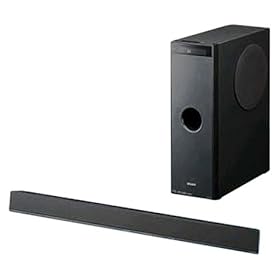
1. Device: Sony HTCT100
2. Type of device: Sound Bar with Sub-Woofer
3. Year: 2008
4. JP1/UEI Remote model: Comcast M1067B3
5. Do you have a JP1 cable? Yes (edited to change this to yes)
6. Still have original remote? Yes
7. Checked the file section? Yes
8. Checked Pronto file section (at R/C)? Yes
9. Partially working setup code? audio/1759
10. Learning remote question? N/A
I need the codes for my new Sony Home Theater system. I have not yet bought a JP1 cable because I don't want to buy stuff and spend a lot of time learning stuff if the things I need to to make it work don't exist.
Sony HTCT100 Sound Bar with Sub-Woofer
Moderator: Moderators
Sony HTCT100 Sound Bar with Sub-Woofer
Last edited by i_am_jim on Fri Jan 09, 2009 11:02 pm, edited 3 times in total.
-
Capn Trips
- Expert
- Posts: 3989
- Joined: Fri Oct 03, 2003 6:56 am
Sony devices and codes are amongst the most thoroughly documented ones here. Look in the file section and you are likely to find an upgrade that will get you most of the way to your goal, and any other codes can be found in all likelihood at the exceptionally complete Sony code site run by (the other) Rob. It is linked at the top of the Code Search Forum in a sticky post.
Beginners - Read this thread first
READ BEFORE POSTING or your post will be DELETED!
Remotes: OFA XSight Touch, AR XSight Touch
TVs: LG 65" Smart LED TV; Samsung QN850BF Series - 8K UHD Neo QLED LCD TV
RCVR: Onkyo TX-SR875; Integra DTR 40.3
DVD/VCR: Pioneer DV-400VK (multi-region DVD), Sony BDP-S350 (Blu-ray), Toshiba HD-A3 (HD-DVD), Panasonic AG-W1 (Multi-system VCR);
Laserdisc: Pioneer CLD-D704.
Amazon Firestick
tape deck: Pioneer CT 1380WR (double cassette deck)
(But I still have to get up for my beer)
READ BEFORE POSTING or your post will be DELETED!
Remotes: OFA XSight Touch, AR XSight Touch
TVs: LG 65" Smart LED TV; Samsung QN850BF Series - 8K UHD Neo QLED LCD TV
RCVR: Onkyo TX-SR875; Integra DTR 40.3
DVD/VCR: Pioneer DV-400VK (multi-region DVD), Sony BDP-S350 (Blu-ray), Toshiba HD-A3 (HD-DVD), Panasonic AG-W1 (Multi-system VCR);
Laserdisc: Pioneer CLD-D704.
Amazon Firestick
tape deck: Pioneer CT 1380WR (double cassette deck)
(But I still have to get up for my beer)
As mentioned in my answers to the standard questions in my original post, I looked in the files section, the Pronto list (whatever it is) and now I've looked at the Sony page at http://www.hifi-remote.com/sony.Capn Trips wrote:Sony devices and codes are amongst the most thoroughly documented ones here. Look in the file section and you are likely to find an upgrade that will get you most of the way to your goal, and any other codes can be found in all likelihood at the exceptionally complete Sony code site run by (the other) Rob. It is linked at the top of the Code Search Forum in a sticky post.
I did not see my unit on any of these lists. I wouldn't have understood what to do with the stuff on the Sony page if it had been there.
-
The Robman
- Site Owner
- Posts: 22056
- Joined: Fri Aug 01, 2003 9:37 am
- Location: Chicago, IL
- Contact:
The correct answer to question 1 would be the brand (Sony) and model (???) of the unit that you want to control.
Sony is very consistent with the remote codes for it's devices, so even if you don't find an exact match in the file section, chances are very good that a similar model will work.
Sony is very consistent with the remote codes for it's devices, so even if you don't find an exact match in the file section, chances are very good that a similar model will work.
Rob
www.hifi-remote.com
Please don't PM me with remote questions, post them in the forums so all the experts can help!
www.hifi-remote.com
Please don't PM me with remote questions, post them in the forums so all the experts can help!
Someone may want to consider relabeling entries 1 & 2 as Make and model.The Robman wrote:The correct answer to question 1 would be the brand (Sony) and model (???) of the unit that you want to control.
Similar systems are listed in the remote's instruction sheet, but the codes don't work.Sony is very consistent with the remote codes for it's devices, so even if you don't find an exact match in the file section, chances are very good that a similar model will work.
I assume from your reply no one here is likely to have a code set for this device. Is that correct?
-
The Robman
- Site Owner
- Posts: 22056
- Joined: Fri Aug 01, 2003 9:37 am
- Location: Chicago, IL
- Contact:
The template is there for our benefit, not yours, and the labels work just fine for us, so I have edited your original post to conform with our template.i_am_jim wrote:Someone may want to consider relabeling entries 1 & 2 as Make and model.
We have the files that we have. I have not checked the file section to see if there's an exact match for your unit or not, but if you have and you say there isn't, then yes, nobody here has an exact match.i_am_jim wrote:Similar systems are listed in the remote's instruction sheet, but the codes don't work.
I assume from your reply no one here is likely to have a code set for this device. Is that correct?
I just did a quick search to see what sort of device this really is, and it turns out that it isn't a conventional home theater system at all, it's officially called a "Sound Bar with Sub-Woofer" at Amazon, so I don't know what I would consider a similar device.
http://www.amazon.com/product/dp/B0015HS1HQ?tag=j0df-20
You say in your original post that you found a code that partially works this device, which code is that?
Last edited by The Robman on Fri Aug 06, 2010 7:26 pm, edited 1 time in total.
Rob
www.hifi-remote.com
Please don't PM me with remote questions, post them in the forums so all the experts can help!
www.hifi-remote.com
Please don't PM me with remote questions, post them in the forums so all the experts can help!
I'm not sure what you consider "officially." Sony calls it a "Home Theater System" http://tinyurl.com/9v3hemThe Robman wrote:We have the files that we have. I have not checked the file section to see if there's an exact match for your unit or not, but if you have and you say there isn't, then yes, nobody here has an exact match.i_am_jim wrote:Similar systems are listed in the remote's instruction sheet, but the codes don't work.
I assume from your reply no one here is likely to have a code set for this device. Is that correct?
I just did a quick search to see what sort of device this really is, and it turns out that it isn't a conventional home theater system at all, it's officially called a "Sound Bar with Sub-Woofer" at Amazon, so I don't know what I would consider a similar device.
I'm more inclined to accept the manufacturer's designation than Amazon's.
By that I meant a code from the remote's instruction sheet. That code is 31759.The Robman wrote:You say in your original post that you found a code that partially works this device, which code is that?
-
The Robman
- Site Owner
- Posts: 22056
- Joined: Fri Aug 01, 2003 9:37 am
- Location: Chicago, IL
- Contact:
Again you seem to be missing the point here. The description is there to help us understand what sort of device that you're trying to control. If you're convinced that you have a conventional "home theater system" then please, by all means, try the Sony HTS upgrades that we have in the file section. But personally, now that I have discovered that what you have is anything but a conventional HT system, I would not expect a regular HTS upgrade to work with it.i_am_jim wrote:I'm not sure what you consider "officially." Sony calls it a "Home Theater System" http://tinyurl.com/9v3hem
I'm more inclined to accept the manufacturer's designation than Amazon's.
Which buttons from this code work? If you want to know what this code looks like, it's here...i_am_jim wrote:By that I meant a code from the remote's instruction sheet. That code is 31759.The Robman wrote:You say in your original post that you found a code that partially works this device, which code is that?
https://www.hifi-remote.com/forums/dload ... le_id=6038
Rob
www.hifi-remote.com
Please don't PM me with remote questions, post them in the forums so all the experts can help!
www.hifi-remote.com
Please don't PM me with remote questions, post them in the forums so all the experts can help!
The volume control. the mute and the menu.The Robman wrote:Which buttons from this code work?i_am_jim wrote:By that I meant a code from the remote's instruction sheet. That code is 31759.
I'll take a look, but I haven't reached an understanding of all this remote programming stuff yet that I'll probably understand it.The Robman wrote:If you want to know what this code looks like, it's here...
https://www.hifi-remote.com/forums/dload ... le_id=6038
-
The Robman
- Site Owner
- Posts: 22056
- Joined: Fri Aug 01, 2003 9:37 am
- Location: Chicago, IL
- Contact:
Judging from the pic of the RM-AAU029 remote in the user manual it looks like there are a total of 17 buttons that you need:
power
input: TV
input: BD
input: DVD
input: SAT
input: DMPORT
sound field
level mode
amp menu
vol+
vol-
mute
arrow up
arrow down
arrow left
arrow right
select
The versions of the 1758 and 1759 codes that are loaded into the URC-1067 Comcast remote are missing several functions, such as the arrow buttons, which are included in the versions of those codes that are loaded into other remotes.
Have you tried the numeric buttons to see if they select the inputs? What about the POWER and TV/VCR buttons, do they do anything?
The buttons that you have verified that work (ie, the volume buttons) use the Sony15 protocol with a device code of 48, and the OBCs are 146 and up. I mention this because these are un-documented codes (on our Sony code site, which implies that this is a new code set.
However, as I can see what codes are used by the 1758 and 1759 setup codes, I'm confident that we could get you up and running if you were to get a JP1 (flash) cable for your remote.
power
input: TV
input: BD
input: DVD
input: SAT
input: DMPORT
sound field
level mode
amp menu
vol+
vol-
mute
arrow up
arrow down
arrow left
arrow right
select
The versions of the 1758 and 1759 codes that are loaded into the URC-1067 Comcast remote are missing several functions, such as the arrow buttons, which are included in the versions of those codes that are loaded into other remotes.
Have you tried the numeric buttons to see if they select the inputs? What about the POWER and TV/VCR buttons, do they do anything?
The buttons that you have verified that work (ie, the volume buttons) use the Sony15 protocol with a device code of 48, and the OBCs are 146 and up. I mention this because these are un-documented codes (on our Sony code site, which implies that this is a new code set.
However, as I can see what codes are used by the 1758 and 1759 setup codes, I'm confident that we could get you up and running if you were to get a JP1 (flash) cable for your remote.
Rob
www.hifi-remote.com
Please don't PM me with remote questions, post them in the forums so all the experts can help!
www.hifi-remote.com
Please don't PM me with remote questions, post them in the forums so all the experts can help!
I'm sorry, when you asked which buttons work I was doing it from memory and forgot about the Power button -- it works too. That's the way I originally discovered the code.The Robman wrote:Have you tried the numeric buttons to see if they select the inputs? What about the POWER and TV/VCR buttons, do they do anything?
Also, I didn't try it before, but now I find that after the Amp Menu becomes active (by pressing Menu), the arrow cluster works just as it does on the Sony remote -- up/down selects mode and right/left chooses setting in that mode. And, the middle button enters the choice.
In fooling around with the number buttons, I discovered #3 turns the Amp Menu off but not on.
#7 switches to DVD input. After that it does nothing.
TV/VCR button does nothing.
If I can get the Input Select buttons working along with the current volume, mute and power I'll be happy. I very rarely change the menu items and pulling out the Sony remote for them is not a problem. I'm really just after getting the Comcast remote to do the routine things.
-
The Robman
- Site Owner
- Posts: 22056
- Joined: Fri Aug 01, 2003 9:37 am
- Location: Chicago, IL
- Contact:
I have split off some of the separate issues to separate threads.
Your questions about which cable to get are here:
https://www.hifi-remote.com/forums/viewtopic.php?t=10497
The cable problems thread is here:
https://www.hifi-remote.com/forums/viewtopic.php?t=10477
The Toshiba DVD code search request is here:
https://www.hifi-remote.com/forums/viewtopic.php?t=10496
And your new request for help setting up your remote is here:
https://www.hifi-remote.com/forums/viewtopic.php?t=10498
Your questions about which cable to get are here:
https://www.hifi-remote.com/forums/viewtopic.php?t=10497
The cable problems thread is here:
https://www.hifi-remote.com/forums/viewtopic.php?t=10477
The Toshiba DVD code search request is here:
https://www.hifi-remote.com/forums/viewtopic.php?t=10496
And your new request for help setting up your remote is here:
https://www.hifi-remote.com/forums/viewtopic.php?t=10498
Last edited by The Robman on Sun Jan 11, 2009 12:14 pm, edited 1 time in total.
Rob
www.hifi-remote.com
Please don't PM me with remote questions, post them in the forums so all the experts can help!
www.hifi-remote.com
Please don't PM me with remote questions, post them in the forums so all the experts can help!
-
The Robman
- Site Owner
- Posts: 22056
- Joined: Fri Aug 01, 2003 9:37 am
- Location: Chicago, IL
- Contact:
Let's summarize where things stand with this. You are using the audio/1759 code that is resisdent in the Comcast M1067B3 remote.
The following button work exactly as advertised:
(Sony15, dev 48)
OBC Function
021 power
018 vol+
019 vol-
020 mute
012 select
(Sony15, dev 176)
OBC Function
120 arrow up
121 arrow down
122 arrow left
123 arrow right
119 menu (amp menu)
Additionally, the following buttons perform the following functions:
3 = clears menu (037, dev 48)
7 = input: DVD (125, dev 48)
tv/vcr = (nothing) (123, dev 121)
Which leaves the following 6 buttons still missing:
input: TV
input: BD
input: SAT
input: DMPORT
sound field
level mode
Is that a correct summary?
The following button work exactly as advertised:
(Sony15, dev 48)
OBC Function
021 power
018 vol+
019 vol-
020 mute
012 select
(Sony15, dev 176)
OBC Function
120 arrow up
121 arrow down
122 arrow left
123 arrow right
119 menu (amp menu)
Additionally, the following buttons perform the following functions:
3 = clears menu (037, dev 48)
7 = input: DVD (125, dev 48)
tv/vcr = (nothing) (123, dev 121)
Which leaves the following 6 buttons still missing:
input: TV
input: BD
input: SAT
input: DMPORT
sound field
level mode
Is that a correct summary?
Rob
www.hifi-remote.com
Please don't PM me with remote questions, post them in the forums so all the experts can help!
www.hifi-remote.com
Please don't PM me with remote questions, post them in the forums so all the experts can help!
-
The Robman
- Site Owner
- Posts: 22056
- Joined: Fri Aug 01, 2003 9:37 am
- Location: Chicago, IL
- Contact:
I was mis-reading the OBCs originally, but now I see that the functions that you have found to work do indeed use standard Sony OBCs.
Could you please re-test all the numeric buttons, EXIT and the CH+ and CH- buttons to verify that they don't do anything. In the meantime, I will prepare an upgrade for you to test to see if we can find the missing functions.
Could you please re-test all the numeric buttons, EXIT and the CH+ and CH- buttons to verify that they don't do anything. In the meantime, I will prepare an upgrade for you to test to see if we can find the missing functions.
Rob
www.hifi-remote.com
Please don't PM me with remote questions, post them in the forums so all the experts can help!
www.hifi-remote.com
Please don't PM me with remote questions, post them in the forums so all the experts can help!
-
The Robman
- Site Owner
- Posts: 22056
- Joined: Fri Aug 01, 2003 9:37 am
- Location: Chicago, IL
- Contact:
Here is an upgrade that you can cut and paste into IR, then assign audio code 2000 to the AUX button, then test it. I have assigned something to practically every button. The only button that has a known code on it is the POWER button, so test that first just to make sure that I haven't messed something up.
I have concentrated the likely input codes onto the 10 numeric buttons. All the other buttons have the potential to do something, so try them all out. If you get a response from any button, please make a note of which button it was and what it did, then report back with your results.
Upgrade Code2 = 37 D0 (Amp/2000) Test upgrade for i_am_jim (RM v1.86)
00 CA 00 FE FE FE FE FA 11 0C 0D C0 B8 16 96 56
D6 4E 9E 92 62 42 97 57 27 77 F7 A8 64 E4 AB 2B
65 05 0D 09 04 5B DB 1B 9B 44 03 78 33 B3 72 E3
93 E8 C3 83 63 C4 84 3B BB 53 F2
End
I have concentrated the likely input codes onto the 10 numeric buttons. All the other buttons have the potential to do something, so try them all out. If you get a response from any button, please make a note of which button it was and what it did, then report back with your results.
Upgrade Code2 = 37 D0 (Amp/2000) Test upgrade for i_am_jim (RM v1.86)
00 CA 00 FE FE FE FE FA 11 0C 0D C0 B8 16 96 56
D6 4E 9E 92 62 42 97 57 27 77 F7 A8 64 E4 AB 2B
65 05 0D 09 04 5B DB 1B 9B 44 03 78 33 B3 72 E3
93 E8 C3 83 63 C4 84 3B BB 53 F2
End
Rob
www.hifi-remote.com
Please don't PM me with remote questions, post them in the forums so all the experts can help!
www.hifi-remote.com
Please don't PM me with remote questions, post them in the forums so all the experts can help!