Here's another update: RemoteMaster.zip.
I've included the same SlingRemote map and image again.
Adding Slingbox support to RM
Moderator: Moderators
-- Greg
Original RemoteMaster developer
JP1 How-To's and Software Tools
The #1 Code Search FAQ and it's answer (PLEASE READ FIRST)
Original RemoteMaster developer
JP1 How-To's and Software Tools
The #1 Code Search FAQ and it's answer (PLEASE READ FIRST)
-
The Robman
- Site Owner
- Posts: 22010
- Joined: Fri Aug 01, 2003 9:37 am
- Location: Chicago, IL
- Contact:
I've got the remaining device type letters...
Phono = P
Cassette = K
Misc Audio = M
DAT = J
I've also got the info on which protocols are in each chip (but not which version of each, though I think we can assume they're the most recent versions), so I'll try re-formatting the info and adding it to the RDFs soon.
Phono = P
Cassette = K
Misc Audio = M
DAT = J
I've also got the info on which protocols are in each chip (but not which version of each, though I think we can assume they're the most recent versions), so I'll try re-formatting the info and adding it to the RDFs soon.
Rob
www.hifi-remote.com
Please don't PM me with remote questions, post them in the forums so all the experts can help!
www.hifi-remote.com
Please don't PM me with remote questions, post them in the forums so all the experts can help!
-
The Robman
- Site Owner
- Posts: 22010
- Joined: Fri Aug 01, 2003 9:37 am
- Location: Chicago, IL
- Contact:
I just added the protocols to the RDFs. I also added the missing device types, but I haven't added the extra button maps yet, so I pointed all the new device types to the TV button mape (temporarily).
BINJU (Slingbox with UEI JU Chip).rdf
BINPL (Slingbox with UEI PL Chip).rdf
So, you can start letting RM generate the protocol when necessary.
BINJU (Slingbox with UEI JU Chip).rdf
BINPL (Slingbox with UEI PL Chip).rdf
So, you can start letting RM generate the protocol when necessary.
Rob
www.hifi-remote.com
Please don't PM me with remote questions, post them in the forums so all the experts can help!
www.hifi-remote.com
Please don't PM me with remote questions, post them in the forums so all the experts can help!
-
The Robman
- Site Owner
- Posts: 22010
- Joined: Fri Aug 01, 2003 9:37 am
- Location: Chicago, IL
- Contact:
Greg, I'm not sure what changed, but I'm having problems with both the latest version of RM and the last beta copy you provided.
When you fire up RM for the first time, you get the following pop-up...
http://www.hifi-remote.com/temp/screen1.gif
If you click it away and select a regular RMDU file, all seems well, but if you then change the selected remote to the JU Slingbox, the "Buttons" and "Layout" screens go blank.
If you then try to switch to the PL version, you get the following pop-up...
http://www.hifi-remote.com/temp/screen2.gif
Here's my rmerror file...
https://www.hifi-remote.com/forums/dload ... le_id=2131
When you fire up RM for the first time, you get the following pop-up...
http://www.hifi-remote.com/temp/screen1.gif
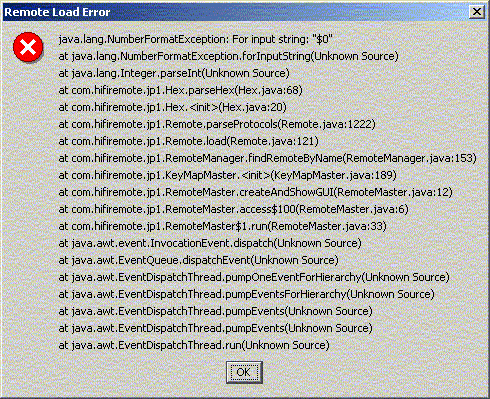
If you click it away and select a regular RMDU file, all seems well, but if you then change the selected remote to the JU Slingbox, the "Buttons" and "Layout" screens go blank.
If you then try to switch to the PL version, you get the following pop-up...
http://www.hifi-remote.com/temp/screen2.gif
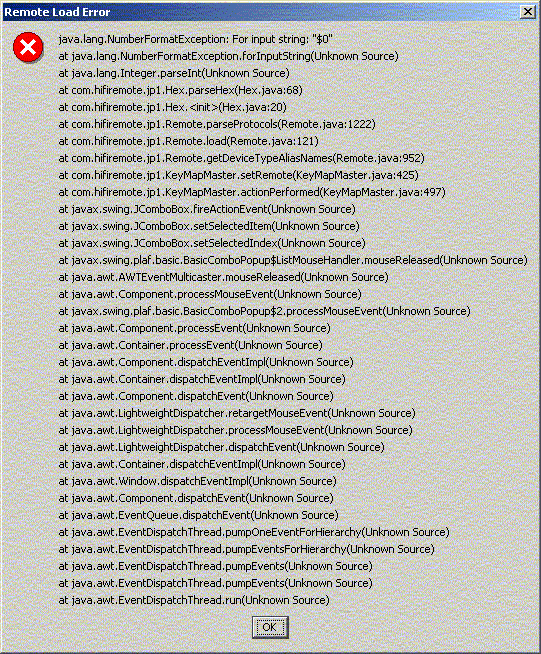
Here's my rmerror file...
https://www.hifi-remote.com/forums/dload ... le_id=2131
Last edited by The Robman on Sat Aug 27, 2005 9:40 am, edited 1 time in total.
Rob
www.hifi-remote.com
Please don't PM me with remote questions, post them in the forums so all the experts can help!
www.hifi-remote.com
Please don't PM me with remote questions, post them in the forums so all the experts can help!
It's the $ you've used in the Protocols section of the Slingbox RDFs. Get rid of them.
-- Greg
Original RemoteMaster developer
JP1 How-To's and Software Tools
The #1 Code Search FAQ and it's answer (PLEASE READ FIRST)
Original RemoteMaster developer
JP1 How-To's and Software Tools
The #1 Code Search FAQ and it's answer (PLEASE READ FIRST)
-
The Robman
- Site Owner
- Posts: 22010
- Joined: Fri Aug 01, 2003 9:37 am
- Location: Chicago, IL
- Contact:
Thanks Greg, I kinda felt I must have been doing something wrong as it had worked before. Needless to say, it's working now!
Rob
www.hifi-remote.com
Please don't PM me with remote questions, post them in the forums so all the experts can help!
www.hifi-remote.com
Please don't PM me with remote questions, post them in the forums so all the experts can help!
-
The Robman
- Site Owner
- Posts: 22010
- Joined: Fri Aug 01, 2003 9:37 am
- Location: Chicago, IL
- Contact:
Hey Greg, I just noticed something kinda funny. When you use the Export bin function, the button on the windows pop-up box that you get which lets you select where you want to save the file actually says "open" rather than "save".
Also, it's not remembering the folder that I last used for the Export function when I try to do another export.
Btw, did you ever add functionality to RM that checks if the total upgrade size is too big? This would already be needed for the Mits 740 remotes and it would also be needed for the Slingbox too now. IIRC, the 740 upgrade size limit is 50 bytes, and the size limit for the Slingbox is 200 bytes. This kinda sounds like another item that we should add to the RDFs (if it isn't already there).
Also, it's not remembering the folder that I last used for the Export function when I try to do another export.
Btw, did you ever add functionality to RM that checks if the total upgrade size is too big? This would already be needed for the Mits 740 remotes and it would also be needed for the Slingbox too now. IIRC, the 740 upgrade size limit is 50 bytes, and the size limit for the Slingbox is 200 bytes. This kinda sounds like another item that we should add to the RDFs (if it isn't already there).
Rob
www.hifi-remote.com
Please don't PM me with remote questions, post them in the forums so all the experts can help!
www.hifi-remote.com
Please don't PM me with remote questions, post them in the forums so all the experts can help!
-
mr_d_p_gumby
- Expert
- Posts: 1370
- Joined: Sun Aug 03, 2003 12:13 am
- Location: Newbury Park, CA
KM checks for the max length, but I think for the 740s, it just keys directly off the processor type and limits it to 50 bytes. There is a similar problem with some of the 6805 remotes and protocol upgrades (which RM checks for, I think), and for that we added MaxProtocolLength=??? to the RDFs. Maybe we could add a MaxUpgradeLength=??? for these cases.The Robman wrote:Btw, did you ever add functionality to RM that checks if the total upgrade size is too big? This would already be needed for the Mits 740 remotes and it would also be needed for the Slingbox too now. IIRC, the 740 upgrade size limit is 50 bytes, and the size limit for the Slingbox is 200 bytes. This kinda sounds like another item that we should add to the RDFs (if it isn't already there).
Mike England
-
The Robman
- Site Owner
- Posts: 22010
- Joined: Fri Aug 01, 2003 9:37 am
- Location: Chicago, IL
- Contact:
Btw, I just upgraded the 2 Slingbox RDFs to include all the keymaps.
Rob
www.hifi-remote.com
Please don't PM me with remote questions, post them in the forums so all the experts can help!
www.hifi-remote.com
Please don't PM me with remote questions, post them in the forums so all the experts can help!
-
The Robman
- Site Owner
- Posts: 22010
- Joined: Fri Aug 01, 2003 9:37 am
- Location: Chicago, IL
- Contact:
I think there is a bug in the formula that RM is using to format the PL binary files. I tried to create a PL upgrade for someone but his Slingbox rejected the code, so I ran it through my PL-JU code verification spreadsheet and found that there were a handful of bytes not coded correctly.
I've put a zip file together which includes the original RMDU file, plus the JU and PL files that RM created, along with a new PL file that I creatd by hand (and am waiting for verification that it works). I've also included my verification spreadsheet, which you can use to verify your formula.
https://www.hifi-remote.com/forums/dload ... le_id=2139
I've put a zip file together which includes the original RMDU file, plus the JU and PL files that RM created, along with a new PL file that I creatd by hand (and am waiting for verification that it works). I've also included my verification spreadsheet, which you can use to verify your formula.
https://www.hifi-remote.com/forums/dload ... le_id=2139
Rob
www.hifi-remote.com
Please don't PM me with remote questions, post them in the forums so all the experts can help!
www.hifi-remote.com
Please don't PM me with remote questions, post them in the forums so all the experts can help!
-
The Robman
- Site Owner
- Posts: 22010
- Joined: Fri Aug 01, 2003 9:37 am
- Location: Chicago, IL
- Contact:
UPDATE: The user just verified that my edited PL bin file worked.
Rob
www.hifi-remote.com
Please don't PM me with remote questions, post them in the forums so all the experts can help!
www.hifi-remote.com
Please don't PM me with remote questions, post them in the forums so all the experts can help!
Rob, I've found a bug that was causing some of the incorrect encryption.
However, there's still some values that aren't getting encrypted correctly, and I can't figure out why.
The PL value for these JU values have the MSB flipped from what RM generates. Did you even come up with an a formula that accounted for these?
However, there's still some values that aren't getting encrypted correctly, and I can't figure out why.
Code: Select all
JU RM PL
-- -- --
8D 52 D2
AD 5A DA
CD 62 E2
ED 6A EA-- Greg
Original RemoteMaster developer
JP1 How-To's and Software Tools
The #1 Code Search FAQ and it's answer (PLEASE READ FIRST)
Original RemoteMaster developer
JP1 How-To's and Software Tools
The #1 Code Search FAQ and it's answer (PLEASE READ FIRST)
-
The Robman
- Site Owner
- Posts: 22010
- Joined: Fri Aug 01, 2003 9:37 am
- Location: Chicago, IL
- Contact:
My encryption formulas are built into that verification spreadsheet that I posted, those are all based on the data samples that I currently have available. There's only one hex value that doesn't work using those formulas (a JU value of "7D" converts to "4E" rather than "CE"). Without additional data, I won't be able to come up with the definitive formula. Hopefully, when I get a PL Slingbox, I can create a fake upgrade that contains all the missing hex codes and see what they get converted to in the EEPROM.
Post whatever formulas you are currently using and I'll see if I can follow them and spot the error.
If you create a new build to fix the bugs that you've found, can you have RM start including protocols in the upgrades when needed please.
Post whatever formulas you are currently using and I'll see if I can follow them and spot the error.
If you create a new build to fix the bugs that you've found, can you have RM start including protocols in the upgrades when needed please.
Last edited by The Robman on Sun Aug 28, 2005 9:24 pm, edited 1 time in total.
Rob
www.hifi-remote.com
Please don't PM me with remote questions, post them in the forums so all the experts can help!
www.hifi-remote.com
Please don't PM me with remote questions, post them in the forums so all the experts can help!
This is my encryption code:
>> is the Java shift right operator.
<< is the Java shift left operator.
^ is the Java XOR operator.
You can get RM to include protocol code in the binary upgrades now by enabling that in the Options menu. I'll make it no longer optional for future builds.
Code: Select all
  public int encrypt( int val )
  {
    val &= 0xFF;
    int val1 = ( val >> 2 | val << 6 ) + 111;
    val1 &= 0xFF;

    int val2 = ( val & 0x80 ) & ( val << 7 );
    int rc = ( val1 ^ val2 );
    return rc;
  }
<< is the Java shift left operator.
^ is the Java XOR operator.
You can get RM to include protocol code in the binary upgrades now by enabling that in the Options menu. I'll make it no longer optional for future builds.
-- Greg
Original RemoteMaster developer
JP1 How-To's and Software Tools
The #1 Code Search FAQ and it's answer (PLEASE READ FIRST)
Original RemoteMaster developer
JP1 How-To's and Software Tools
The #1 Code Search FAQ and it's answer (PLEASE READ FIRST)
I'm so bad at Excel I don't even know how to see the formulas.The Robman wrote:My encryption formulas are built into that verification spreadsheet that I posted, those are all based on the data samples that I currently have available. There's only one hex value that doesn't work using those formulas (it was 4C I think).

According to https://www.hifi-remote.com/forums/viewt ... 3353#p33353
The JU value that caused problems was 7D, for which our formula generated CE but should be 4E. However, the hand coded sample you provided had 7D encrypted to CE and apparently that worked correctly.
-- Greg
Original RemoteMaster developer
JP1 How-To's and Software Tools
The #1 Code Search FAQ and it's answer (PLEASE READ FIRST)
Original RemoteMaster developer
JP1 How-To's and Software Tools
The #1 Code Search FAQ and it's answer (PLEASE READ FIRST)