Hello,
If I design and produce a new brand of remotes(JP1/JP1.2 ready) what would be your recommended design features?
Any suggestions are welcome, including target price range, initial production quantities, added interfaces other than JP1/JP1.2.
p.s. If you think my plan is better answered in other forums, please advide.
Thank you in advance.
A Plan to provide a new brand of JP1/JP1.2 Remotes
Moderator: Moderators
-
Capn Trips
- Expert
- Posts: 3989
- Joined: Fri Oct 03, 2003 6:56 am
Right now, AFAIK NOBODY manufactures these remotes aside from UEIC. Other companies have UEIC MAKE their remotes for them, but UEIC still manufactures them all.
Are you intending to pay royalties/license fees to UEIC? If not, I see intellectual property rights issues likely.
Are you intending to pay royalties/license fees to UEIC? If not, I see intellectual property rights issues likely.
Beginners - Read this thread first
READ BEFORE POSTING or your post will be DELETED!
Remotes: OFA XSight Touch, AR XSight Touch
TVs: LG 65" Smart LED TV; Samsung QN850BF Series - 8K UHD Neo QLED LCD TV
RCVR: Onkyo TX-SR875; Integra DTR 40.3
DVD/VCR: Pioneer DV-400VK (multi-region DVD), Sony BDP-S350 (Blu-ray), Toshiba HD-A3 (HD-DVD), Panasonic AG-W1 (Multi-system VCR);
Laserdisc: Pioneer CLD-D704.
Amazon Firestick
tape deck: Pioneer CT 1380WR (double cassette deck)
(But I still have to get up for my beer)
READ BEFORE POSTING or your post will be DELETED!
Remotes: OFA XSight Touch, AR XSight Touch
TVs: LG 65" Smart LED TV; Samsung QN850BF Series - 8K UHD Neo QLED LCD TV
RCVR: Onkyo TX-SR875; Integra DTR 40.3
DVD/VCR: Pioneer DV-400VK (multi-region DVD), Sony BDP-S350 (Blu-ray), Toshiba HD-A3 (HD-DVD), Panasonic AG-W1 (Multi-system VCR);
Laserdisc: Pioneer CLD-D704.
Amazon Firestick
tape deck: Pioneer CT 1380WR (double cassette deck)
(But I still have to get up for my beer)
A new wish list?
Thank you for your response.
Depending on the answers to my plan and resultant new wish list I have a few choices to select from - from buying from UEIC just the license to full OEM pruducts.
Hope this answers your question.
Yes, indeed.Capn Trips wrote:Right now, AFAIK NOBODY manufactures these remotes aside from UEIC. Other companies have UEIC MAKE their remotes for them, but UEIC still manufactures them all.
Are you intending to pay royalties/license fees to UEIC? If not, I see intellectual property rights issues likely.
Depending on the answers to my plan and resultant new wish list I have a few choices to select from - from buying from UEIC just the license to full OEM pruducts.
Hope this answers your question.
-
The Robman
- Site Owner
- Posts: 22031
- Joined: Fri Aug 01, 2003 9:37 am
- Location: Chicago, IL
- Contact:
You don't always have to have UEI make the finished product. If you have your own means to manufacture the remotes, you can just have UEI make the chips. This is what Philips did for remotes like the REM400.
Rob
www.hifi-remote.com
Please don't PM me with remote questions, post them in the forums so all the experts can help!
www.hifi-remote.com
Please don't PM me with remote questions, post them in the forums so all the experts can help!
The demand and wish list matters...
Yes, you are right.The Robman wrote:You don't always have to have UEI make the finished product. If you have your own means to manufacture the remotes, you can just have UEI make the chips. This is what Philips did for remotes like the REM400.
I foresee the size of demand for the new remotes, and the contents of new wish list will be deciding factors for design, production and supply of the new remotes.
-
greenough1
- Posts: 658
- Joined: Sun Jan 30, 2005 12:20 am
if you look at the feature set implemented in any of the more popular extenders (don't forget though there are experts that don't use extenders and get their remotes to do everything they want), then you'll find the set of features that most users of jp1-able remotes want. just a few are:
on the software side:
1) macros on device buttons.
2) LKP/DKP
3) pause
4) DSM
5) shifting and shift-cloaking
and not to overlook the hardware side:
6) interface for pc programmability
did I forget any important features?
Best,
jeff
on the software side:
1) macros on device buttons.
2) LKP/DKP
3) pause
4) DSM
5) shifting and shift-cloaking
and not to overlook the hardware side:
6) interface for pc programmability
did I forget any important features?
Best,
jeff
Hello Jeff,
Thank you for your comment.
Best regards,
Yesok
Thank you for your comment.
Regarding 6)PC Programmability, any specific requirements other than current software implementations?greenough1 wrote:if you look at the feature set implemented in any of the more popular extenders (don't forget though there are experts that don't use extenders and get their remotes to do everything they want), then you'll find the set of features that most users of jp1-able remotes want. just a few are:
on the software side:
1) macros on device buttons.
2) LKP/DKP
3) pause
4) DSM
5) shifting and shift-cloaking
and not to overlook the hardware side:
6) interface for pc programmability
did I forget any important features?
Best,
jeff
Best regards,
Yesok
Here's some random thoughts on my ideal remote.
I want the transport keys and navigation keys united, not just close together. Both the MX-500 and the Harmony 680 seem to have accomplished this. I also want the channel up & down buttons close to these buttons.
I don't need dedicated instant-replay and advance/skip buttons.
I do need dedicated next-track and prev-track buttons, which I would use for advance/skip and instant-replay.
I want it to be able to know as soon as I pick it up which end is the transmitting end, without having to locate any buttons. This can be accomplished a number of different ways, using shape, weight, and/or texture.
I want it to be easy to use in the dark, without having to look at it. This means the buttons shouldn't all be same shape and size, and buttons should be arranged in logical groups, not just laid out in a grid.
I want to it to fit comfortably it my hand, and to be able to use it with one hand, so it can't be very big.
Some backlighting or glow-in-the-dark keys would be nice, but I don't want it to eat battteries. If the button arrangement is well done, this won't be necessary.
I want mostly hard buttons. A small number of soft-buttons with an LCD would be OK, but not a requirement.
I want enough learning memory for at least 50 keys, but 100 would be better.
I don't want silly restrictions, such as not being able to assign macros to the device or power buttons.
I don't want artificially slow, painfully slow macros.
I want the transport keys and navigation keys united, not just close together. Both the MX-500 and the Harmony 680 seem to have accomplished this. I also want the channel up & down buttons close to these buttons.
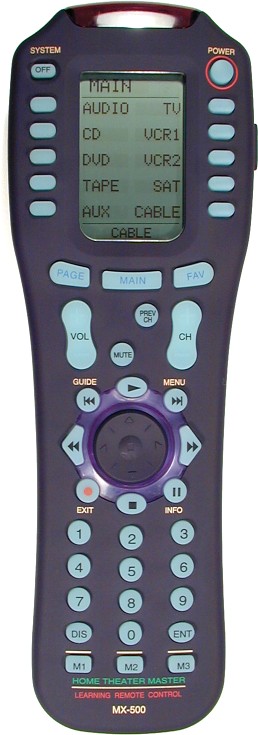

I don't need dedicated instant-replay and advance/skip buttons.
I do need dedicated next-track and prev-track buttons, which I would use for advance/skip and instant-replay.
I want it to be able to know as soon as I pick it up which end is the transmitting end, without having to locate any buttons. This can be accomplished a number of different ways, using shape, weight, and/or texture.
I want it to be easy to use in the dark, without having to look at it. This means the buttons shouldn't all be same shape and size, and buttons should be arranged in logical groups, not just laid out in a grid.
I want to it to fit comfortably it my hand, and to be able to use it with one hand, so it can't be very big.
Some backlighting or glow-in-the-dark keys would be nice, but I don't want it to eat battteries. If the button arrangement is well done, this won't be necessary.
I want mostly hard buttons. A small number of soft-buttons with an LCD would be OK, but not a requirement.
I want enough learning memory for at least 50 keys, but 100 would be better.
I don't want silly restrictions, such as not being able to assign macros to the device or power buttons.
I don't want artificially slow, painfully slow macros.
-- Greg
Original RemoteMaster developer
JP1 How-To's and Software Tools
The #1 Code Search FAQ and it's answer (PLEASE READ FIRST)
Original RemoteMaster developer
JP1 How-To's and Software Tools
The #1 Code Search FAQ and it's answer (PLEASE READ FIRST)
I don't even understand some of Greg's requests, but others are top of my own list:
It is a tricky design and tradeoff issue. Because the buttons should also be easy to operate. Most hand held devices designed with features that give it "character" are misdesigned so buttons are hard to press:
Buttons too close together are hard to press. Buttons too far apart take up too much space. Buttons evenly spaced are a grid. All three are bad. A good design staying away from all three is difficult, but I think it can be done.
Many people like rocker buttons. I hate them. They help you orient by feel on the remote, but they are harder to press correctly. A doughnut ring button (like the old 8910) takes that to the extreme. Lots of character, but real hard to use.
I really like the digit shaped digit buttons of the 7800. I don't understand why most JP1'ers (that have commented in the past) don't like them. They help you orient, but they don't make the buttons any harder to press.
I think worst of both is the Kameleon design. All the flaws of soft button LCD, but with so little display flexibility that it also has all the flaws of pure hard button.
The point of silly restrictions is that the on-remote programming has so little user feedback that flexibility = mistakes = getting totally lost.
So for a PC programmed remote those restrictions make no sense at all (leaving aside the question of whether the particular set of restrictions OFA puts in ever made any sense).
The only right way to do macros is to make the duration and delay of each signal step in each macro a visible, easy to change, part of the macro definition UI.
Users that care about macro speed can trim each duration and delay down to the fastest that works for that step and boost the duration and/or delay for the exception cases where the default is too slow.
With JP1, you have either:
No extender: Mostly too slow by default. No way to speed up, and slowing down is tricky.
Extender: Maximum possible speed by default (so of course no way to speed up) and slowing down (especially duration) is tricky.
I'm suggesting: Slow by default (if you just select keys in the macro programming GUI and don't touch duration or delay) but easy to speed up or slow down (and doc advises users to test slow version first, then tweak speed).
That's my #1. The physical layout should have some character to it, so if you touch an area on the remote you know which area you're touching. Definitely no big grids.gfb107 wrote:I want it to be easy to use in the dark, without having to look at it. This means the buttons shouldn't all be same shape and size, and buttons should be arranged in logical groups, not just laid out in a grid.
It is a tricky design and tradeoff issue. Because the buttons should also be easy to operate. Most hand held devices designed with features that give it "character" are misdesigned so buttons are hard to press:
Buttons too close together are hard to press. Buttons too far apart take up too much space. Buttons evenly spaced are a grid. All three are bad. A good design staying away from all three is difficult, but I think it can be done.
Many people like rocker buttons. I hate them. They help you orient by feel on the remote, but they are harder to press correctly. A doughnut ring button (like the old 8910) takes that to the extreme. Lots of character, but real hard to use.
I really like the digit shaped digit buttons of the 7800. I don't understand why most JP1'ers (that have commented in the past) don't like them. They help you orient, but they don't make the buttons any harder to press.
Right. I think the 7800 got that right as well.gfb107 wrote: I want to it to fit comfortably it my hand, and to be able to use it with one hand, so it can't be very big.
Lots of people want that. I use it sometimes on my 15-2104 (because the layout is too gridlike). I never missed having a backlight when I used a 7800.gfb107 wrote: Some backlighting or glow-in-the-dark keys would be nice, but I don't want it to eat battteries. If the button arrangement is well done, this won't be necessary.
One remote won't please everyone. I don't know if any LCD labeled soft buttons would help much for those who know how to use their own remote. A few isn't enough for making a remote your baby sitter could use. I think it is two different markets and half way between is neither.gfb107 wrote: I want mostly hard buttons. A small number of soft-buttons with an LCD would be OK, but not a requirement.
I think worst of both is the Kameleon design. All the flaws of soft button LCD, but with so little display flexibility that it also has all the flaws of pure hard button.
I'm not sure, but I think a PC programmable remote might be better off with no learning. Put the IR capture hardware in the programming cable and let the PC program "learn" decode and include clean signals in the program it sends to the remote.gfb107 wrote: I want enough learning memory for at least 50 keys, but 100 would be better.
We are talking about a PC programmed remote, right?gfb107 wrote: I don't want silly restrictions, such as not being able to assign macros to the device or power buttons.
The point of silly restrictions is that the on-remote programming has so little user feedback that flexibility = mistakes = getting totally lost.
So for a PC programmed remote those restrictions make no sense at all (leaving aside the question of whether the particular set of restrictions OFA puts in ever made any sense).
If you provide enough duration and delay for each signal that 80% of the devices you might be programming will accept the macro (as OFA does), the result is too slow to be worth using for me, but too fast for the other 20% of devices.gfb107 wrote: I don't want artificially slow, painfully slow macros.
The only right way to do macros is to make the duration and delay of each signal step in each macro a visible, easy to change, part of the macro definition UI.
Users that care about macro speed can trim each duration and delay down to the fastest that works for that step and boost the duration and/or delay for the exception cases where the default is too slow.
With JP1, you have either:
No extender: Mostly too slow by default. No way to speed up, and slowing down is tricky.
Extender: Maximum possible speed by default (so of course no way to speed up) and slowing down (especially duration) is tricky.
I'm suggesting: Slow by default (if you just select keys in the macro programming GUI and don't touch duration or delay) but easy to speed up or slow down (and doc advises users to test slow version first, then tweak speed).
Thanks for the comments.
Hello Greg,
Thanks for your valuable comments.
Best regards,
Yesok
Thanks for your valuable comments.
Could you tell me more about your ideas?gfb107 wrote:Here's some random thoughts on my ideal remote.
...
I want it to be able to know as soon as I pick it up which end is the transmitting end, without having to locate any buttons. This can be accomplished a number of different ways, using shape, weight, and/or texture.
Best regards,
Yesok
Three best/worst design remotes
Hello John,
Thank you for your valuable comments.
Could you tell me three best and three worst designed remotes and your selection criteria?
Then I may prepare, for your review, basic requirements for THREE candidate remotes design aimed for hackers, power users and general users.
Best regards,
Yesok
Thank you for your valuable comments.
I think we need more than one design of remotes to satisfy diverse user requirements.johnsfine wrote:That's my #1. The physical layout should have some character to it, so if you touch an area on the remote you know which area you're touching. Definitely no big grids.
It is a tricky design and tradeoff issue. Because the buttons should also be easy to operate. Most hand held devices designed with features that give it "character" are misdesigned so buttons are hard to press:
Buttons too close together are hard to press. Buttons too far apart take up too much space. Buttons evenly spaced are a grid. All three are bad. A good design staying away from all three is difficult, but I think it can be done.
Many people like rocker buttons. I hate them. They help you orient by feel on the remote, but they are harder to press correctly. A doughnut ring button (like the old 8910) takes that to the extreme. Lots of character, but real hard to use.
I really like the digit shaped digit buttons of the 7800. I don't understand why most JP1'ers (that have commented in the past) don't like them. They help you orient, but they don't make the buttons any harder to press.
Could you tell me three best and three worst designed remotes and your selection criteria?
Then I may prepare, for your review, basic requirements for THREE candidate remotes design aimed for hackers, power users and general users.
Best regards,
Yesok
-
ElizabethD
- Advanced Member
- Posts: 2348
- Joined: Mon Feb 09, 2004 12:07 pm
If not too late, here's my 5 cents (some repeats of previous requests):
> A rectangular remote with grid arrangement of buttons is the worst design in this universe. Half the time you pick it up and the wrong buttons are pushed and the IR signal goes the wrong way (example 6131new).
> Buttons like on the 7800 would be great. Button arrangement of the 7800 and 6131 are the best.
> LED indicator should be on its own, not like on the 6131new sharing a power button (what were they thinking of?!)
> Minimum 75 keys learning memory, long learns, say 56 bits signals.
> LCD for programming is indispensible, but device and setup code are sufficient, don't need clock and all that other stuff that 8910 has.
> IR emmiter exposed far anough out of the enclosure to widen the range. Some of us aren't skilled enough to push'm out.
> Unlabelled buttons, similar to L1 to L4 and M1 to M3 on the 8910, or Macro and L buttons on the 7800.
> Adjustable backlight duration, controlled only by the light key. Glow in the dark doesn't last long enough.
> Strong signal like on the 7800
> Bigger space for programming than 1K, and totally flexible use of that space to eliminate current fixed division between the keymoves and upgrade space.
> Fav type macros for more than one device
> Everything that the extenders can do (nested, fast, macros and keymoves, DSM, multiplex, DKP, LKP, Pause adjustments) and more.
> Non slippery surfaces and completely flat bottom
> Hard buttons, of different shapes, possibly some with click feedback, BIG Mute button. BIG light button.
> Battery compartment from which batteries don't wiggle out, nor prevent removal like in a Replay.
> Battery cover where the flexible clip does not break
> Eight to ten transport buttons, six isn't sufficient. Labelling is risky on some (what's thumbs up or a checkmark??)
> Program access to a timer separate from backlight and the IR engine.
> No deeply reset buttons.
> Optional RF thing.
> Goes without saying: jp1 interface, open code to a reasonable extent, with jump table (vectors) provided.
See also main page of this site
http://www.hifi-remote.com/ofa/perfect.shtml
> A rectangular remote with grid arrangement of buttons is the worst design in this universe. Half the time you pick it up and the wrong buttons are pushed and the IR signal goes the wrong way (example 6131new).
> Buttons like on the 7800 would be great. Button arrangement of the 7800 and 6131 are the best.
> LED indicator should be on its own, not like on the 6131new sharing a power button (what were they thinking of?!)
> Minimum 75 keys learning memory, long learns, say 56 bits signals.
> LCD for programming is indispensible, but device and setup code are sufficient, don't need clock and all that other stuff that 8910 has.
> IR emmiter exposed far anough out of the enclosure to widen the range. Some of us aren't skilled enough to push'm out.
> Unlabelled buttons, similar to L1 to L4 and M1 to M3 on the 8910, or Macro and L buttons on the 7800.
> Adjustable backlight duration, controlled only by the light key. Glow in the dark doesn't last long enough.
> Strong signal like on the 7800
> Bigger space for programming than 1K, and totally flexible use of that space to eliminate current fixed division between the keymoves and upgrade space.
> Fav type macros for more than one device
> Everything that the extenders can do (nested, fast, macros and keymoves, DSM, multiplex, DKP, LKP, Pause adjustments) and more.
> Non slippery surfaces and completely flat bottom
> Hard buttons, of different shapes, possibly some with click feedback, BIG Mute button. BIG light button.
> Battery compartment from which batteries don't wiggle out, nor prevent removal like in a Replay.
> Battery cover where the flexible clip does not break
> Eight to ten transport buttons, six isn't sufficient. Labelling is risky on some (what's thumbs up or a checkmark??)
> Program access to a timer separate from backlight and the IR engine.
> No deeply reset buttons.
> Optional RF thing.
> Goes without saying: jp1 interface, open code to a reasonable extent, with jump table (vectors) provided.
See also main page of this site
http://www.hifi-remote.com/ofa/perfect.shtml
Liz
Tweeking 8910, HTPro/9811, C7-7800, 6131o, 6131n, AtlasOCAP-1056B01, RCA-RCRP05B and enjoying the ride
Tweeking 8910, HTPro/9811, C7-7800, 6131o, 6131n, AtlasOCAP-1056B01, RCA-RCRP05B and enjoying the ride
-
doorknob_59
- Posts: 7
- Joined: Thu Jul 20, 2006 7:49 pm
I like the size, weight and control of my iPod mini. Could not this type of control be designed into a URC with some of the features listed in this thread? It sure could be a simple looking/clean and small device. However, like most things in life, I'm sure there would be a compromise somewhere. Just my thoughts.
Chris H.
Some questions...
Hello Liz,
Thanks for your valuable comments.
I have some questions;
Could you tell me examples where you need more than 75 keys learning
memory?
Best regards,
Yesok
Thanks for your valuable comments.
I have some questions;
ElizabethD wrote: > Minimum 75 keys learning memory, long learns, say 56 bits signals.
Could you tell me examples where you need more than 75 keys learning
memory?
Would you be happy if you have an additional CPU and memory(which are pluggable) to play with? What features would you expect from such a remote?ElizabethD wrote: > Bigger space for programming than 1K, and totally flexible use of that space to eliminate current fixed division between the keymoves and upgrade space.
May I ask the advantage of completely flat buttom?ElizabethD wrote: > Non slippery surfaces and completely flat bottom.
What shapes would you recommend for the buttons?ElizabethD wrote: > Hard buttons, of different shapes, possibly some with click feedback, BIG Mute button. BIG light button.
Best regards,
Yesok
Re: Some questions...
Again sounds to me like a different market. Before JP1, the 1Kb of learning memory in OFA remotes was generally not enough. So much so that even the 3Kb IIRC in the 8820 wouldn't inspire much confidence ("75 key" is what OFA gives as the estimated number of learned keys you can fit in 3Kb).yesok wrote:Could you tell me examples where you need more than 75 keys learning memory?
In a remote to be programmed by PC, there is little point to such high capacity. Of course, with current flash memories, if you support learning at all there is also little point to having a lower limit.
If the remote were programmed without a PC, a fair number of users would run into multiple new or obscure devices and could easily go past 75 keys (per remote supporting multiple device. We're not talking about per device).
ElizabethD wrote: > Bigger space for programming than 1K, and totally flexible use of that space to eliminate current fixed division between the keymoves and upgrade space.
Sounds really excessive. A single chip like the one in the 8820 contains a powerful CPU and plenty of flash memory and plenty of RAM.yesok wrote: Would you be happy if you have an additional CPU and memory(which are pluggable) to play with?
The request is just to be less brain dead than OFA has been about allocation of the portion of the flash that the firmware doesn't need. There is no good reason to pre partition that space. Just have the pool of space and let the PC program portion it for upgrades, keymoves, macros, however fits the current configuration.
ElizabethD wrote: > Non slippery surfaces and completely flat bottom.
Did I forget earlier to ask for that non slip surface that many of the radio shack models (15-2104 etc.) had. That makes a big difference.yesok wrote: May I ask the advantage of completely flat buttom?
I assume flat bottom is so it will be very stable if you use it on a table rather than in your hand. Either that's a different product (a remote designed to be used on a table) or it's going too far. If you want to sometimes use it in your hand and sometimes on a table, a flat bottom would feel really wrong. I think you can do a better job than OFA does about stability on a table without making it feel wrong.