Hi
I am trying to learn the codes for a Grundig DTR-8720 using an IR Widget and IRSCOPE. The key codes are being recognised, as is the Device Number (42.17), but the protocol displayed is :
XMP:139.xxx-0B1F442A14810200
where xxx seems to vary (The Harmony remote defaults to sending a code 5 times, so I get 5 values.)
All the documentation I have read seems to assume you have a proper JP1 Remote and are using IR.EXE. Is there any way of decoding a protocol to use in RemoteMaster using those values or the waveform readout ?
Al
XMP: Getting a Protocol from IRScope
Moderator: Moderators
-
alanrichey
- Expert
- Posts: 3533
- Joined: Mon Mar 24, 2008 7:14 am
- Location: UK/USA
I hope that happened because you're using an obsolete version of DecodeIr.dll, because otherwise it probably represents a bug in DecodeIr.dll
XMP signals are very hard for learning remotes to capture correctly, and with a learning remote it is common to have XMP signals only partially decoded as that one was. But the IR Widget should do a much better job than a learning remote.
From the overall format of that string, I can see DecodeIr thinks that XMP signal was learned with an error in it.
From the "0B1F442A14810200" portion, I can tell the signal is either correct or has an unusual kind of large error. More likely correct.
That whole string XMP:139.xxx-0B1F442A14810200 represents just the second half of one XMP signal. You didn't give enough info for me to guess what happened to the first half. (But each half of an XMP signal has all the information if learned correctly. Looking at the other half is only important if the learn is bad and you need redundant info to interpret it.)
Does just that xxx vary or do some of the hex digits vary as well?
The xxx is DecodeIr.dll's estimate of the timing distortion in the learn. Despite the "." it is an integer value, not a fraction. I would have expected a two digit xx not three digit. A three digit value would represent a high level of timing distortion, which I would not expect from IR Widget.
Anyway, the correct protocol is "XMP". I assume you want a Slingbox upgrade. I think that might be tricky (upgrade size issues). Hopefully, Rob will give you some guidance on that.
After I see what Rob suggests (or find his old posts on XMP for Slingbox if he doesn't join this thread soon), I probably can tell you how to interpret any problem decodes you get from IR Widget well enough to include them in an upgrade.
XMP signals are very hard for learning remotes to capture correctly, and with a learning remote it is common to have XMP signals only partially decoded as that one was. But the IR Widget should do a much better job than a learning remote.
From the overall format of that string, I can see DecodeIr thinks that XMP signal was learned with an error in it.
From the "0B1F442A14810200" portion, I can tell the signal is either correct or has an unusual kind of large error. More likely correct.
That whole string XMP:139.xxx-0B1F442A14810200 represents just the second half of one XMP signal. You didn't give enough info for me to guess what happened to the first half. (But each half of an XMP signal has all the information if learned correctly. Looking at the other half is only important if the learn is bad and you need redundant info to interpret it.)
Does just that xxx vary or do some of the hex digits vary as well?
The xxx is DecodeIr.dll's estimate of the timing distortion in the learn. Despite the "." it is an integer value, not a fraction. I would have expected a two digit xx not three digit. A three digit value would represent a high level of timing distortion, which I would not expect from IR Widget.
Anyway, the correct protocol is "XMP". I assume you want a Slingbox upgrade. I think that might be tricky (upgrade size issues). Hopefully, Rob will give you some guidance on that.
After I see what Rob suggests (or find his old posts on XMP for Slingbox if he doesn't join this thread soon), I probably can tell you how to interpret any problem decodes you get from IR Widget well enough to include them in an upgrade.
-
alanrichey
- Expert
- Posts: 3533
- Joined: Mon Mar 24, 2008 7:14 am
- Location: UK/USA
Hi John
Thanks for the swift reply. Always good to hear from the author
I'm using V2.36 downloaded from the JP1 Tools. Is there a newer one?
I've just done a lot more learns, and have a better handle on what is happening. For any key I get the following 6 readings (The Device is always 42.17):
XMP
XMP.xxx.yyy-0B1F442A1z81qq00
XMP.xxx.yyy-0B1F442A1z81qq00
XMP.xxx.yyy-0B1F442A1z81qq00
XMP.xxx.yyy-0B1F442A1z81qq00
XMP.xxx.yyy-0B1F442A1z81qq00
The xxx is always 139 or 140
The yyy varies between 120 and 300
The q is the hex value of the key
The z seems to vary and I can't see any correlation.
I note from your upgrade notes that the XMP used to be the Dreambox protocol, which is supported by RemoteMaster ?
Cheers
Al
Thanks for the swift reply. Always good to hear from the author
I'm using V2.36 downloaded from the JP1 Tools. Is there a newer one?
I've just done a lot more learns, and have a better handle on what is happening. For any key I get the following 6 readings (The Device is always 42.17):
XMP
XMP.xxx.yyy-0B1F442A1z81qq00
XMP.xxx.yyy-0B1F442A1z81qq00
XMP.xxx.yyy-0B1F442A1z81qq00
XMP.xxx.yyy-0B1F442A1z81qq00
XMP.xxx.yyy-0B1F442A1z81qq00
The xxx is always 139 or 140
The yyy varies between 120 and 300
The q is the hex value of the key
The z seems to vary and I can't see any correlation.
I note from your upgrade notes that the XMP used to be the Dreambox protocol, which is supported by RemoteMaster ?
Cheers
Al
-
Kevin Timmerman
- Expert
- Posts: 142
- Joined: Tue Jan 09, 2007 5:52 pm
- Location: West Michigan
-
alanrichey
- Expert
- Posts: 3533
- Joined: Mon Mar 24, 2008 7:14 am
- Location: UK/USA
Hi Kevin
Done them both, while learning the '5' key.
https://www.hifi-remote.com/forums/dload ... le_id=6555
Cheers
Al
Done them both, while learning the '5' key.
https://www.hifi-remote.com/forums/dload ... le_id=6555
Cheers
Al
-
The Robman
- Site Owner
- Posts: 22056
- Joined: Fri Aug 01, 2003 9:37 am
- Location: Chicago, IL
- Contact:
The XMP protocol is a major PITA! It's UEI's $016C executor and it's called "Dreambox" in RM.
Looking at your "0B1F442A14810200" string, "0B1F442A" is the fixed data for the executor. Just FYI, the 2nd character "B" is the first checksum, it's a ADD of all the other characters in the fixed data. This data would give a checksum value of "C", so there's an error in the data. The "F44" portion is the same in every XMP sample that I've ever seen. Apart from the checksum, the only data that really varies by device is the first byte and the last 2 bytes.
The first character of the 2nd half of the string (ie, "14810200") is supposed to be the same as the first character of the 1st half of the string. Your data doesn't match, so either the 1 in the 2nd half is wrong or the 0 in the first half is wrong. If you change the 0 in the first half to a 1, the checksum calculates to a "B", so I'm going to assume that the fixed data should really be "1B1F442A".
The 2nd character in the 2nd half is another checksum, also calculated by ADD'ing all the other characters. You show a "4" but I calculate a "C" so something's wrong here too. Looking at the part2 string in your screen shot "12810400" the checksum is wrong also (you have a "2", I calculate an "A")
There is a toggle in the signal, which turns up in bit3 of the 3rd character of the 2nd string, so this character should alternate between 0 and 8 as the signal repeats.
Depending on the device, either the last 2 bytes, or the next 2 bytes in, are the "OBC" bytes. In this case it's the latter.
Looking at your "0B1F442A14810200" string, "0B1F442A" is the fixed data for the executor. Just FYI, the 2nd character "B" is the first checksum, it's a ADD of all the other characters in the fixed data. This data would give a checksum value of "C", so there's an error in the data. The "F44" portion is the same in every XMP sample that I've ever seen. Apart from the checksum, the only data that really varies by device is the first byte and the last 2 bytes.
The first character of the 2nd half of the string (ie, "14810200") is supposed to be the same as the first character of the 1st half of the string. Your data doesn't match, so either the 1 in the 2nd half is wrong or the 0 in the first half is wrong. If you change the 0 in the first half to a 1, the checksum calculates to a "B", so I'm going to assume that the fixed data should really be "1B1F442A".
The 2nd character in the 2nd half is another checksum, also calculated by ADD'ing all the other characters. You show a "4" but I calculate a "C" so something's wrong here too. Looking at the part2 string in your screen shot "12810400" the checksum is wrong also (you have a "2", I calculate an "A")
There is a toggle in the signal, which turns up in bit3 of the 3rd character of the 2nd string, so this character should alternate between 0 and 8 as the signal repeats.
Depending on the device, either the last 2 bytes, or the next 2 bytes in, are the "OBC" bytes. In this case it's the latter.
Rob
www.hifi-remote.com
Please don't PM me with remote questions, post them in the forums so all the experts can help!
www.hifi-remote.com
Please don't PM me with remote questions, post them in the forums so all the experts can help!
-
Kevin Timmerman
- Expert
- Posts: 142
- Joined: Tue Jan 09, 2007 5:52 pm
- Location: West Michigan
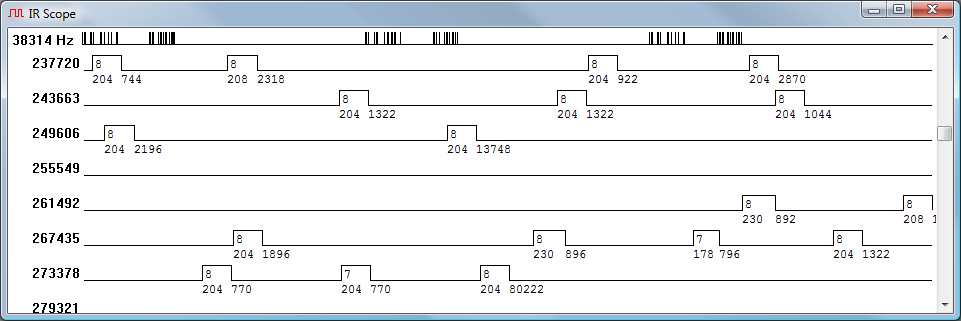
Thanks for the files. The IR Widget likes to have on durations of at least 300 uS and requires on durations of greater than 200 uS. The XMP protocol is right on the edge of the 200 uS absolute minimum. This will cause a bit more jitter in the timing than signals with longer on durations. It looks like the timing is within +/- 10% or so of what is in this post.
I assume the lack of precision in the IR Widget capture is the cause of the error reported (yyy = 120 to 300) by the IR decoder DLL.
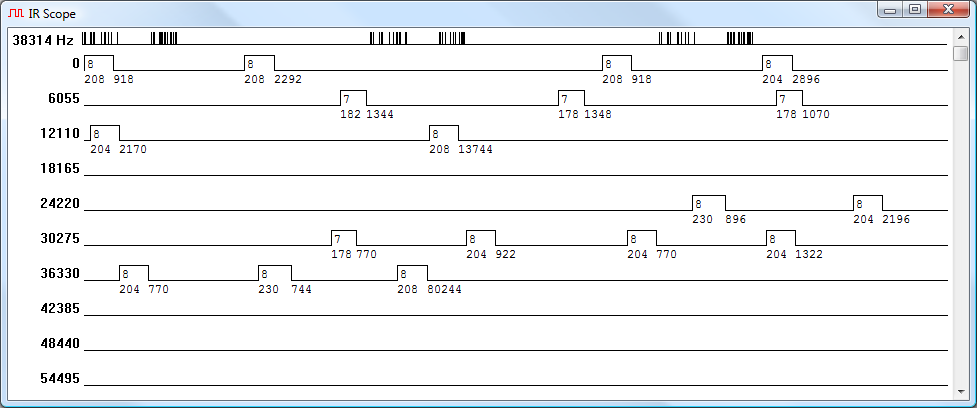
I assume the lack of precision in the IR Widget capture is the cause of the error reported (yyy = 120 to 300) by the IR decoder DLL.
Last edited by Kevin Timmerman on Tue Apr 14, 2009 3:56 pm, edited 1 time in total.
-
alanrichey
- Expert
- Posts: 3533
- Joined: Mon Mar 24, 2008 7:14 am
- Location: UK/USA
-
alanrichey
- Expert
- Posts: 3533
- Joined: Mon Mar 24, 2008 7:14 am
- Location: UK/USA
I had left the Capture duration at 700ms and held the button down until the capture was completed. I know I can tweak the Harmony to set the number of times to repeat the signal. Is there any mileage in doing that ?Kevin Timmerman wrote:Thanks for the files. The IR Widget likes to have on durations of at least 300 uS and requires on durations of greater than 200 uS. The XMP protocol is right on the edge of the 200 uS absolute minimum. This will cause a bit more jitter in the timing than signals with longer on durations. It looks like the timing is within +/- 10% or so of what is in this post.
I assume the lack of precision in the IR Widget capture is the cause of the error reported (xxx ~= 140) by the IR decoder DLL.
Al
-
Kevin Timmerman
- Expert
- Posts: 142
- Joined: Tue Jan 09, 2007 5:52 pm
- Location: West Michigan
Oops! That was exactly what I was looking for, yet I missed it. I added the numbers in my head quickly and thought it came out right.The Robman wrote:"0B1F442A" is the fixed data for the executor. Just FYI, the 2nd character "B" is the first checksum, it's a ADD of all the other characters in the fixed data. This data would give a checksum value of "C", so there's an error in the data.
So DecodeIR is correct. The XMP signal is not good enough to be completely decoded without some application of human intelligence. Those high yyy values are accurately reporting a second point of view on the same error that is identified by the wrong checksum.
Boy have I forgotten a lot! I knew that too.The first character of the 2nd half of the string (ie, "14810200") is supposed to be the same as the first character of the 1st half of the string.
That all sounds right, so I agree.Your data doesn't match, so either the 1 in the 2nd half is wrong or the 0 in the first half is wrong. If you change the 0 in the first half to a 1, the checksum calculates to a "B", so I'm going to assume that the fixed data should really be "1B1F442A".
What??The 2nd character in the 2nd half is another checksum, also calculated by ADD'ing all the other characters. You show a "4" but I calculate a "C" so something's wrong here too.
I ignored the word "ADD" the first time because you obviously know what you're talking about. But it is actually an inverse sum. The "4" still looks correct to me.
Same again. I think "12810400" is perfect.Looking at the part2 string in your screen shot "12810400" the checksum is wrong also (you have a "2", I calculate an "A")
For an ordinary upgrade (not Slingbox) that observation by Rob was the only hard part. Everything else should be easy.The Robman wrote:"0B1F442A" is the fixed data for the executor ... that the fixed data should really be "1B1F442A".
But Rob may also know if there are extra issues because of size constraints in Slingbox upgrades.
-
Kevin Timmerman
- Expert
- Posts: 142
- Joined: Tue Jan 09, 2007 5:52 pm
- Location: West Michigan
-
The Robman
- Site Owner
- Posts: 22056
- Joined: Fri Aug 01, 2003 9:37 am
- Location: Chicago, IL
- Contact:
You're right about the 2nd part of the signal, the spreadsheet that I was using to calculate the checksum was expecting the first repeat where the toggle nibble would be "0", whereas the data posted is obviously from the 2nd repeat where the toggle nibble is "8".
Also, just for everyone else, here's how you can calculate the checksum:
1) convert each nibble (except for the checksum nibble) to decimal
2) ADD all the decimal values
3) subtract the result from 256
4) MOD it with 16 (ie, divide by 16 and keep the remainder)
5) convert the result back to 1 nibble of hex.
Also, just for everyone else, here's how you can calculate the checksum:
1) convert each nibble (except for the checksum nibble) to decimal
2) ADD all the decimal values
3) subtract the result from 256
4) MOD it with 16 (ie, divide by 16 and keep the remainder)
5) convert the result back to 1 nibble of hex.
Rob
www.hifi-remote.com
Please don't PM me with remote questions, post them in the forums so all the experts can help!
www.hifi-remote.com
Please don't PM me with remote questions, post them in the forums so all the experts can help!
The timing certainly looks that way, but ...Kevin Timmerman wrote:The second and later parts clearly begin with a '0'.
No it doesn't. The decoder had no clue beyond something is wrong in the first half of the second part.Does the decoder assume it will always be '1'?
Rob deduced that it was a '1' by looking at the other info. I still agree with him on that.
I don't know how to read enough from the screen shots you posted. DecodeIr.dll thinks the overall timing is pretty bad.The overall timing is not too bad.
I think that is WAY down the list of possibilities.Looks like a new protocol variant
Higher up the list, but still doesn't seem likely.or a Harmony error.
Are you confident the firmware in the capture device isn't systematically distorting the timing of that pulse?
Edit: I put all the numbers from the .ict file into Excel and examined them in various ways. The data is pretty bad, but that one (we think) wrong digit is three times worse every time than the next worst digit ever is.
So, I'm starting to lean toward the theory that it is a Harmony error.
Most devices receiving XMP ignore a lot of major errors in the signal. So I'd be surprised if there were any symptoms from that error (beyond the decode problem). I've never understood the concepts behind most of the design decisions in XMP protocol. One of those is having a checksum but apparently ignoring checksum errors.
Last edited by johnsfine on Tue Apr 14, 2009 2:13 pm, edited 1 time in total.