Choosing my first JP1 remote

This is the JP1 beginners forum. There's no such thing as a stupid question in here, so post away, but this forum is just for JP1 users and people considering JP1, non-JP1 users please use the appropriate forum above!

Moderator: Moderators

Post Reply
JezW
Posts: 156
Joined: Thu Nov 26, 2015 6:30 am

Post by JezW »

I thought I'd try something simpler :roll:

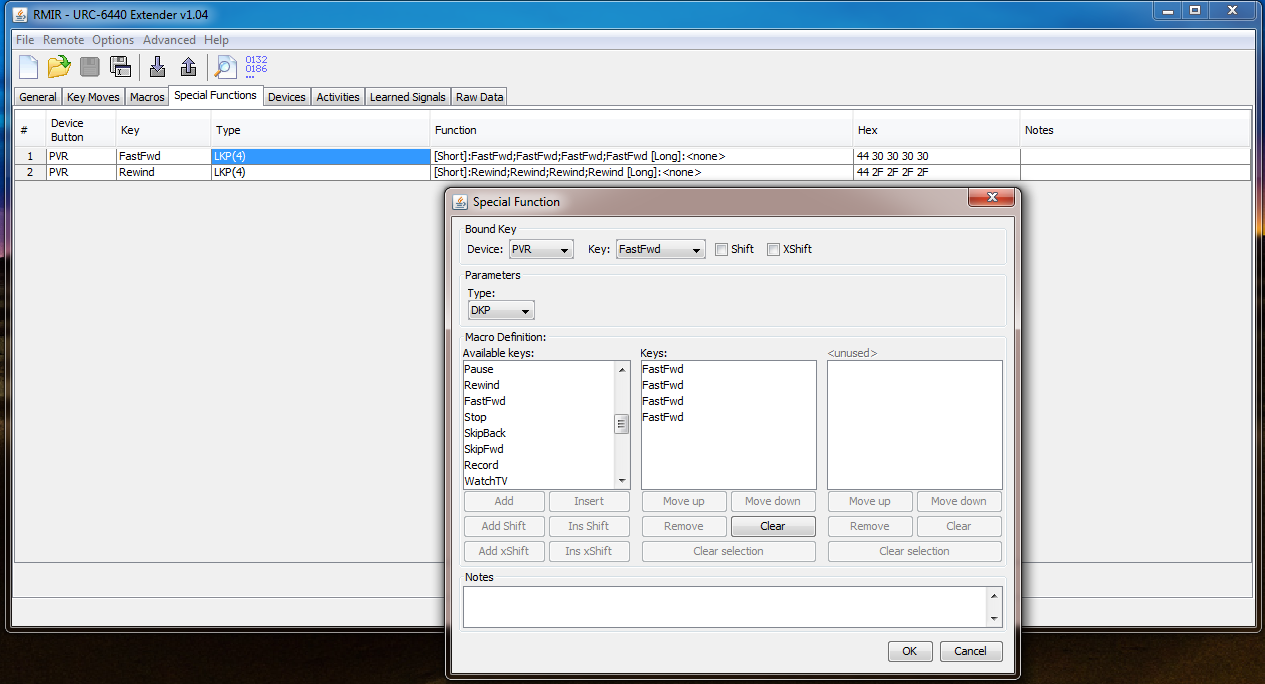
-Setup a macro so that when in the PVR device, and press the forward button twice (DKP), or rewind button twice, the macro presses those buttons four times.

But when I set them up and click ok, they show up as LKP(4).

And then they don't work lol
Image
tranx
Posts: 682
Joined: Sun May 13, 2012 4:53 am
Location: Hants, UK

Post by tranx »

...trying to do now is set up a macro so that when I hold down the power button it turns everything off (assuming everything is on to start with)..
All edited many times:
TV;(buttonX);PVR;(ButtonX);DVD;(ButtonX);EXTRA;(ButtonX) - on the long side of the LKP should do it,
- (ButtonX) being another place to put the Power Function in each device, to avoid making an infinite loop.
- btw you could leave the power functions on the power buttons and do the shift cloaking mentioned by mathdon, by calling (empty) Shift-Power buttons, as (buttonX)s.
- As it stands this would leave the remote in the EXTRA device mode, so you might want to add 'TV' or 'PVR', or turn one of those off last.
- Yes I see that, assuming the Power Functions are toggles rather than discrete commands, it would do All Off and All On alternately.
- As usual everyone does things in his/her own way and otherwise you may not want to use combo-modes themselves, but see 4.6 in the manual about ticking/unticking the the power button boxes in the Activities tab.
- In the screenshot there are some editing features missing fom the LKP definition window, please see the last comments below.
...Setup a macro so that when in the PVR device, and press the forward button twice (DKP), or rewind button twice, the macro presses those buttons four times...
- You may already appreciate that these buttons serve both for FastFwd and SkipFwd and for Rewind and SkipBack, which is illustrated by their split labels in the device editor.
- That is discussed in various threads, and seem to remember that it may affect macros, even with the extender. If so, it is sure to be in the manual.
- The macros would call themselves, so in any case the repeated functions would need to be located somewhere else.
(in the DKP setup)...But when I set them up and click ok, they show up as LKP(4)...
Thanks for the screenshots:
- Although the term 'Type' and 'DKP' below it, do show in the Special Functions window, there is no term 'Duration', with the default '(4)' in a box below it, which should both be shown there,
(and the same problem is apparent in the earlier screenshot of the LKP definition window).
- It seems something might have gone wrong with the installation of the Extender, or perhaps with loading any pre-saved .rmir, so think it would be worth redoing things to make sure.

It is very early days at the deeper end but, if it is any comfort, you have generally done better than I did :)
JezW
Posts: 156
Joined: Thu Nov 26, 2015 6:30 am

Post by JezW »

For when I get going again, please can someone clarify these questions for me? Tranx did answer them but I didn't fully understand some of the responses.

1. Which buttons do most people use for macros? Shifted buttons?
"Without the extender, there is no shift button."

So why is there a shift “tick box” if I go to “Macros”-->”New” in the unextended remote?

3. What are the ticked boxes under the activities tab?
“I think they determine whether pressing that combi-button issues a power command for the devices which have boxes ticked "
I don’t think this is the case. Pressing the combi-button doesn’t send any power commands.
tranx
Posts: 682
Joined: Sun May 13, 2012 4:53 am
Location: Hants, UK

Post by tranx »

Without the extender's shift button, as below "...the shifted buttons can still carry functions to which macros can refer" i.e. a shifted button can be included in a macro.

Please see 4.6 in the manual about ticking/unticking the the power button boxes in the Activities tab (I believe that the relevant device must be mentioned in the button group assignments).
...I assume it's possible to write a macro which operates more than one device without having the extender installed?
Yes, the following sequence should still be ok for doing AllOff or AllOn, without the extender installed.
You could assign a global macro to the Power button
(i.e. that would be the same as it might have been done with the extender, but in the macro editor tab, rather than device <none> in the Special functions editor, or in the ordinary macro tab),
and Phantom1 in each device might be another place to put the Power Function in each device, to avoid making an infinite loop. In that case 'Phantom1' would be '(buttonX)':-
i.e. an ordinary macro on the Power button as follows:-
TV;Phantom1;PVR;Phantom1;DVD;Phantom1;EXTRA;Phantom1

- or again you could have the power functions 'cloaked' by the macro on the common unshifted power button and using the shift cloaking method, which in each device would call the (empty) Shift-Power button, as (buttonX).
i.e. an ordinary macro on the Power button:-
TV;Shift-Power;PVR;Shift-Power;DVD;Shift-Power;EXTRA;Shift-Power
- Since the remote would find no command assigned to Shift-Power it would next look for any command on the unshifted key and find 'Power'.

- As it stands this would leave the remote in the EXTRA device mode, so you might want to add 'TV' or 'PVR' at the end, or put the:
(favoured device);Shift-Power, pair of buttons at the end.
- The macro would do All Off and All On alternately.
...I feel like I'm wasting people's time now...
Not at all, it's a bit of fun and good practice, and there's not so much else to do these days. It took me ages to get the hang of shift cloaking and by coincidence that has reminded me when I needed it for the first time only yesterday...
Last edited by tranx on Sun Nov 29, 2015 11:16 am, edited 2 times in total.
tranx
Posts: 682
Joined: Sun May 13, 2012 4:53 am
Location: Hants, UK

Post by tranx »

JezW, and all, it's cool if someone else would like to correct anything or put things in different ways to make them clearer 8-) especially as I have plenty to learn too...so please keep on asking or correcting if needed
Last edited by tranx on Sun Nov 29, 2015 11:37 am, edited 1 time in total.
JezW
Posts: 156
Joined: Thu Nov 26, 2015 6:30 am

Post by JezW »

Thanks for expanding on your responses tranx. I'll look over them tomorrow with a new control :roll:
tranx
Posts: 682
Joined: Sun May 13, 2012 4:53 am
Location: Hants, UK

Post by tranx »

(crossed post again) I took it that mathdon had 'ok'd DKP on Fast FF/Rew buttons by passing over my reference to something being in the manual if it would cause a problem, but it was an obscure one.

However when pressing FF the built-in behaviour which involves a few moments delay before it either:-

(Corrected 30.11.2015: In the numbered paragraphs below Skip/Fwd and FastFwd had been the wrong way round).
1. If the FastFwd/SkipFwd button is tapped and is NOT still being held after a fixed period, which is around 1 second, a single dose is issued of IR for whatever command is allocated to SkipFwd.

or

2. If the button IS held until the 1 sec delay runs out, instead it executes FastFwd.

and

3. If the button is held for yet more time, the dose of IR for the function on the FastFwd position is repeated, but at shorter intervals, until the button is finally released.

With the extender the FastFwd/SkipFwd button behaves the same as it does without it but (edit: 'before correction here') I had guessed that DKP would fail or just be interpreted as 1. unless the button were to be held for 1+ secs.
Since mathdon had not then commented, I took it that the extender would indeed replace the unextended standard behaviour with that for DKP. (30.11.2015 edit: He has now checked and confirmed, on P7, that DKP works as long as it is on the SkipFwd key) I see mathdon has posted now, thanks, so JezW, please report how you get on with it.
Last edited by tranx on Mon Nov 30, 2015 10:33 am, edited 2 times in total.
tranx
Posts: 682
Joined: Sun May 13, 2012 4:53 am
Location: Hants, UK

Post by tranx »

You could indeed put a command in the normal press and hold position labelled (corrected:) 'FastFwd', which referred to your repeating FF macro elsewhere, but it would take a while to start, just like waiting for the normal press and hold to start.

What we do is to use the original setup but with FastFwd on both the positions for FastForward and for SkipFwd which exist on on the single physical FF button,

- and use buttons #1. and #3 (which are immediately below Rew and FF) for LKP macros with two lengths of of advert skipping commands, such as the proper 'Skip' commands, if they are provided by the device,
- or for a workaround macros for menu items to move a progress bar etc.
- or for your type of LKP/DKP sets of repeated FF if only FF is available, but we haven't needed that solution.
- or refer to a macro on another button with one or more FFs in it, which then calls the original button (Vicky2003TM)
This forms a self-repeating system which, with the extender, can be interrupted by pressing and holding Pause.

It depends on your gear. The digit functions are on shifted number buttons as mentioned earlier, to leave room for DSMs instead.
Last edited by tranx on Mon Nov 30, 2015 12:40 pm, edited 6 times in total.
JezW
Posts: 156
Joined: Thu Nov 26, 2015 6:30 am

Post by JezW »

It seems this idea of having a DKP on the rewind and fast forward buttons is seriously complicated! I'll do my best to read through everything that's been said and apply it :roll:

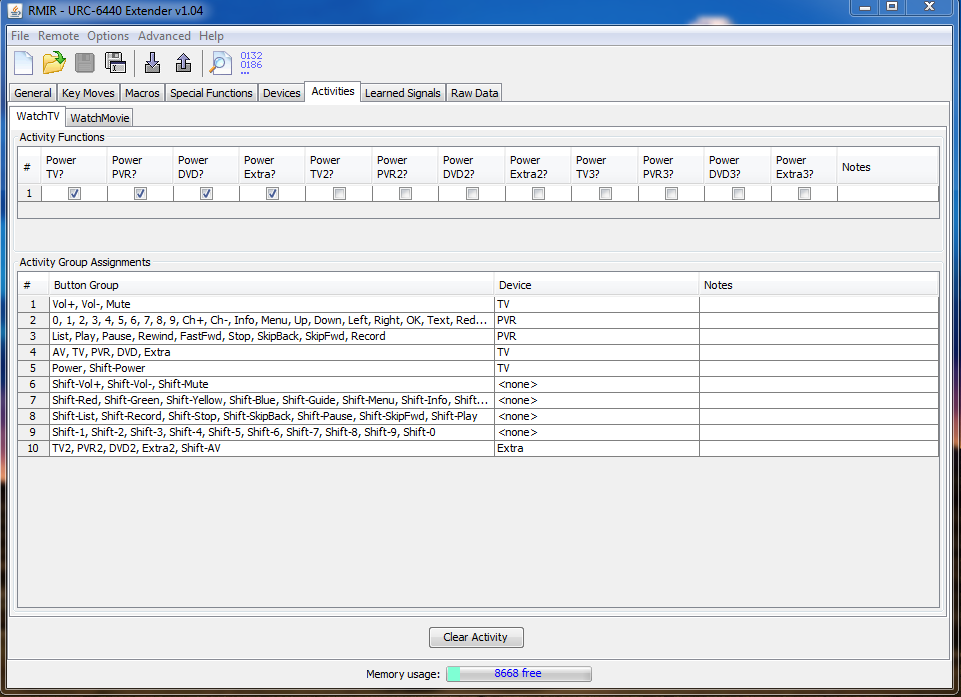
Good news is I've got the power off button working for everything now. 4.6 in the manual discusses the power button in combo mode. If held down, it sends a power signal "for each device that is assigned to a button group in that combo mode"

I don't have my amp controls selected for anything in the WatchTV activity. Therefore when using the power combo, it doesn't send a power command for the amp. But if I select the amp (Extra) for the TV2,PV2 buttons, etc. at the bottom of the list then this works fine. Is this an acceptable way to get the power combo working on everything (because I don't plan on ever using those buttons). Feels like I'm cheating lol

Image
JezW
Posts: 156
Joined: Thu Nov 26, 2015 6:30 am

Post by JezW »

Right, I'm making progress now :)

I've programmed a couple keymoves and been playing around with macros, DKP and LKP and I think I understand them now (mostly!) Everything is working as it should!

So...discrete codes eh... :wink:

For Samsung TVs, there's a list of discrete codes here:

http://www.remotecentral.com/cgi-bin/mb ... d.cgi?5780

Should I be downloading prontoedit, as described here?

https://www.remotecentral.com/files/use-ir.htm

One other thing - This control is extended and on its way to being setup how I'd like it. But there does seem to be a physical problem with the FF button. Before I take it for an exchange tomorrow, I'll copy the original settings.bin back onto it. When I get the replacement, can I simply copy my current settings.bin file onto it and it will upload the extender with all my current settings?

Thanks everyone
3FG
Expert
Posts: 3438
Joined: Mon May 18, 2009 11:48 pm

Post by 3FG »

Consider using a newer list of Samsung discretes (as suggested back on page 2 of this thread). You don't need to worry about Pronto Hex-- the OBCs for each discrete is listed (in both RC links) as the function number. For example, the OBC for Power Off is 152. Just ignore the Pronto Hex numbers.

Of course, all this will be a lot easier if you instead use the facilities available here. I used JP1Master to select this Samsung UE55F8000 TV upgrade. It probably already has what you want-- without any typing.

Yes, you can copy the settings.bin file from one 6440 to another without any loss of information.
tranx
Posts: 682
Joined: Sun May 13, 2012 4:53 am
Location: Hants, UK

Post by tranx »

...Is this an acceptable way to get the power combo working on everything (because I don't plan on ever using those buttons)...
That is ok, as long as you don't forget that you weren't going ever to use them in the WatchTv activity mode and it's not cheating because 'Comb-Controls' are built-in functions.
Except for access to Simpleset.com, the Extender does not take things away, it just adds to the original features.
mathdon
Expert
Posts: 4728
Joined: Tue Jul 22, 2008 8:53 am
Location: Cambridge, UK

Post by mathdon »

Jez & Tranx, I have just confirmed by experiment that you CAN put three functions easily on the FastFwd and Rewind physical buttons. Simply put a DKP on SkipFwd or SkipBack for the device concerned, and an ordinary function or DSM on FastFwd or Rewind. Then with FastFwd, one quick press sends the SkipFwd DKP single-press macro, two quick presses send the SkipFwd DKP double-press macro, one long press sends the FastFwd function or DSM.

Note that SkipFwd and FastFwd are separate entries in the Keys listing in setting up a Special Function, even though they are the same physical button, and you must do it the way round I said, i.e. the DKP on the Skip button. not the Fast button. For the technically minded, this is because SkipFwd and FastFwd have different keycodes. The remote tests the key hold time and uses SkipFwd keycode for a short press, FastFwd keycode for a long press. With a DKP on SkipFwd, one or two quick presses are therefore both seen as SkipFwd but a long press selects the FastFwd keycode, which never sees the DKP. Note also that an LKP would not work, it needs to be a DKP for this three-function trick.

I may find this useful myself, now that I know it is possible :D .
Graham
JezW
Posts: 156
Joined: Thu Nov 26, 2015 6:30 am

Post by JezW »

Hi 3FG, thanks for clarifying prontohex and the OBC code.

It worked :D But of course I've got a few questions about it..

1. If the discrete power off OBC for my TV is 152, how would I program this into the control if there is no TV device in the devices tab of RMIR for me to edit? Or I would have to create one there?

Or, as you said, I can use a device that's already been setup for me (which I've done and works!). I opened my remote settings file on RMIR, went to devices, clicked new, open, then selected the samsung file that you linked on your post. There are some "lost function assignments" due to remote differences but I think I can work these out later.

Within the functions tab, there's the following listed:

1. Power - OBC 2
2. DiscreteOn - OBC 153
3. DiscreteOff - OBC 152

I then assign the DiscreteOn and DiscreteOff to buttons using the buttons tab by selecting a function cell and double clicking on DiscreteOn/DiscreteOff? 2. Or this can be done on the layout tab in the same manner and has the same results?

I then click ok and it says "This device upgrade is not assigned to a device button, do you want to assign it now" and gives a drop down list to select the desired device. I selected TV.

This device upgrade then "overules" the TV device I have in the general tab?

I have noticed the TV setup code in the general tab has changed now, from 1619 to 2004. What effect do these setup codes have?

Thank you for your help, very surprised I got this working already.
mathdon
Expert
Posts: 4728
Joined: Tue Jul 22, 2008 8:53 am
Location: Cambridge, UK

Post by mathdon »

JezW wrote:1. If the discrete power off OBC for my TV is 152, how would I program this into the control if there is no TV device in the devices tab of RMIR for me to edit? Or I would have to create one there?
This is what the "Create missing upgrades" button is for. It should create the upgrade for you to edit as you wish.

Please see my earlier post about your missing Activities, and post your settings.bin file for me to check.
Graham
Post Reply