I have a new remote, the Contour 4 (URC-1240). It is basically the same as the Contour 8 (URC-1280), but with 4 device buttons only (TV, SAT, AMP, DVD).
https://www.oneforall.com/universal-rem ... -contour-4
It is identified by RMIR as Contour 8 (it has the same signature: 368001), and I thought there's no need to create a new RDF, if I want to use four devices only. So I prepared and uploaded my config, it was accepted by the remote, but it behaves very strangely. After sending one code to the SAT device properly, it flashes 4 times, and get back to TV mode.
Could anybody help me? What could be the problem? Do I have to create a new RDF for this remote? How to distinguish it from the Contour 8?
Thank you!
368001 One For All Contour 4 - URC-1240
-
The Robman
- Site Owner
- Posts: 21997
- Joined: Fri Aug 01, 2003 9:37 am
- Location: Chicago, IL
- Contact:
There is a sticky thread at the top of this forum that describes what I need to create a new RDF for you, follow those steps and we'll see if it's really a clone of the URC-1280. I will also PM you for some additional info.
Rob
www.hifi-remote.com
Please don't PM me with remote questions, post them in the forums so all the experts can help!
www.hifi-remote.com
Please don't PM me with remote questions, post them in the forums so all the experts can help!
Here is the information according to the sticky post:
1. One For All Contour 4, URC-1240
2. URL for the photo:
https://www.oneforall.com/universal-rem ... -contour-4
https://www.oneforall.com/sites/default ... new_20.png
3. Raw download: https://www.hifi-remote.com/forums/dload ... e_id=26291
4. TV: 3301 (LG 42LW5590), SAT: 3306 (Onkyo TX-SR507), AMP: 3302 (Vero 4k+ lirc in WDTV mode). All these are created with device upgrade for my own taste.
5. Raw download with macros: https://www.hifi-remote.com/forums/dload ... e_id=26292
Macros programmed:
6. N/A
7. Files are uploaded, links are in the post.
I also sent answer to PM.
Thank you in advance!
1. One For All Contour 4, URC-1240
2. URL for the photo:
https://www.oneforall.com/universal-rem ... -contour-4
https://www.oneforall.com/sites/default ... new_20.png
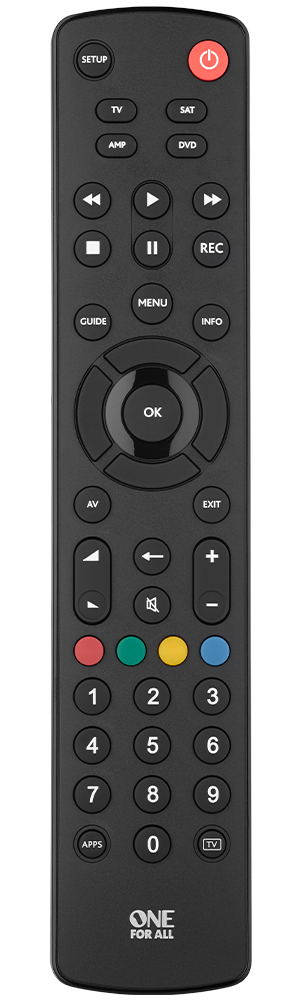
3. Raw download: https://www.hifi-remote.com/forums/dload ... e_id=26291
4. TV: 3301 (LG 42LW5590), SAT: 3306 (Onkyo TX-SR507), AMP: 3302 (Vero 4k+ lirc in WDTV mode). All these are created with device upgrade for my own taste.
5. Raw download with macros: https://www.hifi-remote.com/forums/dload ... e_id=26292
Macros programmed:
Code: Select all
1: Setup;Power;TV;SAT;AMP;DVD;Rewind;Play;FastFwd;Stop;Pause;Record;Guide;Menu;Info
2: Up;Left;OK;Right;Down;AV;Exit;Vol+;Vol-;Back;Mute;Ch+;Ch-
3: Red;Green;Yellow;Blue;4;5;6;7;8;9;Apps;0;Live_TV7. Files are uploaded, links are in the post.
I also sent answer to PM.
Thank you in advance!
-
The Robman
- Site Owner
- Posts: 21997
- Joined: Fri Aug 01, 2003 9:37 am
- Location: Chicago, IL
- Contact:
Thanks for these, I'll post an update shortly.
Rob
www.hifi-remote.com
Please don't PM me with remote questions, post them in the forums so all the experts can help!
www.hifi-remote.com
Please don't PM me with remote questions, post them in the forums so all the experts can help!
-
The Robman
- Site Owner
- Posts: 21997
- Joined: Fri Aug 01, 2003 9:37 am
- Location: Chicago, IL
- Contact:
This remote is an exact clone of the larger URC-1280 remote, which means whatever issue you were having was not based on this remote not having its own RDF. To that end, if I were you, I'd do a MFR reset (see below), then build up your new profile step by step, adding one upgrade at a time and testing it, to see which one is introducing the problem.
I have created a new RDF, image and map here:
https://www.hifi-remote.com/forums/dload ... e_id=26293
To perform a MFR Reset:
Remove all power from the remote (press a button after to discharge the capacitor),
Reapply power, wait for 2 flashes,
Press 2 + 8 simultaneously within 6 seconds, 2 flashes,
Type 9 8 1, wait for 4 flashes.
I have created a new RDF, image and map here:
https://www.hifi-remote.com/forums/dload ... e_id=26293
To perform a MFR Reset:
Remove all power from the remote (press a button after to discharge the capacitor),
Reapply power, wait for 2 flashes,
Press 2 + 8 simultaneously within 6 seconds, 2 flashes,
Type 9 8 1, wait for 4 flashes.
Rob
www.hifi-remote.com
Please don't PM me with remote questions, post them in the forums so all the experts can help!
www.hifi-remote.com
Please don't PM me with remote questions, post them in the forums so all the experts can help!
Thank you!
Thank you very much for your prompt action!
I've tested the new RDF, it is working perfectly.
After seeing the strange error happening again with the new config also, I started to investigate further. It turned out that the problem was because of a wrong set of batteries. It had enough power to send out one code only, and then did a reset on the remote (that's why it seemed to be turning back to TV mode).
I've tested it again with the former (Contour 8) config, and it was also working perfectly. So, after all it would have not been necessary to create a new RDF...
Thank you, anyway!
I've tested the new RDF, it is working perfectly.
After seeing the strange error happening again with the new config also, I started to investigate further. It turned out that the problem was because of a wrong set of batteries. It had enough power to send out one code only, and then did a reset on the remote (that's why it seemed to be turning back to TV mode).
I've tested it again with the former (Contour 8) config, and it was also working perfectly. So, after all it would have not been necessary to create a new RDF...
Thank you, anyway!
-
The Robman
- Site Owner
- Posts: 21997
- Joined: Fri Aug 01, 2003 9:37 am
- Location: Chicago, IL
- Contact:
Back in the day, our answer to every posted problem was "have you tried new batteries", so I guess that golden oldie has returned, lol.
But it's still good to have an RDF and image that matches your remote, so I'm glad you brought this up.
But it's still good to have an RDF and image that matches your remote, so I'm glad you brought this up.
Rob
www.hifi-remote.com
Please don't PM me with remote questions, post them in the forums so all the experts can help!
www.hifi-remote.com
Please don't PM me with remote questions, post them in the forums so all the experts can help!