Short question: What's the relationship between these two protocols?
Longer question: Learning my Sharp DVD player functions on an 8910 and 2117 each yields decodes of Kaseikyo 170.90 protocol with Device 8.48. Both KM and RM support building an upgrade using the Kaseikyo protocol, with corresponding settings Device=8, Subdevice=48, OEM1=170, OEM2=90. This upgrade works just fine, but carries with it a memory penalty due to the protocol upgrade required.
I noticed in the devices spreadsheet that there are several versions of a Sharp DVD protocol. I picked the setup code using one of those protocols in my 8910 and assigned the built-in code DVD/0630. It works, but of course I want to build a device upgrade to tailor this setup code. So, to try to sort this out, I learned from this code from one remote to another. All of the signals decode as above (Kaseikyo-170.90: 8.48). In devices.xls, however, it tells me that this is Sharp DVD (0):143.48.170.90.
Now in KM and RM, I can select SharpDVD protocol (not a version 0, 1, or 2) and assign 143.48, but not the 170.90.
What's going on? Does DecodeIR.dll need to be updated? Is the 170.90 meaningful?
Apparently, Kaseikyo-170.90:8.48 is equivalent to SharpDVD:143.48 but my head hurts figuring this out. All of the OBCs decode the same, however, so I presume I can just build an upgrade using SharpDVD:143.48 and will have a working upgrade WITHOUT requiring a protocol upgrade, correct?
Sharp DVD vs. Kaseikyo protocols: DecodeIR.dll problem?
Moderator: Moderators
-
Capn Trips
- Expert
- Posts: 3989
- Joined: Fri Oct 03, 2003 6:56 am
Sharp DVD vs. Kaseikyo protocols: DecodeIR.dll problem?
Beginners - Read this thread first
READ BEFORE POSTING or your post will be DELETED!
Remotes: OFA XSight Touch, AR XSight Touch
TVs: LG 65" Smart LED TV; Samsung QN850BF Series - 8K UHD Neo QLED LCD TV
RCVR: Onkyo TX-SR875; Integra DTR 40.3
DVD/VCR: Pioneer DV-400VK (multi-region DVD), Sony BDP-S350 (Blu-ray), Toshiba HD-A3 (HD-DVD), Panasonic AG-W1 (Multi-system VCR);
Laserdisc: Pioneer CLD-D704.
Amazon Firestick
tape deck: Pioneer CT 1380WR (double cassette deck)
(But I still have to get up for my beer)
READ BEFORE POSTING or your post will be DELETED!
Remotes: OFA XSight Touch, AR XSight Touch
TVs: LG 65" Smart LED TV; Samsung QN850BF Series - 8K UHD Neo QLED LCD TV
RCVR: Onkyo TX-SR875; Integra DTR 40.3
DVD/VCR: Pioneer DV-400VK (multi-region DVD), Sony BDP-S350 (Blu-ray), Toshiba HD-A3 (HD-DVD), Panasonic AG-W1 (Multi-system VCR);
Laserdisc: Pioneer CLD-D704.
Amazon Firestick
tape deck: Pioneer CT 1380WR (double cassette deck)
(But I still have to get up for my beer)
-
The Robman
- Site Owner
- Posts: 22056
- Joined: Fri Aug 01, 2003 9:37 am
- Location: Chicago, IL
- Contact:
"Kaseikyo" is the protocol that is most commonly known as "Panasonic". When you select Panasonic in KM or RM, the OEM codes get defaulted to the correct values for Panasonic and the checksum gets calculated correctly also.
IIRC, the Sharp DVD protocol is almost identical to Panasonic, but it uses different OEM codes and the checksum byte is calculated differently (but I forgot all the real details).
I'd have to fig into this a bit deeper to give you a complete answer, which I don't have time to do right now, so hopefully John or one of the other experts can chime in with some more info.
IIRC, the Sharp DVD protocol is almost identical to Panasonic, but it uses different OEM codes and the checksum byte is calculated differently (but I forgot all the real details).
I'd have to fig into this a bit deeper to give you a complete answer, which I don't have time to do right now, so hopefully John or one of the other experts can chime in with some more info.
Rob
www.hifi-remote.com
Please don't PM me with remote questions, post them in the forums so all the experts can help!
www.hifi-remote.com
Please don't PM me with remote questions, post them in the forums so all the experts can help!
Re: Sharp DVD vs. Kaseikyo protocols: DecodeIR.dll problem?
Kaseikyo is a family of related protocols.Capn Trips wrote:Short question: What's the relationship between these two protocols?
Sharp DVD is KM (I assume) support for part or all of the capabilities of some protocol executor for some subset of the Kaseikyo family. Sorry, I don't know the exact details of the executor nor the KM support for it.
devices.xls doesn't have a detailed interpretation for the fixed data of every protocol. Sometimes it applies generic rules to fixed data in a tricky protocol where generic rules don't give a great interpretation.Capn Trips wrote: I noticed in the devices spreadsheet that there are several versions of a Sharp DVD protocol. I picked the setup code using one of those protocols in my 8910 and assigned the built-in code DVD/0630. It works, but of course I want to build a device upgrade to tailor this setup code. So, to try to sort this out, I learned from this code from one remote to another. All of the signals decode as above (Kaseikyo-170.90: 8.48 ). In devices.xls, however, it tells me that this is Sharp DVD (0):143.48.170.90.
143 decimal is 8F hex. The 8 and the F have completely seperate meanings in the Kaseikyo structure. Combining them and converting the result to decimal seriously obscures things.
The 170.90 is the Kaseikyo manufacturer code for Sharp. Based just on what you said (not on any prior recollection of Sharp DVD protocol), the protocol executor must support manufacturer numbers other than Sharp, but the support for it in KM/RM apparently doesn't.Capn Trips wrote: Now in KM and RM, I can select SharpDVD protocol (not a version 0, 1, or 2) and assign 143.48, but not the 170.90.
I don't think so. It is always a judgement call how deep to push DecodeIr into compatibility with the stranger protocol support in KM. In this case I don't think I should push it that deep.Capn Trips wrote: What's going on? Does DecodeIR.dll need to be updated?
The 48 is the sameCapn Trips wrote:Apparently, Kaseikyo-170.90:8.48 is equivalent to SharpDVD:143.48

170.90 I've explained.
143 is 8F hex. That 8 is the 8 of the other view. The F is the check nibble for the manufacturer number, and as such really should be hidden from the user (as we hide check parts of other protocols). Sometime KM/RM compute such things and include them in the data given the executor, and sometimes the executor computes them on the fly. That decision should be hidden from the user.
"Panasonic" protocol is a big exception to all that I've said above. I reverse engineered the structure of Panasonic long before JP1 and long before I ever heard of Kaseikyo, much less read its spec. Panasonic was designed such that both the Kaseikyo view of check nibbles and a simpler view would give the same answer. With no other Kaseikyo examples to look at, I saw only the simpler rule and misinterpreted Panasonic. Then predecessors to DecodeIR and MakeHex were built speading that misinterpretation through the community of people reverse engineering IR. By the time we found out the correct structure of Panasonic, there would have been too many consequences to changing everything. So Panasonic must remain an exception to the Kaseikyo rules in DecodeIR.
-
Capn Trips
- Expert
- Posts: 3989
- Joined: Fri Oct 03, 2003 6:56 am
Roger all of your explanations, John. Thank y ou for that. Here's my point (if there is one).
These signals get interpreted as Kaseikyo-170.90 Device 8, Subdevice 48 WHEN LEARNED.
When one builds an upgrade using this info, the natural tendency is to use the Kaseikyo protocol and fill in the required data. This works perfectly fine, but ALWAYS results in a 44-byte protocol upgrade being required, as the "bare" Kaseikyo protocol is not resident in any JP1 remote (according to Devices.xls).
For this particular case, building the SAME upgrade using SharpDVD protocol with Device 143, subdevice 48 and all of the same OBCs, one can get a much smaller upgrade, since the SharpDVD protocol is already resident (obviously this only appplies to specific remotes). Of course, for those remotes that do NOT have the SharpDVD protocol (obviously a specific "sub-"protocol" of the Kaseikyo), that would be a 61-byte upgrade, so using Kaseikyo would be more efficient.
The casual JP1-er would not be able to discern this similarity/relationship very easily.
Can a NOTE be made in the Protocol help (in both KM and RM) for Kaseikyo (there is already a pretty extensive one) pointing out this circumstance. Something to the effect of
Just a suggestion.
These signals get interpreted as Kaseikyo-170.90 Device 8, Subdevice 48 WHEN LEARNED.
When one builds an upgrade using this info, the natural tendency is to use the Kaseikyo protocol and fill in the required data. This works perfectly fine, but ALWAYS results in a 44-byte protocol upgrade being required, as the "bare" Kaseikyo protocol is not resident in any JP1 remote (according to Devices.xls).
For this particular case, building the SAME upgrade using SharpDVD protocol with Device 143, subdevice 48 and all of the same OBCs, one can get a much smaller upgrade, since the SharpDVD protocol is already resident (obviously this only appplies to specific remotes). Of course, for those remotes that do NOT have the SharpDVD protocol (obviously a specific "sub-"protocol" of the Kaseikyo), that would be a 61-byte upgrade, so using Kaseikyo would be more efficient.
The casual JP1-er would not be able to discern this similarity/relationship very easily.
Can a NOTE be made in the Protocol help (in both KM and RM) for Kaseikyo (there is already a pretty extensive one) pointing out this circumstance. Something to the effect of
This would require no changes to the actual KM or RM programs, nor to decodeIR.dll, but would provide useful info to the user trying to economize on upgrade space usage."Functions that decode as Kaseikyo-170.90, Dev 8, SubDev 48 can be built using either the Kaseikyo protocol (Dev=8, SubDev=48, OEM1=170, OEM2=90) or the SharpDVD protocol (using Dev=143, SubDev=48 ). Choose whichever one results in a smaller protocol upgrade (or none) for your remote"
Just a suggestion.
Last edited by Capn Trips on Thu May 11, 2006 6:14 am, edited 1 time in total.
Beginners - Read this thread first
READ BEFORE POSTING or your post will be DELETED!
Remotes: OFA XSight Touch, AR XSight Touch
TVs: LG 65" Smart LED TV; Samsung QN850BF Series - 8K UHD Neo QLED LCD TV
RCVR: Onkyo TX-SR875; Integra DTR 40.3
DVD/VCR: Pioneer DV-400VK (multi-region DVD), Sony BDP-S350 (Blu-ray), Toshiba HD-A3 (HD-DVD), Panasonic AG-W1 (Multi-system VCR);
Laserdisc: Pioneer CLD-D704.
Amazon Firestick
tape deck: Pioneer CT 1380WR (double cassette deck)
(But I still have to get up for my beer)
READ BEFORE POSTING or your post will be DELETED!
Remotes: OFA XSight Touch, AR XSight Touch
TVs: LG 65" Smart LED TV; Samsung QN850BF Series - 8K UHD Neo QLED LCD TV
RCVR: Onkyo TX-SR875; Integra DTR 40.3
DVD/VCR: Pioneer DV-400VK (multi-region DVD), Sony BDP-S350 (Blu-ray), Toshiba HD-A3 (HD-DVD), Panasonic AG-W1 (Multi-system VCR);
Laserdisc: Pioneer CLD-D704.
Amazon Firestick
tape deck: Pioneer CT 1380WR (double cassette deck)
(But I still have to get up for my beer)
-
Capn Trips
- Expert
- Posts: 3989
- Joined: Fri Oct 03, 2003 6:56 am
Just one more thing. 
Devices.xls seems to indicate that this SharpDVD protocol is most often protocol ID 00F8, and the protocol upgrade generated in KM and RM is in fact ID 00F8. This is the protocol hidden in the protocol upgrade area of KM when selected for a URC 8910/9910/HTPro remote.
Devices.xls indicates, however, that for THIS PARTICULAR REMOTE ONLY (plus the REM400B01) the SharpDVD protocol is protocol ID 0171!!
Any device upgrade generated by KM or RM for an 8910 calling on the SharpDVD protocol calls on protocol 00F8, presumed to be resident by KM/RM, whilst according to Devices.xls 00F8 is NOT resident, but is under a different name, 0171.
So it seems to me that such an upgrade will call on a not-installed protocol.
So, when installing such an upgrade, should I manually alter the first two bytes of the device upgrade in IR to 71 01 instead of F8 00?
Does this discrepancy require a modification to KM/RM?
Or is devices.xls wrong, and the SharpDVD protocol in the 8910 is indeed named 00F8?
Devices.xls seems to indicate that this SharpDVD protocol is most often protocol ID 00F8, and the protocol upgrade generated in KM and RM is in fact ID 00F8. This is the protocol hidden in the protocol upgrade area of KM when selected for a URC 8910/9910/HTPro remote.
Devices.xls indicates, however, that for THIS PARTICULAR REMOTE ONLY (plus the REM400B01) the SharpDVD protocol is protocol ID 0171!!
Any device upgrade generated by KM or RM for an 8910 calling on the SharpDVD protocol calls on protocol 00F8, presumed to be resident by KM/RM, whilst according to Devices.xls 00F8 is NOT resident, but is under a different name, 0171.
So it seems to me that such an upgrade will call on a not-installed protocol.
So, when installing such an upgrade, should I manually alter the first two bytes of the device upgrade in IR to 71 01 instead of F8 00?
Does this discrepancy require a modification to KM/RM?
Or is devices.xls wrong, and the SharpDVD protocol in the 8910 is indeed named 00F8?
Beginners - Read this thread first
READ BEFORE POSTING or your post will be DELETED!
Remotes: OFA XSight Touch, AR XSight Touch
TVs: LG 65" Smart LED TV; Samsung QN850BF Series - 8K UHD Neo QLED LCD TV
RCVR: Onkyo TX-SR875; Integra DTR 40.3
DVD/VCR: Pioneer DV-400VK (multi-region DVD), Sony BDP-S350 (Blu-ray), Toshiba HD-A3 (HD-DVD), Panasonic AG-W1 (Multi-system VCR);
Laserdisc: Pioneer CLD-D704.
Amazon Firestick
tape deck: Pioneer CT 1380WR (double cassette deck)
(But I still have to get up for my beer)
READ BEFORE POSTING or your post will be DELETED!
Remotes: OFA XSight Touch, AR XSight Touch
TVs: LG 65" Smart LED TV; Samsung QN850BF Series - 8K UHD Neo QLED LCD TV
RCVR: Onkyo TX-SR875; Integra DTR 40.3
DVD/VCR: Pioneer DV-400VK (multi-region DVD), Sony BDP-S350 (Blu-ray), Toshiba HD-A3 (HD-DVD), Panasonic AG-W1 (Multi-system VCR);
Laserdisc: Pioneer CLD-D704.
Amazon Firestick
tape deck: Pioneer CT 1380WR (double cassette deck)
(But I still have to get up for my beer)
-
The Robman
- Site Owner
- Posts: 22056
- Joined: Fri Aug 01, 2003 9:37 am
- Location: Chicago, IL
- Contact:
Re: Sharp DVD vs. Kaseikyo protocols: DecodeIR.dll problem?
While I agree that you shouldn't push decodeIR to be compatible with KM specifically, I do think you should push it to be compatible with UEI's executors. When UEI has created an exec that covers a paricular signal, regardless of how misguided their decision might have been, we should try to give the user the best info so that they can use that exec.johnsfine wrote:I don't think so. It is always a judgement call how deep to push DecodeIr into compatibility with the stranger protocol support in KM. In this case I don't think I should push it that deep.Capn Trips wrote: What's going on? Does DecodeIR.dll need to be updated?
After all, look how much effort we went to to let the user use that terrible Panasonic Combo protocol that only handles a few specific sub-device codes.
Rob
www.hifi-remote.com
Please don't PM me with remote questions, post them in the forums so all the experts can help!
www.hifi-remote.com
Please don't PM me with remote questions, post them in the forums so all the experts can help!
I don't have time any time soon to investigate or repair this situation, though I think you are correct that it should be fixed. That calls for changes in RM's protocols.ini file, in KM, and in DecodeIr's documentation.
I don't recall what functional difference there is between the Kaseikyo executor and the SharpDVD executor. It sounds like a significant fraction of Kaseikyo could be generated by the SharpDVD executor. In that case protocols.ini could be code to use that executor automatically when present in the remote.Capn Trips wrote: When one builds an upgrade using this info, the natural tendency is to use the Kaseikyo protocol and fill in the required data. This works perfectly fine, but ALWAYS results in a 44-byte protocol upgrade being required, as the "bare" Kaseikyo protocol is not resident in any JP1 remote (according to Devices.xls).
I'm not sure how universal device 8 is. If devices other than 8 show up in decodes then we might need to be more generalCapn Trips wrote: Can a NOTE be made in the Protocol help (in both KM and RM) for Kaseikyo (there is already a pretty extensive one) pointing out this circumstance. Something to the effect of"Functions that decode as Kaseikyo-170.90, Dev 8, SubDev 48 can be built using either the Kaseikyo protocol (Dev=8, SubDev=48, OEM1=170, OEM2=90) or the SharpDVD protocol (using Dev=143, SubDev=48 ). Choose whichever one results in a smaller protocol upgrade (or none) for your remote"
But I would sure prefer having KM/RM just pick the better executor automatically."Functions that decode as Kaseikyo-170.90, Dev D, SubDev S can be built using either the Kaseikyo protocol (Dev=D, SubDev=S, OEM1=170, OEM2=90) or the SharpDVD protocol (using Dev=16*D+15, SubDev=S ).
-
Capn Trips
- Expert
- Posts: 3989
- Joined: Fri Oct 03, 2003 6:56 am
Edit: I was typing all of the below while Rob and John were answering above. I understand your answers above and can wait patiently 8) but the info below might still be helpful in sorting out the mess
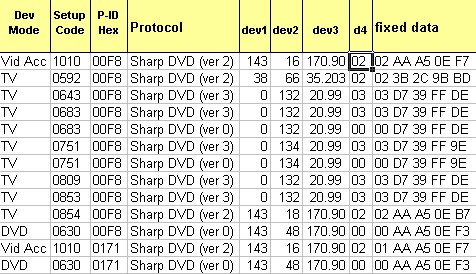
This excerpt from Devices.xls shows all of the currently identified preloaded device codes that use the SharpDVD protocol(s). I know (by setting and learning) that the DVD/0630 setup code decodes as Kaseikyo-170.90 Dev=8, Subdev=48. Hence all of my previous ramblings.
If I select SharpDVD in KM or RM, the only selections I can make are Dev1 and Dev2. All of the previous discussion in this thread sort of presumed that the 170.90 was somehow embedded in the "SharpDVD" protocol. Well here are examples of several OTHER OEM combinations (20.99 and 35.203) that seem to use THE SAME protocol (00F8 - (or 0171)).
CAN ONE (and HOW WOULD ONE) enter these data in a KM/RM upgrade using the SharpDVD protocol? Are there indeed three distinct SharpDVD protocols, each using ID 00F8? and how about the variants using ID 0171?
The different ID sort of makes sense for the 8910 (which is the primary JP1 remote that uses it (in addition to the Rex B01 mentioned above, it's also in the Atlas) if it were used to differentiate between, say version 0 and version 2, or something like that , or if each corresponded to a unique OEM1.OEM2 pair, but it doesn't - not consistently.
So to a NEW bottom line question - IN THE INTERIM how does one figure out how to use the SharpDVD protocol correctly in KM/RM?
This excerpt from Devices.xls shows all of the currently identified preloaded device codes that use the SharpDVD protocol(s). I know (by setting and learning) that the DVD/0630 setup code decodes as Kaseikyo-170.90 Dev=8, Subdev=48. Hence all of my previous ramblings.
If I select SharpDVD in KM or RM, the only selections I can make are Dev1 and Dev2. All of the previous discussion in this thread sort of presumed that the 170.90 was somehow embedded in the "SharpDVD" protocol. Well here are examples of several OTHER OEM combinations (20.99 and 35.203) that seem to use THE SAME protocol (00F8 - (or 0171)).
CAN ONE (and HOW WOULD ONE) enter these data in a KM/RM upgrade using the SharpDVD protocol? Are there indeed three distinct SharpDVD protocols, each using ID 00F8? and how about the variants using ID 0171?
The different ID sort of makes sense for the 8910 (which is the primary JP1 remote that uses it (in addition to the Rex B01 mentioned above, it's also in the Atlas) if it were used to differentiate between, say version 0 and version 2, or something like that , or if each corresponded to a unique OEM1.OEM2 pair, but it doesn't - not consistently.
So to a NEW bottom line question - IN THE INTERIM how does one figure out how to use the SharpDVD protocol correctly in KM/RM?
Beginners - Read this thread first
READ BEFORE POSTING or your post will be DELETED!
Remotes: OFA XSight Touch, AR XSight Touch
TVs: LG 65" Smart LED TV; Samsung QN850BF Series - 8K UHD Neo QLED LCD TV
RCVR: Onkyo TX-SR875; Integra DTR 40.3
DVD/VCR: Pioneer DV-400VK (multi-region DVD), Sony BDP-S350 (Blu-ray), Toshiba HD-A3 (HD-DVD), Panasonic AG-W1 (Multi-system VCR);
Laserdisc: Pioneer CLD-D704.
Amazon Firestick
tape deck: Pioneer CT 1380WR (double cassette deck)
(But I still have to get up for my beer)
READ BEFORE POSTING or your post will be DELETED!
Remotes: OFA XSight Touch, AR XSight Touch
TVs: LG 65" Smart LED TV; Samsung QN850BF Series - 8K UHD Neo QLED LCD TV
RCVR: Onkyo TX-SR875; Integra DTR 40.3
DVD/VCR: Pioneer DV-400VK (multi-region DVD), Sony BDP-S350 (Blu-ray), Toshiba HD-A3 (HD-DVD), Panasonic AG-W1 (Multi-system VCR);
Laserdisc: Pioneer CLD-D704.
Amazon Firestick
tape deck: Pioneer CT 1380WR (double cassette deck)
(But I still have to get up for my beer)
A "protocol" is three different things:
1) A way of encoding device/subdevice/obc (and sometimes other things) into an IR signal.
2) An executor: Code and data that makes a JP1 remote encode and transmit something.
3) An entry the user can select in KM or RM.
For many protocols we get away with pretending all three of those are aspects of one thing, the "protocol".
But in some cases (clearly including SharpDVD) we can't make it that simple.
1) A way of encoding device/subdevice/obc (and sometimes other things) into an IR signal.
2) An executor: Code and data that makes a JP1 remote encode and transmit something.
3) An entry the user can select in KM or RM.
For many protocols we get away with pretending all three of those are aspects of one thing, the "protocol".
But in some cases (clearly including SharpDVD) we can't make it that simple.
-
Capn Trips
- Expert
- Posts: 3989
- Joined: Fri Oct 03, 2003 6:56 am
Roger. I will stop throwing gasoline on this fire. I just wanted to highlight these discrepancies, and am happy (and hopeful) that as they are more clearly identified, they will be dealt with in due course.
Thanks for all of the ongoing efforts.
Thanks for all of the ongoing efforts.
Beginners - Read this thread first
READ BEFORE POSTING or your post will be DELETED!
Remotes: OFA XSight Touch, AR XSight Touch
TVs: LG 65" Smart LED TV; Samsung QN850BF Series - 8K UHD Neo QLED LCD TV
RCVR: Onkyo TX-SR875; Integra DTR 40.3
DVD/VCR: Pioneer DV-400VK (multi-region DVD), Sony BDP-S350 (Blu-ray), Toshiba HD-A3 (HD-DVD), Panasonic AG-W1 (Multi-system VCR);
Laserdisc: Pioneer CLD-D704.
Amazon Firestick
tape deck: Pioneer CT 1380WR (double cassette deck)
(But I still have to get up for my beer)
READ BEFORE POSTING or your post will be DELETED!
Remotes: OFA XSight Touch, AR XSight Touch
TVs: LG 65" Smart LED TV; Samsung QN850BF Series - 8K UHD Neo QLED LCD TV
RCVR: Onkyo TX-SR875; Integra DTR 40.3
DVD/VCR: Pioneer DV-400VK (multi-region DVD), Sony BDP-S350 (Blu-ray), Toshiba HD-A3 (HD-DVD), Panasonic AG-W1 (Multi-system VCR);
Laserdisc: Pioneer CLD-D704.
Amazon Firestick
tape deck: Pioneer CT 1380WR (double cassette deck)
(But I still have to get up for my beer)
-
Capn Trips
- Expert
- Posts: 3989
- Joined: Fri Oct 03, 2003 6:56 am
Oh yeah, one last short term question:
Capn Trips wrote:Just one more thing.
So, when installing such an upgrade in the 8910, should I manually alter the first two bytes of the device upgrade in IR to 71 01 instead of F8 00?
Beginners - Read this thread first
READ BEFORE POSTING or your post will be DELETED!
Remotes: OFA XSight Touch, AR XSight Touch
TVs: LG 65" Smart LED TV; Samsung QN850BF Series - 8K UHD Neo QLED LCD TV
RCVR: Onkyo TX-SR875; Integra DTR 40.3
DVD/VCR: Pioneer DV-400VK (multi-region DVD), Sony BDP-S350 (Blu-ray), Toshiba HD-A3 (HD-DVD), Panasonic AG-W1 (Multi-system VCR);
Laserdisc: Pioneer CLD-D704.
Amazon Firestick
tape deck: Pioneer CT 1380WR (double cassette deck)
(But I still have to get up for my beer)
READ BEFORE POSTING or your post will be DELETED!
Remotes: OFA XSight Touch, AR XSight Touch
TVs: LG 65" Smart LED TV; Samsung QN850BF Series - 8K UHD Neo QLED LCD TV
RCVR: Onkyo TX-SR875; Integra DTR 40.3
DVD/VCR: Pioneer DV-400VK (multi-region DVD), Sony BDP-S350 (Blu-ray), Toshiba HD-A3 (HD-DVD), Panasonic AG-W1 (Multi-system VCR);
Laserdisc: Pioneer CLD-D704.
Amazon Firestick
tape deck: Pioneer CT 1380WR (double cassette deck)
(But I still have to get up for my beer)
-
The Robman
- Site Owner
- Posts: 22056
- Joined: Fri Aug 01, 2003 9:37 am
- Location: Chicago, IL
- Contact:
Definitely not.Capn Trips wrote:Just one more thing.
So, when installing such an upgrade in the 8910, should I manually alter the first two bytes of the device upgrade in IR to 71 01 instead of F8 00?
The 2nd byte of the upgrade is NOT the first byte of the protocol id, it's actually the byte that gets set when the codes assigned to the numeric buttons match one of the pre-defined sets. This is a space saving technique that UEI use for their upgrades that we replicate.
If you wanted to manually change the protocol used by your upgrade, the only data that you need to edit is the first byte of the code, which is the 2nd byte of the PID, as you've already figured out. To change the first byte of the PID, you need to either check or un-check the "Protocol > FF" checkbox in the "Add Upgrade Device" panel in IR.exe
As for why the PID used by the built in codes might change, every so often UEI will realize that they have multiple executors that generate very similar protocols, so rather than continue to maintain these multiple executors, they will combine them into one executor. This is likely what happened here, though I would need to review the data to be sure.
Rob
www.hifi-remote.com
Please don't PM me with remote questions, post them in the forums so all the experts can help!
www.hifi-remote.com
Please don't PM me with remote questions, post them in the forums so all the experts can help!