Viewsonic Digital Picture Frame

This forum is a repository for code search requests that have been resolved.

Moderator: Moderators

Post Reply
paula0015
Posts: 16
Joined: Sat Jan 23, 2010 2:58 pm

Viewsonic Digital Picture Frame

Post by paula0015 »

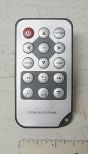
1. Device: ViewSonic VFD1020-12
2. Type of device: Digital Photo Frame
3. Year: 2009
4. JP1/UEI Remote model: URC-10820
5. Do you have a JP1 cable? yes
6. Still have original remote? yes, but doesn't work
7. Checked the file section? yes
8. Checked Pronto file section (at R/C)? yes
9. Partially working setup code? no
10. Learning remote question? n/a

Our remote for this photo frame doesn't work. Would be grateful if someone could learn the 15 codes and post them.
Image
Capn Trips
Expert
Posts: 3989
Joined: Fri Oct 03, 2003 6:56 am

Post by Capn Trips »

This PanDigital is the only picture frame remote I've seen here. Can't hurt to try, I suppose.
Beginners - Read this thread first
READ BEFORE POSTING or your post will be DELETED!


Remotes: OFA XSight Touch, AR XSight Touch
TVs: LG 65" Smart LED TV; Samsung QN850BF Series - 8K UHD Neo QLED LCD TV
RCVR: Onkyo TX-SR875; Integra DTR 40.3
DVD/VCR: Pioneer DV-400VK (multi-region DVD), Sony BDP-S350 (Blu-ray), Toshiba HD-A3 (HD-DVD), Panasonic AG-W1 (Multi-system VCR);
Laserdisc: Pioneer CLD-D704.
Amazon Firestick
tape deck: Pioneer CT 1380WR (double cassette deck)
(But I still have to get up for my beer)
mdavej
Expert
Posts: 4643
Joined: Wed Oct 08, 2003 7:08 am

Post by mdavej »

I realize your remote is "hurtin", but if you could manage to learn at least a code or two from it, that will get you in the ballpark (protocol, device, subdevice) so you could get the rest by trial and error if necessary.
paula0015
Posts: 16
Joined: Sat Jan 23, 2010 2:58 pm

Post by paula0015 »

mdavej wrote:I realize your remote is "hurtin", but if you could manage to learn at least a code or two from it . . .
Thank you. I realized after posting that I replaced accuracy with a cute phrase. The remote is completely dead.
paula0015
Posts: 16
Joined: Sat Jan 23, 2010 2:58 pm

Post by paula0015 »

Capn Trips wrote:This PanDigital is the only picture frame remote I've seen here. Can't hurt to try, I suppose.
I will and I will report back.

[Later]
Nope. The Pandigital does not work with the Viewsonic. But it was still a good thought.
vickyg2003
Site Admin
Posts: 7109
Joined: Sat Mar 20, 2004 12:19 pm
Location: Florida
Contact:

Post by vickyg2003 »

I had recently done a search for picture frame and came up with no results. Using different criteria I came up with this list

Technika S408 Digital Photo Frame
Edge Picture Frame
Kodak Easy Share digitial pictur Fram SV710

You might want to see if any of these work with the viewsonic.
Remember to provide feedback to let us know how the problem was solved and share your upgrades.

Tip: When creating an upgrade, always include ALL functions from the oem remote, even if you never plan on assigning them to a button. Complete function lists makes an upgrade more helpful to others.
paula0015
Posts: 16
Joined: Sat Jan 23, 2010 2:58 pm

Post by paula0015 »

vickyg2003 wrote:I had recently done a search for picture frame and came up with no results. Using different criteria I came up with this list
You might want to see if any of these work with the viewsonic.
Thank you. I'll report back.
The Robman
Site Owner
Posts: 22027
Joined: Fri Aug 01, 2003 9:37 am
Location: Chicago, IL
Contact:

Post by The Robman »

hifi-remote is proud to present, the brand new digital picture frame folder:
https://www.hifi-remote.com/forums/dload ... cat_id=145
Rob
www.hifi-remote.com
Please don't PM me with remote questions, post them in the forums so all the experts can help!
vickyg2003
Site Admin
Posts: 7109
Joined: Sat Mar 20, 2004 12:19 pm
Location: Florida
Contact:

Post by vickyg2003 »

The Robman wrote:hifi-remote is proud to present, the brand new digital picture frame folder:
https://www.hifi-remote.com/forums/dload ... cat_id=145
Thanks Rob, I had a real hard time finding them before.

Paula wrote:Thank you. I realized after posting that I replaced accuracy with a cute phrase. The remote is completely dead.


Paula, sometimes a "dead" remote can be revived for a few minutes with new batteries. If you can capture anything its better than just guessing.
Remember to provide feedback to let us know how the problem was solved and share your upgrades.

Tip: When creating an upgrade, always include ALL functions from the oem remote, even if you never plan on assigning them to a button. Complete function lists makes an upgrade more helpful to others.
Post Reply