Page 1 of 1
URC-4050B00 compatibility with JP1
Posted: Sun Mar 11, 2007 7:22 pm
by ttl_pakg
Remote in question is an rcu-4050b00 one for all upgradeable. Tried using search but find very little info on this remote. It has a 3-pad contact area marked J1 under battery cover. Did learn it was compatible with irdc-dos but no interest there. Is it capable of communicating with JP1 software? Thanks in advance for any help provided.
Posted: Sun Mar 11, 2007 10:16 pm
by The Robman
Is this your remote...
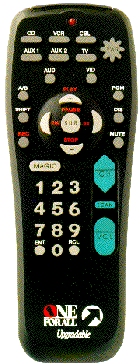
If so, this is a very old remote, one that was created way before UEI started using the JP1 platform.
A user by the name of "ziggr" created a web page that gave some information about how you could use the 3-hole connector, but it was all before any of us got involved with UEI remotes, so we've never gone back and re-visited the work that was done.
I do, however, have archives of both ziggr's web site and John Wasser's web site as he also wrote some stuff up about these old remotes.
Here are the URLs:
http://www.hifi-remote.com/ziggr/
http://www.hifi-remote.com/wasser/
But to answer your main question, no you can't program it using JP1.
Posted: Mon Mar 12, 2007 9:15 am
by ttl_pakg
Yes that is the exact same picture of the remote I have. I will check out the links provided and thank you for your time and the response. Was hoping it would have been possible to use on one device only which I picked up remote codes for in the index at remote central. Have an NEC XM29 PLUS monitor with no remote control unit. Was reading up on pronto-edit and ccf files and such. I'm a pure newbie at this but sounds fun to learn. Just need a JP1 compatible remote I suppose.
Posted: Mon Mar 12, 2007 10:31 am
by The Robman
If you do get a JP1 remote, there is an upgrade file for the NEC XM2950 available:
https://www.hifi-remote.com/forums/dload ... le_id=4205
Have you tried TV/030 in your URC-4050 remote with your NEC monitor? The three volume buttons should work and if the remote supports advanced codes, you could program the rest of the buttons using them.
183 volume up
187 volume down
055 mute
169 power on
167 power off
171 degauss
164 rgb 2
168 screen position right
166 screen position left
170 screen position up
037 screen position down
041 width out
039 width in
043 height out
036 height in
040 scan select
038 normal size
042 user size
104 video 1
102 video 2
235 rgb 1
125 sharpness up for Video
129 sharpness down for Video
127 bright up for RGB/Video
131 bright down for RGB/Video
124 contrast up for RGB/Video
128 contrast down for RGB/Video
126 color up for Video
130 color down for Video
253 tint up for Video
001 tint down for Video
255 normal color
003 user color
252 pin cushion out
000 pin cushion in
Posted: Mon Mar 12, 2007 11:36 am
by ttl_pakg
Woo-Hoo ,thank you. Tried tv code 030 and volume control worked. Went looking and yes my remote supports advanced code entry. Found info on advanced entry on this link in table of contents step 14. Just substitute magic button instead of setup button which is listed in text.
http://www.hifi-remote.com/manuals/ofa- ... 0#keymove2
Only tried a few function codes so far but it works. Gonna print off a copy of the list you supplied for safe keeping. Will start programming the rest here in a bit. Once again thank you so much.

Posted: Mon Mar 12, 2007 1:19 pm
by ttl_pakg
Working great now. Once I picked the layout and keys that were important to me. One last question? Does this mean this remote can work other devices using advanced key entry? Or only devices that have a base code that has at least one function working? Such as 030 with working volume for the NEC monitor.
Was looking in the forum and noticed a JP1 file for the ILO DVDRHD04 player.
https://www.hifi-remote.com/forums/dload ... le_id=1291
Will probably find myself a JP1 remote to play with cause it sounds fun. But just curious if direct code entry would also work for the ILO and my 4050. Either way its just nice to get some use from the RCU-4050. It was collecting dust and the monitor was all I really cared about. Worked out great.
Many thanks to the RobMan. And all here.

Posted: Mon Mar 12, 2007 2:21 pm
by kupakai
ttl_pakg wrote:Does this mean this remote can work other devices using advanced key entry? Or only devices that have a base code that has at least one function working? Such as 030 with working volume for the NEC monitor.
Was looking in the forum and noticed a JP1 file for the ILO DVDRHD04 player.
https://www.hifi-remote.com/forums/dload ... le_id=1291
It can work as long as you get the correct protocol. For example, according to that upgrade file, Ilo DVD uses JVC protocol with device number 239. According to
this Excel chart, DVD/0558 or DVD/0623 should be the same protocol. Try using that code to see if the remote has that one built in. Since the remote does not have a "DVD" device key, it might be on the "AUX" keys, if at all. Even if the remote accepts that device code, the keys will not be mapped the same way as the Ilo upgrade file. For example, ENTER key might get you MENU on the player. Once you get the correct protocol for the device, you should be able to use that upgrade file to look up each of the command number (the EFC) and program them to the correct keys on the remote as you did previously. These should be the list of advanced codes from that upgrade file:
073 0
060 1
161 2
165 3
171 4
196 5
203 6
069 7
218 8
198 9
164 mute
202 channel up
243 channel down
199 power
074 menu
115 program/guide
160 display/info
070 up arrow
113 down arrow
157 left arrow
040 right arrow
033 Tools
109 enter
177 Navigate
010 play
223 pause
036 rewind
045 fast fwd
111 stop
048 record
134 f.fwd/next track
112 f.rew/prev track
244 Target
197 On Screen Menu
133 Source
Posted: Mon Mar 12, 2007 3:14 pm
by ttl_pakg
Doesn't seem to have the right protocol. Didn't work under VCR key or AUX ,but hey it was fun trying. Feel almost like I learned something. Remote is probably just too old. Unless a code for an older VCR or CD player had the right protocol then its probably a no-go.
Thanks for trying to help.
Also what "if any" remote from Wal-Mart would be JP1 compatible? Something possibly to control 4 items. Nothing fancy.
Don't care much for our local radio-shack store. Plus they keep very little in stock. Radio shack isn't what it used to be. Can remember once upon a time radio shack actually sold electronic components. Now most of the employees don't even know what a resistor is. LOL...

Posted: Mon Mar 12, 2007 3:42 pm
by cywelchjr
Actually, unless your Walmart is different than the ones in my area they don't seem to carry any JP1 remotes anymore.
If your in the area of any Fry's stores, they do carry some of the JP1 units, of which my personal favorite is the 8910/9910. You could also order one from Rob, which I would recommend before trying elsewhere. I do notice that Fry's seems to be aware of JP1 as they actually mention in the description for at least one of the All for One remotes they carry that it's JP1 compatible.
Posted: Mon Mar 12, 2007 4:11 pm
by The Robman
ttl_pakg wrote:Also what "if any" remote from Wal-Mart would be JP1 compatible? Something possibly to control 4 items. Nothing fancy.
WM used to carry the URC-8810, but these days they don't have any JP1 remotes. Fortunately, I still have JP1 remotes for sale.
Posted: Mon Mar 12, 2007 5:04 pm
by ttl_pakg
Thanks for all the help from everyone. Gonna do a little more reading and learning. Then take the plunge and join in on the fun.
8)