Philips DSX-5500C Satellite Receivers - unit codes?
Posted: Tue Dec 02, 2003 9:38 am
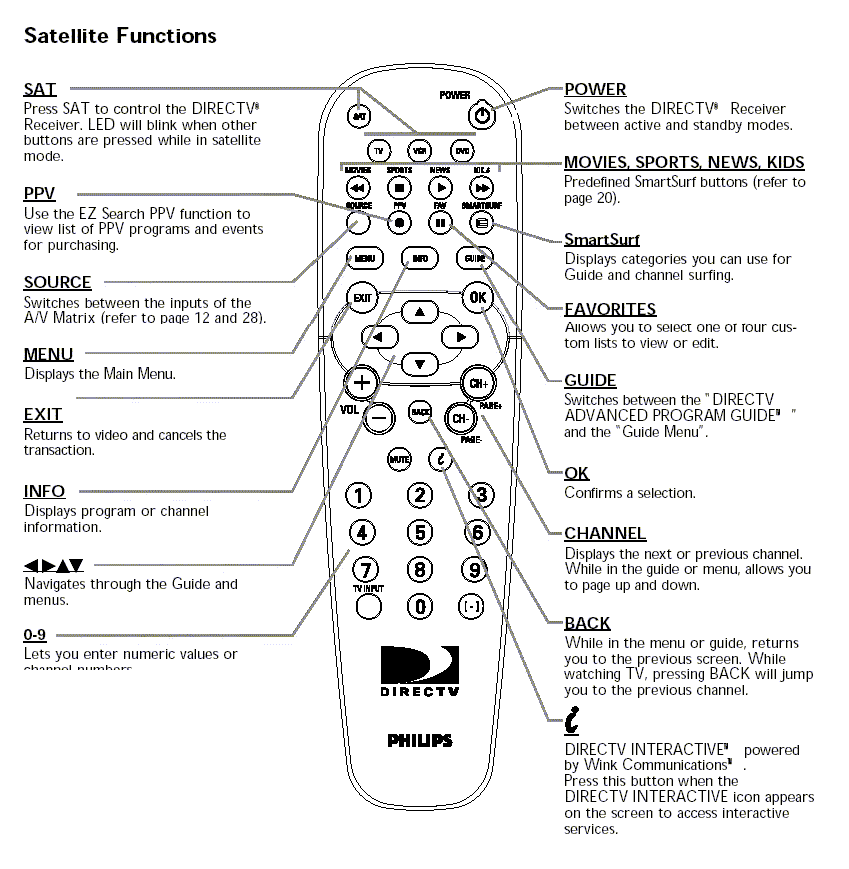
I'm trying to help someone who has two identical Philips DSX-5500C Satellite Receivers in the same location which need to be controlled indenpendtly, however the remotes supplied by DirecTV are not responding to the programming methods outlined for making then unit specific.
So I'm looking for someone with similar satellite boxes that has the ability to determine what the signals look like when the remote is set to a different unit code. Can anyone help?
Here's the method used to re-program the Philips remotes (taken from the user manual for the sat boxes):
Preferences: Remote Control ID
If you purchase two DSX 5500 or DSX 5540 receivers and use them in close proximity to each other, control them independently by assigning a separate ID number to each remote.
To change the ID number of the remote control:
1. Press MENU.
2. Press DOWN ARROW to select “Preferences” and press OK.
3. Press DOWN ARROW to select “Remote Control ID” and press OK.
4. The only option available is the alternate ID. Select and press OK.
5. Press and hold down the SAT and MUTE buttons on the remote till the SAT light stays on.
6. To set the ID number to 1, enter '111' or to set the ID number to 0, enter '000'. The SAT button will blink twice to confirm the entry.
7. Point the remote at the receiver and press OK to complete the process.
Note: It is important at the end of the procedure to point the remote at the corresponding DirecTV receiver and press OK. Otherwise the remote control will change its ID but the receiver will not and communication will be lost between the two.
Click here to see the philips.com page on this device and download the user manual.
So I'm looking for someone with similar satellite boxes that has the ability to determine what the signals look like when the remote is set to a different unit code. Can anyone help?
Here's the method used to re-program the Philips remotes (taken from the user manual for the sat boxes):
Preferences: Remote Control ID
If you purchase two DSX 5500 or DSX 5540 receivers and use them in close proximity to each other, control them independently by assigning a separate ID number to each remote.
To change the ID number of the remote control:
1. Press MENU.
2. Press DOWN ARROW to select “Preferences” and press OK.
3. Press DOWN ARROW to select “Remote Control ID” and press OK.
4. The only option available is the alternate ID. Select and press OK.
5. Press and hold down the SAT and MUTE buttons on the remote till the SAT light stays on.
6. To set the ID number to 1, enter '111' or to set the ID number to 0, enter '000'. The SAT button will blink twice to confirm the entry.
7. Point the remote at the receiver and press OK to complete the process.
Note: It is important at the end of the procedure to point the remote at the corresponding DirecTV receiver and press OK. Otherwise the remote control will change its ID but the receiver will not and communication will be lost between the two.
Click here to see the philips.com page on this device and download the user manual.