Choosing my first JP1 remote
Moderator: Moderators
Initial thoughts are:
-This remote is really nice to use!
-Buttons really nice to press, remote very comfortable in hand and weighted well
So I've used the simpleset instructions to set it up with my TV and the device code to setup my sky box on the PVR button.
Is now the time I plug it in and download these using JP1?
Or should I learn all my amp buttons to the remote before I get going with JP1?
-This remote is really nice to use!
-Buttons really nice to press, remote very comfortable in hand and weighted well
So I've used the simpleset instructions to set it up with my TV and the device code to setup my sky box on the PVR button.
Is now the time I plug it in and download these using JP1?
Or should I learn all my amp buttons to the remote before I get going with JP1?
-
The Robman
- Site Owner
- Posts: 21970
- Joined: Fri Aug 01, 2003 9:37 am
- Location: Chicago, IL
- Contact:
Plug it in and use JP1 to download what you have done so far, and save it.
Then start learning the buttons from your amp. Due to the limitations of the learning memory, it might require a couple of passes to get all the buttons. Plus, sometimes it's just a good idea to take a couple of passes at it. Here's how I would do it: for the first pass, learn all the buttons with obvious matches on the 6440. Then, on the second pass, learn all the goofy buttons that don't have an obvious match, and use whatever scheme works for you where you will remember what you programmed where. Or, if you don't think you will remember, plan it out in advance. Maybe create a spreadsheet with the amp button names in one column and the 6440 buttons in the next column.
After each pass, download the remote's memory using RMIR and save the file. Then, zip the files together and post them here for us to look at. Use the File Section link at the top of the page and put the file in the Diagnosis Area, then post a link to it here.
Then start learning the buttons from your amp. Due to the limitations of the learning memory, it might require a couple of passes to get all the buttons. Plus, sometimes it's just a good idea to take a couple of passes at it. Here's how I would do it: for the first pass, learn all the buttons with obvious matches on the 6440. Then, on the second pass, learn all the goofy buttons that don't have an obvious match, and use whatever scheme works for you where you will remember what you programmed where. Or, if you don't think you will remember, plan it out in advance. Maybe create a spreadsheet with the amp button names in one column and the 6440 buttons in the next column.
After each pass, download the remote's memory using RMIR and save the file. Then, zip the files together and post them here for us to look at. Use the File Section link at the top of the page and put the file in the Diagnosis Area, then post a link to it here.
Rob
www.hifi-remote.com
Please don't PM me with remote questions, post them in the forums so all the experts can help!
www.hifi-remote.com
Please don't PM me with remote questions, post them in the forums so all the experts can help!
I'm glad that you went for the white one and like it. Personally, I think it is nicer than the black US one which I have for development purposes but don't use "for real".JezW wrote:Just opened it. It's actually pretty smart in white
I'm also glad you made the comments about its nice feel and weight balance. I think that too. Its shape is comfortable in the hand, and all in all I think it the nicest UEI remote I have come across.
Graham
"Devices on this remote that are set up up with simpleset.com all have a corresponding device upgrade. This enables one to see the functions of the device and to customise them as desired. Devices set up through the remote itself or with RMIR do not initally have such an upgrade. If you have loaded a .bin file rather than a .rmir file, you may create any missing upgrades by pressing the "Create missing upgrades" button. If this button is present but disabled (grayed out), it means that there are no missing upgrades."
I pressed the "Create missing upgrades button" but not sure if it did anything?
I pressed the "Create missing upgrades button" but not sure if it did anything?
So I started writing some questions...then I started trying to program...and more questions just kept coming up so I added them to this post. Sorry!
1. It seems that macros are mostly global? It doesn't matter if you are in the TV device or PVR device, if you have assigned a macro to a key, it will perform those key presses. But this doesn't apply in activities? (I think this might be what I didn't understand earlier)
Therefore if I apply a macro to the button 1, this button is now not usable as a number 1 in any device mode?
2. Following on from question 1, which buttons do most people use for macros? Shifted buttons?
3. How do I create a macro on a button whilst the control is in an activity?
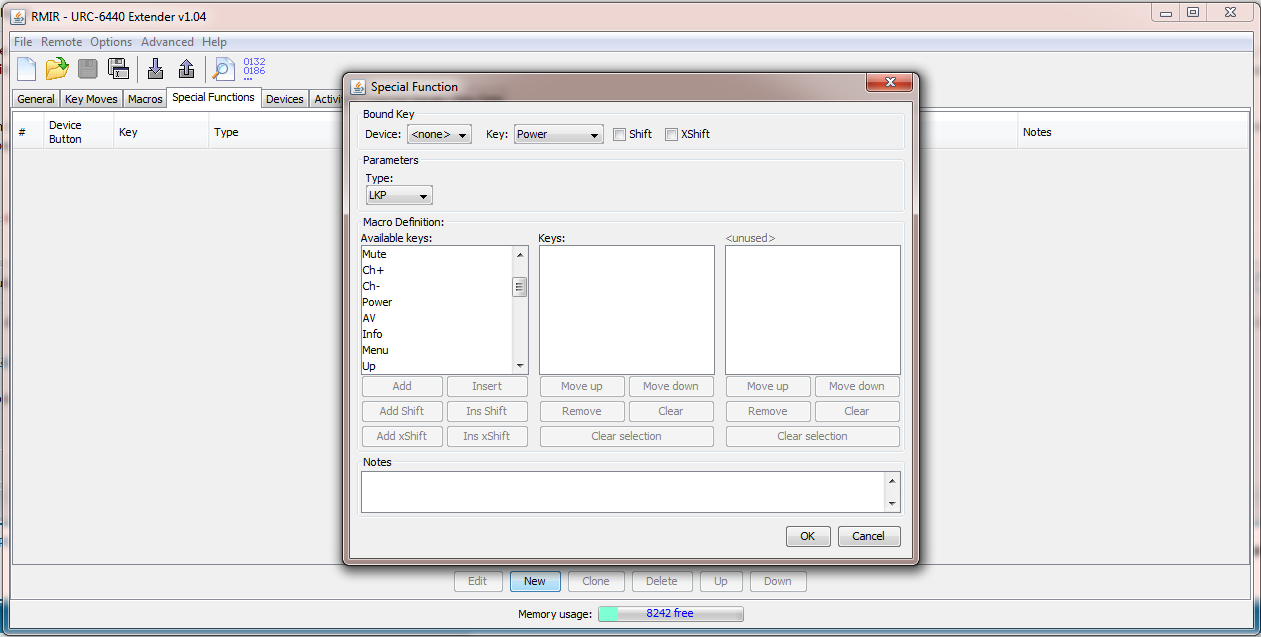
4. The macro manu in RMIR has a tick box for "shift" next to the bound key. I thought this would only be available with the extender?
5. How do I create a macros which involve several devices? The available keys in the macro list are not associated with a particular device.
6. How do I create a macro to go to a specific HDMI input, eg.HDMI3? (requires state tracking?). This is being used on the TV device, so will it be necessary to press the TV button before pressing the button this macro is assigned to?
7. What are the ticked boxes under the activities tab?
8. Will a Flirc dongle be best for sending PC commands? (as opposed to a different infra-red dongle)
9. Special functions are only functions/macros that occur when you are using a particular device? I see that you can select Device=TV and then Key=WatchMovie...so this lets you assign a macro to the WatchMovie button? You can also select Key=PVR, when would this be used? It seems it would get rid of the PVR device and replace the physical button with one function (if pressed after pressing TV?)?
....and now I've installed the extender...
Rob, you were right...definitely should've walked before I tried to run lol
Going to bed very confused
Goodnight and thank you for all your help everyone.
1. It seems that macros are mostly global? It doesn't matter if you are in the TV device or PVR device, if you have assigned a macro to a key, it will perform those key presses. But this doesn't apply in activities? (I think this might be what I didn't understand earlier)
Therefore if I apply a macro to the button 1, this button is now not usable as a number 1 in any device mode?
2. Following on from question 1, which buttons do most people use for macros? Shifted buttons?
3. How do I create a macro on a button whilst the control is in an activity?
4. The macro manu in RMIR has a tick box for "shift" next to the bound key. I thought this would only be available with the extender?
5. How do I create a macros which involve several devices? The available keys in the macro list are not associated with a particular device.
6. How do I create a macro to go to a specific HDMI input, eg.HDMI3? (requires state tracking?). This is being used on the TV device, so will it be necessary to press the TV button before pressing the button this macro is assigned to?
7. What are the ticked boxes under the activities tab?
8. Will a Flirc dongle be best for sending PC commands? (as opposed to a different infra-red dongle)
9. Special functions are only functions/macros that occur when you are using a particular device? I see that you can select Device=TV and then Key=WatchMovie...so this lets you assign a macro to the WatchMovie button? You can also select Key=PVR, when would this be used? It seems it would get rid of the PVR device and replace the physical button with one function (if pressed after pressing TV?)?
....and now I've installed the extender...
Rob, you were right...definitely should've walked before I tried to run lol
Going to bed very confused
Goodnight and thank you for all your help everyone.
Expert answers will be interesting to me too but meanwhile here goes:
1. It seems that macros are mostly global? It doesn't matter if you are in the TV device or PVR device, if you have assigned a macro to a key, it will perform those key presses.
- RMIR's tab 'macro' lets you set up the global macros
- and the tab 'special functions' lets you set up Device Specific Macros, 'DSM's
1.a. But this doesn't apply in activities? (I think this might be what I didn't understand earlier)
- right, but this restriction has been removed in the extender
- one method of switching between macro functions and normally assigned functions of a device is to set all the button groups in an activity to the same device (except perhaps the volume controls and see the Volume PunchThroughs in the general tab), and to use the relevant combi/activity and device buttons as the switches
1.b. Therefore if I apply a macro to the button 1, this button is now not usable as a number 1 in any device mode?
- right, unless you use a DSM, which would only work in the chosen device mode, or unless you put a keymove (which takes precedence) on the same button
- it would be worthwhile to review the the order of precedence, which is in the extender manual
2. Following on from question 1, which buttons do most people use for macros? Shifted buttons?
- without the extender there is no shift button, but the shifted buttons can still carry functions to which macros can refer.
- with the extender the choice might be to put the most used function/macro on the un-shifted button
3. How do I create a macro on a button whilst the control is in an activity?
- good question...I can't remember but you could try having a keymove there which refers to a macro, although I doubt if that would work either
4. The macro manu in RMIR has a tick box for "shift" next to the bound key. I thought this would only be available with the extender?
- a macro on a shifted button can be accessed with a keymove (without the extender, macros can't be nested)
5. How do I create a macros which involve several devices? The available keys in the macro list are not associated with a particular device.
- in 9. you asked: "You can also select Key=PVR, when would this be used?", and this is where 'Key=PVR' comes in, i.e. to set/change the device which applies to the functions which follow in a macro
6. How do I create a macro to go to a specific HDMI input, eg.HDMI3? (requires state tracking?). This is being used on the TV device, so will it be necessary to press the TV button before pressing the button this macro is assigned to?
- a macro may not be needed because 'discrete' functions are usually available for changing inputs, and could be keymoved from another device, but if not then a macro might be needed to negotiate the input menu/s, and see 5. for the second part (to change device in a macro)
7. What are the ticked boxes under the activities tab?
- I think they determine whether pressing that combi-button issues a power command for the devices which have boxes ticked
(also provided that those devices feature under the 'device' heading of the button group assignments)
8. Will a Flirc dongle be best for sending PC commands? (as opposed to a different infra-red dongle)
- I think so because I believe flirc can learn to respond to most IR signals, so you would not necessarily need a unique upgrade just to control the pc
9. Special functions are only functions/macros that occur when you are using a particular device?
- yes, and while DSMs are the only ones on offer but with the extender other special functions are available: Pause, LKP, DKP, ToadTog, Multiplex
- it is also remarkable that the extender can render a DSM global, by selecting 'none' in the the special functions device box
9.a. I see that you can select Device=TV and then Key=WatchMovie...so this lets you assign a macro to the WatchMovie button?
- yes
- perhaps not in the case of a macro on a combi-button, but it might be necessary to add the device key (such as DVD) to the end of a macro which has selected a TV input (from the DVD)
9.b. You can also select Key=PVR, when would this be used? It seems it would get rid of the PVR device and replace the physical button with one function (if pressed after pressing TV?)?
- using the key PVR is equivalent to pressing that device button, and see 5. for the first part. If still needed, could you rephrase the second part please?
1. It seems that macros are mostly global? It doesn't matter if you are in the TV device or PVR device, if you have assigned a macro to a key, it will perform those key presses.
- RMIR's tab 'macro' lets you set up the global macros
- and the tab 'special functions' lets you set up Device Specific Macros, 'DSM's
1.a. But this doesn't apply in activities? (I think this might be what I didn't understand earlier)
- right, but this restriction has been removed in the extender
- one method of switching between macro functions and normally assigned functions of a device is to set all the button groups in an activity to the same device (except perhaps the volume controls and see the Volume PunchThroughs in the general tab), and to use the relevant combi/activity and device buttons as the switches
1.b. Therefore if I apply a macro to the button 1, this button is now not usable as a number 1 in any device mode?
- right, unless you use a DSM, which would only work in the chosen device mode, or unless you put a keymove (which takes precedence) on the same button
- it would be worthwhile to review the the order of precedence, which is in the extender manual
2. Following on from question 1, which buttons do most people use for macros? Shifted buttons?
- without the extender there is no shift button, but the shifted buttons can still carry functions to which macros can refer.
- with the extender the choice might be to put the most used function/macro on the un-shifted button
3. How do I create a macro on a button whilst the control is in an activity?
- good question...I can't remember but you could try having a keymove there which refers to a macro, although I doubt if that would work either
4. The macro manu in RMIR has a tick box for "shift" next to the bound key. I thought this would only be available with the extender?
- a macro on a shifted button can be accessed with a keymove (without the extender, macros can't be nested)
5. How do I create a macros which involve several devices? The available keys in the macro list are not associated with a particular device.
- in 9. you asked: "You can also select Key=PVR, when would this be used?", and this is where 'Key=PVR' comes in, i.e. to set/change the device which applies to the functions which follow in a macro
6. How do I create a macro to go to a specific HDMI input, eg.HDMI3? (requires state tracking?). This is being used on the TV device, so will it be necessary to press the TV button before pressing the button this macro is assigned to?
- a macro may not be needed because 'discrete' functions are usually available for changing inputs, and could be keymoved from another device, but if not then a macro might be needed to negotiate the input menu/s, and see 5. for the second part (to change device in a macro)
7. What are the ticked boxes under the activities tab?
- I think they determine whether pressing that combi-button issues a power command for the devices which have boxes ticked
(also provided that those devices feature under the 'device' heading of the button group assignments)
8. Will a Flirc dongle be best for sending PC commands? (as opposed to a different infra-red dongle)
- I think so because I believe flirc can learn to respond to most IR signals, so you would not necessarily need a unique upgrade just to control the pc
9. Special functions are only functions/macros that occur when you are using a particular device?
- yes, and while DSMs are the only ones on offer but with the extender other special functions are available: Pause, LKP, DKP, ToadTog, Multiplex
- it is also remarkable that the extender can render a DSM global, by selecting 'none' in the the special functions device box
9.a. I see that you can select Device=TV and then Key=WatchMovie...so this lets you assign a macro to the WatchMovie button?
- yes
- perhaps not in the case of a macro on a combi-button, but it might be necessary to add the device key (such as DVD) to the end of a macro which has selected a TV input (from the DVD)
9.b. You can also select Key=PVR, when would this be used? It seems it would get rid of the PVR device and replace the physical button with one function (if pressed after pressing TV?)?
- using the key PVR is equivalent to pressing that device button, and see 5. for the first part. If still needed, could you rephrase the second part please?
A few quick answers before I go out for the day.
I think some your questions would answer themselves if you think of a macro as a series of button presses. You send signals to more than one device by pressing a device key, then the key for the signal to that device, then a different device key followed by a key to signal that new device. Same happens when you include this key sequence in a macro.
Look at the Devices tab in RMIR. If it worked, you should now have an entry there, i.e. a device upgrade, for every setup code used in the Device Buttons listing on the General tab. The advantage is that you can now edit these devices to add or change functions or button assignments.I pressed the "Create missing upgrades button" but not sure if it did anything?
You can't be in a device mode and a combo mode at the same time. Pressing WatchMovie (or including it in a macro) overrides a preceding press (or key in a macro listing) of TV. But you CAN put a macro on the WatchMovie button. Make sure, however, that you read section 4.5 of the extender manual before doing so - and section 4.6 about those tick boxes of your question 7.I see that you can select Device=TV and then Key=WatchMovie...so this lets you assign a macro to the WatchMovie button?
I think some your questions would answer themselves if you think of a macro as a series of button presses. You send signals to more than one device by pressing a device key, then the key for the signal to that device, then a different device key followed by a key to signal that new device. Same happens when you include this key sequence in a macro.
I don't understand the question. You create a macro (not device specific) or a DSM (device-specific macro), then when you use that key (for macro) or that device and key (DSM) in an activity, it will send the macro. There is no such thing as an activity-specific macro, if that is what you are asking, as an activity just assigns button groups to particular devices.How do I create a macro on a button whilst the control is in an activity?
Graham