Page 11 of 11
Posted: Thu Dec 03, 2015 5:56 pm
by JezW
It also works for the power button

Is it possible to rename the phantom buttons? My macros are getting a bit confusing.
Posted: Fri Dec 04, 2015 1:53 am
by tranx
https://www.hifi-remote.com/forums/viewtopic.php?t=16570
ToadTogs......whoaa

(as well as how to re-name the phantoms)
Posted: Fri Dec 04, 2015 6:35 am
by JezW
Hahaha...I know!
This remote and extender are brilliant

Posted: Fri Dec 04, 2015 12:12 pm
by mdavej
Time to add some pause steps.
I also like to put my input commands at the beginning AND at the end of my macros. That way, if a device is already on, inputs switch right away. If it's just turning on and needs more time, the input commands at the end (after my pauses) cover it.
If you're ever in the market for a new amp, Denon is very remote friendly. Its discrete input commands also act as discrete on. So my macros are very simple and bullet proof.
Posted: Fri Dec 04, 2015 12:27 pm
by JezW
Oops, I meant to put this in the ToadTog thread

A pause is an option, but my amp takes a few seconds to turn on so it might be a long pause!
I've tried the input commands at the end but it's still too quick for my TV if it was off. But my macros are longer now so I'll give it a go. Good idea having the input change at the start as well, thanks.
I'll remember about Denon but I love my amp

Posted: Fri Dec 04, 2015 12:34 pm
by mdavej
Years ago I had to string together about 20 seconds worth of pauses for one system. Luckily, that was an RF system, so I didn't have to point the remote all that time.
Unfortunately, pauses are the only solution within a macro. Just do some tests so you use the minimum required time. It may start responding sooner than you realize.
Posted: Fri Dec 04, 2015 12:37 pm
by JezW
Still way too fast for my TV to change input if it was off!
I tried with a 2.5 second pause as well and that's still not long enough so I'll just press the button again if the TV was off and on the wrong input.
Posted: Fri Dec 04, 2015 12:45 pm
by JezW
Sorry, missed your last post. You've evolved from an RF system to an IR one? lol
Amp works with a 2.7 second pause so not terrible. First world problems eh
Posted: Fri Dec 04, 2015 12:48 pm
by JezW
Just realised, I've got my amp turning on near the end of the macro. I can probably shave another second off by putting it at the start
Posted: Fri Dec 04, 2015 2:13 pm
by mdavej
JezW wrote:Sorry, missed your last post. You've evolved from an RF system to an IR one? lol
No, still RF. Nevo C3 is RF. Base has 6 blasters on 3m leads. Not a bad system. I use the IR C2's elsewhere.
But you're on the right track with your macros. Turn on the slowest device first, do other stuff, throw in some pauses as required, then come back.
Posted: Fri Dec 04, 2015 2:56 pm
by JezW
Oh very nice. I was thinking about RF but currently all my devices are in view, except my amp but that has an infra red extender which works well.
I got the pause down from 2.7s to 0.8 seconds by re-arranging the macro
Posted: Fri Dec 04, 2015 6:46 pm
by JezW
One last issue and my remote is finished (for now!)
I've set up a global "All off" LKP on the power button, shown below
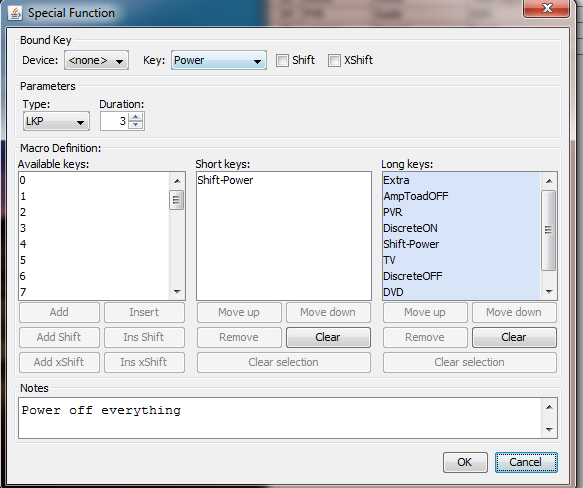
I've tested it on the 0 button for every device and in both the WatchTV and WatchMovie activity and it works globally.
However, when I put the macro on the power button it only seems to work when I'm in the TV, PVR or DVD device.
In the Extra device, WatchTV and WatchMovie activities it doesn't work.
In the Extra device, it just sends the power command to my amplifier.
In WatchTV and WatchMovie, the LKP does nothing.
I don't know what's different about the power button to the 0 button, which works fine for this macro. The only thing I can think of is that I have setup a ToadTog for the power button within the Extra device. Is that affecting it?
Posted: Sat Dec 05, 2015 5:19 am
by tranx
I will have a go, so yes. The manual says:
"Note that in long-press action it is the underlying function assigned to the Power button that is sent,...' (perhaps in EXTRA, that is done by the ToadTog, the LKP macro having precedence and being ignored) '... even if a macro is assigned to that button.' (as in LKPress for WatchTV and WatchMovie, where the LKP macro is being ignored)
'For a short press the button acts as normally, so the macro would be sent if one is assigned." (as in SKPress for WatchTV and WatchMovie)
Posted: Sat Dec 05, 2015 6:21 am
by mathdon
Section 4.6 of the extender manual begins:
The Power button has a dual function when the remote is in a combo mode. If it is pressed for less than 0.25 seconds then it acts as the Power button of the device assigned by its button group (group 5) for the activity concerned. If held for longer than 0.25 seconds then it sends the Power signal in turn for each device that is assigned to a button group in that combo mode.
This is why your LKP doesn't work on the Power button in the combo modes. If you hold it for the length of time needed for the long press of the LKP, it will be longer than 0.25 seconds, so behaves as in the final sentence of this quote.
Section 10.1 of the manual says:
This is part of a more general priority ordering of DSM, then key move, then learned signal and finally traditional macro
This priority applies to ANY Special Function, not only to macros, so a device-specific Special Function (your ToadTog on Power for the Extra device) takes priority over the non-specific Special Function that is your LKP on the Power button.
So the behaviour you have found is what is supposed to happen. You may have to content yourself with putting the LKP on some other button.
Posted: Sat Dec 05, 2015 7:51 pm
by JezW
Thanks, that all makes sense. Sorry that you have to keep quoting the manual to me.
In case you ever plan on updating the extender, I hope you don't mind a suggestion - Maybe the user could be given the ability to disable the current use of the power button in combo mode. With people using discrete codes and ToadTog, power toggles might be used less frequently.
Thanks again for a great extender, the remote is brilliant now