Page 2 of 2
Posted: Tue Sep 12, 2006 6:39 am
by The Robman
vr-hunter wrote:Just for everyone to know: The builtin codes (TV 0565 on my URC-5550) DO work very well ...
That's the sort of info we could have used right from the start.
For John, TV/0565 uses the $00EB protocol with fixed data "01 40 80 00". If I get a chance, I will put together a KM file for it later which was can try comparing to the CCF file.
Posted: Tue Sep 12, 2006 6:42 am
by Capn Trips
As I wrote a couple of days ago:
Capn Trips wrote: If you go to the Code Search Forum and look at the number 1 Code Search FAQ (linked in my sig below) you would be prompted to provide a bunch more info than you have.
It is never too late to provide all of the information requested in that template.

Here's what I can figure out:
- 1.Device: Bang & olufsen Beovision 6000
2.Type of device: TV (I think)
3.Year: ???
4. JP1 Remote model: URC 5550
5. JP1 user? Yes
6. Still have original remote? ???
7. Checked the file section? Yes?
Answering "Yes" implies that you checked the file section and didn't find any files for your device (or similar models of the same brand). If you DID find an upgrade, please provide a link to the file, even if the upgrade doesn't work, just so we can rule it out. If there are upgrade files available for your brand, even if the model numbers are different, please try them and specify whether they worked or not in your post.
8. Checked the Pronto file section (at R/C)? Yes (link to file(s))
Answering "Yes" implies that you checked the file section and didn't find any files for your device (or similar models of the same brand). If you DID find a CCF file, please provide a link to the file, even if the upgrade doesn't work, just so we can rule it out.
9. Partially working setup code? TV/0565
If you have found a setup code that controls some functions, even if it's only one or two butons, PLEASE STATE what the setup code is (eg, VCR/1234), and what part works or doesn't work.
10. Learning remote question? (n/a)
Posted: Tue Sep 12, 2006 7:16 am
by vr-hunter
It is never too late to provide all of the information requested in that template.
Yeah I know I should have been more precice from the beginning...

Anyway I think I provided all the
relevant information after your last "reminder". Just so you don't get the wrong picture: I do think that it is essential to provide that information an I'm sorry I didn't do so right from the beginning. I was just a little overwhelmed with all the information on this site... So here you go:
1. Bang & Olufsen Beovision MX6000
2. TV
3. approx 1996
4. URC-5550
5. Yes, proud owner of a self-soldered JP1- parallel interface connector
6. Yes, I do have the original remote, but as the URC-5550 is not a learning remote I didn't think this to matter.
7. Yes, and found nothing adequate.
8. Yes,
http://www.filearea.net/muell/beolink.ccf
9. TV/0565 - number buttons, ch up/down, vol up/down, mute, menu buttons work (some others seem to be doing something too, but I couldn't quite figure out what

) The "Device-Buttons" (i.e. v.tape etc), the "play/enter" key and maybe some others DON'T work.
10. nope. not a learning remote.
Posted: Tue Sep 12, 2006 8:17 am
by Capn Trips
Well, the TV/0565 device is " supposed" to be in my long-unused and buried-somewhere-deeply Sky remote according to the devices.xls spreadsheet, so I will try to find it, and learn the TV/0565 signals to one of my learning remotes, if only to help confirm the basic data that Rob has apparently already extracted.
Hopefully, my URC-8910 or RS 15-1994 or RS 15-2117 will be able to learn these signals.
Posted: Tue Sep 12, 2006 1:40 pm
by The Robman
Here's a KM file. I got the function names from a URC-8060 "Kameleon" remote, but I mapped the buttons as they are premapped in the URC-5550, so you can see what the buttons are supposed to do.
https://www.hifi-remote.com/forums/dload ... le_id=3570
Posted: Wed Sep 13, 2006 3:56 am
by Capn Trips
OK, vr,
Rob's upgrade SHOULD reproduce what you have when you use your installed TV/0565 setup code, so the upgrade alone ought not make a big difference to you as it stands. You still need to figure out those functions that are NOT included in the UEIC official upgrade
To fill in those functions that do NOT work, or are not included in the upgrade, you basically have two choices:
OPTION (1) Conduct a code search -
(a) look at the KM upgrade on the Code List worksheet.
(b) Sort the list by OBCs (button at the top left selects either EFC or OBC).
(c) Take unused OBCs (using some logical rationale where you see "gaps" of unassigned OBCs on the list) and add them to your function list
(d) assign these unused OBCs to buttons and create a "test" upgrade.
(e) upload this upgrade to your remote and test it to see what - if anything - these unused OBCs do.
(f) Build a more complete upgrade using the functions you discover.
One caveat - there are certain brands of TV that have secret "service" modes accesible by IR functions. In MOST cases, they start with a service menu of some sort from which you can back out before doing any damage. But there have been reported cases where one stumbles upon a code that performs a reset of the TV such that it is rendered unusable. I have not read of such a code for B&O TV's but that does not guarantee its non-existence. I have conducted code searches on a JVC and NEC TV's with no ill effects, but I just thought I'd warn you there is a small, but real risk.
OPTION (2) Send your OEM remote to someone with a JP1 learning remote who will learn the codes you need and then the OBCs can be extracted from the learns. This, of course, is more costly (postage), time-consuming, leaves you without your OEM remote for a while, is potentially uncertain, as John indicated above that a learner may have trouble with these codes, and requires more people to help. (or BUY a cheap JP1 learning remote and try to learn the codes yourself, and someone here would help decode them).
Posted: Wed Sep 13, 2006 5:34 am
by johnsfine
Any of us with two JP1 remotes could test whether a JP1 remote can do a decent job of learning these signals.
If that works, it would also tell us the correspondence between the Hex Cmd and the pattern of bursts (if Rob doesn't already know that). Then one could directly compute the hex command for any of the functions in that CCF file.
The function naming in this device is confusing me, so I have no idea whether the missing (from TV/0565) functions are in the CCF.
I'd also like to try CaptureIR with TV/0565, but I haven't had time yet.
Posted: Wed Sep 13, 2006 7:10 am
by The Robman
Capn Trips wrote:Rob's upgrade SHOULD reproduce what you have when you use your installed TV/0565 setup code, so the upgrade alone ought not make a big difference to you as it stands.
Except that that upgrade contains MORE functions than are found in the URC-5550's version of TV/0565, and the functions are possibly better named. This is because I used the URC-8060's version of the code as a starting point, then I assigned the functions to buttons to match how they are programmed in the URC-5550.
johnsfine wrote:If that works, it would also tell us the correspondence between the Hex Cmd and the pattern of bursts (if Rob doesn't already know that).
I do know how to learn from one remote to another, I just don't have the time to do so. Hopefully by providing a working KM file, anybody can do that.
Posted: Wed Sep 13, 2006 7:31 am
by johnsfine
The Robman wrote:
johnsfine wrote: the correspondence between the Hex Cmd and the pattern of bursts (if Rob doesn't already know that).
I do know how to learn from one remote to another
I meant you might already know the correspondence between Hex Cmd and burst pattern for this protocol executor.
I tried to figure it out by comparing the digits in the upgrade to the digits in the CCF. There seemed to be a simple correspondence, but that pattern didn't work for anything other than the digits.
Assuming you don't know that correspondence, I was NOT trying to ask you to do the work that I've been too busy to get to. Maybe someone else will or maybe I'll get to it.
Posted: Wed Sep 13, 2006 9:47 am
by vr-hunter
First of all: big thanks to everyone! I didn't have time to try out the upgrade yet and won't be able to do so today, but as soon as I have some time I will. I'll also try and find out those missing codes and post them here.
Cheers
Posted: Fri Sep 15, 2006 1:16 pm
by Capn Trips
OK, I've gotten around to it.
HERE is the KM upgrade I built using Rob's TV/0565 UEI code.
HERE is the IR file with that upgrade installed to a 8910.
HERE is the IR file with the same signals (or most of them) learned to a 1994.
johnsfine wrote:I wouldn't bet that you could learn these signals with a JP1 remote.
I guess they ARE learnable, John.

Have fun analysing, fellas.
Posted: Thu Sep 28, 2006 7:55 am
by The Robman
Hey VR, did you make any progress with this? If not, I may be able to get you an upgrade in a couple of weeks.
well...
Posted: Tue Oct 31, 2006 11:09 am
by vr-hunter
first of all: thanks for all the support! I didn't have time to play around with my remote the last weeks so it took me some time to check things out. The KM file works (which is great) however the operations I need are still not in it. This is probably due to the nature of the B&O Remotes. I've attached an image:
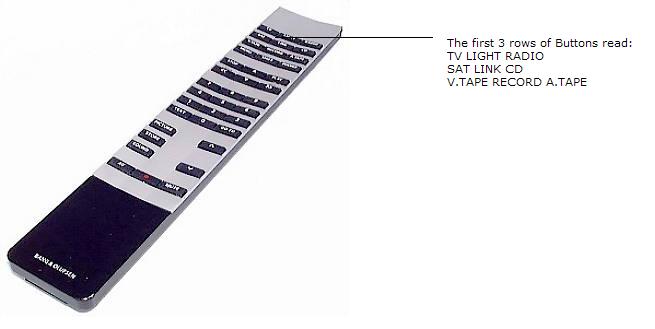
If you press one of the buttons in the first 3 rows, the remote sends a signal to that device and if necessary to another device to activate the corresponding input.
For example: To activate the AV-Input on my TV I have to press V.TAPE. That makes the TV switch to the VCR-input and *tries* to turn on a B&O VCR. (Which of course doesn't make any sense in my case because I have a PS2 hooked to the AV-input)
Consequently I am not able to turn on my TV with the KM file you provided (as I'd need a "TV" Button) nor am I able to switch to my *VCR*...
However there seem to be some signals for exactly those functions in the pronto file I postet earlier in this thread.
Posted: Tue Oct 31, 2006 8:21 pm
by The Robman
Here's an updated version of TV/0565 that may include some additional functions.
Just FYI, they have changed the executor so it uses 2 variable bytes now.
https://www.hifi-remote.com/forums/dload ... le_id=3797