JP1.3 with FTDI adapter DTR only
Posted: Wed Apr 12, 2017 6:08 am
Hello
now, some years later, my Harmony 300 is getting sick (the OK press does not work always), I found my RCA RCRP05b and wnat to use that with a Sony LCD TV (49KDL755), the VU+ Solo2 and a Bose soundbar.
So I downloaded all the tools and rdmu files to re-program the RCRP05B with the FTDI adapter I used previously. Unforntunately neither IR802/804 nor RemoteMaster were able to find the Remote
Then I tested following "Identifying JP1.2 & JP1.3 Remotes" using RealTerm. Fortunately the remote answers when I use DTR instead of RTS and so I know, it still is operating:
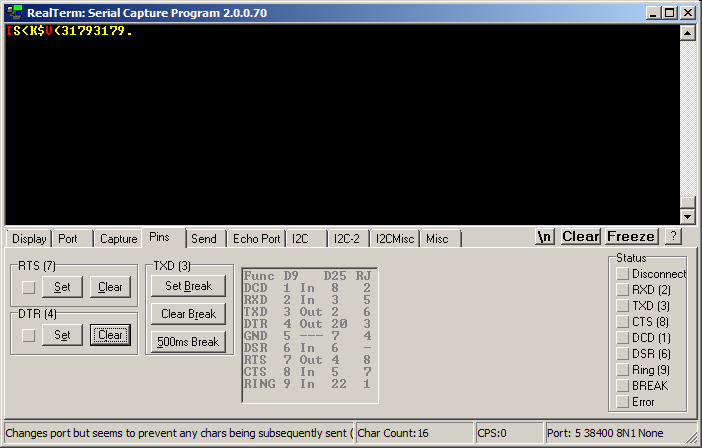
www.hjgode.de/RCRP05B/realterm.png
Now, there is something wrong with the serial remote protocol. I downloaded the RemoteMaster JAVA source, but this was not helpful except that it points to the jp12serial library. So I download the jp12serial source code and then looked at the jp13Connect function:
That does not look like the manual sequence I used with RealTerm (SetBreak, SetDTS, ResetDTS, ClrBreak). So I rewrote that function to:
Then I compiled this new jp12serial.dll for x86 and x64 and put the DLLs in the Windows-x86 and Windows-amd64 folders of the RemoteMaster installation.
I now started RMIR and voilá, Remote Master was able to find the Remote and download the data.
VS2008 source code of my modded jp12serial.dll code: www.hjgode.de/RCRP05B/jp13serial_modded ... VS2008.zip
The binaries only: www.hjgode.de/RCRP05B/JP13_modded.zip
Thanks to all for providing the source code. Otherwise I would not have been able to get this working without buying another FTDI board.
~Josef
now, some years later, my Harmony 300 is getting sick (the OK press does not work always), I found my RCA RCRP05b and wnat to use that with a Sony LCD TV (49KDL755), the VU+ Solo2 and a Bose soundbar.
So I downloaded all the tools and rdmu files to re-program the RCRP05B with the FTDI adapter I used previously. Unforntunately neither IR802/804 nor RemoteMaster were able to find the Remote
Then I tested following "Identifying JP1.2 & JP1.3 Remotes" using RealTerm. Fortunately the remote answers when I use DTR instead of RTS and so I know, it still is operating:
www.hjgode.de/RCRP05B/realterm.png

Now, there is something wrong with the serial remote protocol. I downloaded the RemoteMaster JAVA source, but this was not helpful except that it points to the jp12serial library. So I download the jp12serial source code and then looked at the jp13Connect function:
Code: Select all
int jp13Connect( void )
{
	if ( !jp12EscapeComm( SETRTS ))   // ON/+10V/0 makes IDC-5 Low
		return 0;
	if ( !jp12EscapeComm( CLRBREAK )) // OFF/-10V/1 makes IDC-4 High
		return 0;

	Sleep( 100 );
	if ( !jp12EscapeComm( CLRDTR ))   // OFF/-10V/1, discharge capacitor
		return 0;
	Sleep( 10 );                      // allow capacitor to discharge
	if ( !jp12EscapeComm( SETBREAK )) // ON/+10V/0 makes IDC-4 Low
		return 0;                       // JP1.3 remote tests for Low 56 cycles after Power On Reset
										// so need to set break ON early

	if ( !jp12EscapeComm( SETDTR ))   // ON/+10V/0, Reset pulse delay(10-20ms) from capacitor charge up
		return 0;                       // this generates the result pulse width

	Sleep( 100 );  // wait at least 50ms with IDC-4 Low for JP1.3 to go into BootLoader mode
	if ( !jp12EscapeComm( CLRBREAK )) // OFF/-10V/1 makes IDC-4 High
		return 0;

	Sleep( 10 );

	return 1;
}Code: Select all
int jp13Connect( void )
{
	//exit from serial mode if any
	if ( !jp12EscapeComm( SETDTR ))
		return 0;
	Sleep( 10 );
	if ( !jp12EscapeComm( CLRDTR ))
		return 0;
	Sleep( 10 );

	//clear all
	if ( !jp12EscapeComm( CLRDTR )) //already done
		return 0;
	if ( !jp12EscapeComm( CLRBREAK ))
		return 0;
	Sleep( 100 );
	//set to Serial Mode
	if ( !jp12EscapeComm( SETBREAK ))
		return 0;
	Sleep(10);
	if ( !jp12EscapeComm( SETDTR ))
		return 0;
	Sleep( 100 );
	if ( !jp12EscapeComm( CLRDTR ))
		return 0;
	Sleep( 100 );
	if ( !jp12EscapeComm( CLRBREAK ))
		return 0;
	Sleep( 10 );

	return 1;
}I now started RMIR and voilá, Remote Master was able to find the Remote and download the data.
VS2008 source code of my modded jp12serial.dll code: www.hjgode.de/RCRP05B/jp13serial_modded ... VS2008.zip
The binaries only: www.hjgode.de/RCRP05B/JP13_modded.zip
Thanks to all for providing the source code. Otherwise I would not have been able to get this working without buying another FTDI board.
~Josef