My amp is a Roksan Kandy K2 integrated amplifier
http://www.roksan.co.uk/kandy-k2-integr ... ifier.html
Codes seem to be non existent online. I've even spoken to Roksan and they said that a company in Taiwan supplies the remotes and communicating software for the amplifiers and they do not give the codes to Roksan.
It's one of the main reasons I'd like a JP1 remote with state tracking - I won't be able to find discrete codes for the amp.
Roksan Kandy K2 integrated amplifier
Moderator: Moderators
For your Roksan amp, after you learn the signals, we'll help you to find out which IR protocol is in use, and it will probably turn out that there are only 256 possible signals for that particular protocol. Then you can construct an upgrade for that protocol and device numbers, and try out all the possibilities.
-
The Robman
- Site Owner
- Posts: 22056
- Joined: Fri Aug 01, 2003 9:37 am
- Location: Chicago, IL
- Contact:
Regarding your amp, you will need to learn the buttons and then post the results for us, and we'll help you build an upgrade, or build one for you, so you will be set there. And just because it's a rare brand doesn't mean that there won't be discrete codes, it just means that they're not known. You can go fishing for them yourself, once we know the signal structure.
I just looked up Roksan using the Lookup Tool and found a couple of CD codes, the good news is that they both use the NEC1 protocol (device code 134.97), which is good because NEC1 is really easy to capture and re-create.
I just looked up Roksan using the Lookup Tool and found a couple of CD codes, the good news is that they both use the NEC1 protocol (device code 134.97), which is good because NEC1 is really easy to capture and re-create.
Rob
www.hifi-remote.com
Please don't PM me with remote questions, post them in the forums so all the experts can help!
www.hifi-remote.com
Please don't PM me with remote questions, post them in the forums so all the experts can help!
Can't believe it! I'm very impressed with simpleset so far.
I've got my TV and Sky box setup and copied across a couple buttons which were missing.
Then I thought I'll just have a look on simpleset's website...
Clicked "add device", "extra", "amp"
And Roksan was there!
It really hasn't added many buttons because my amp hardly needs any but it works!
The buttons which are programmed now are:
power, volume, source change and mute

Now's the time for JP1
I've got my TV and Sky box setup and copied across a couple buttons which were missing.
Then I thought I'll just have a look on simpleset's website...
Clicked "add device", "extra", "amp"
And Roksan was there!
It really hasn't added many buttons because my amp hardly needs any but it works!
The buttons which are programmed now are:
power, volume, source change and mute
Now's the time for JP1

-
The Robman
- Site Owner
- Posts: 22056
- Joined: Fri Aug 01, 2003 9:37 am
- Location: Chicago, IL
- Contact:
And don't forget that we'd like to see the upgrade for your Roksan Kandy K2 amplifier. Did you test the one that was automatically installed? If it works, go to the Devices tab and find the entry for the upgrade that was added, then double click on the first cell of the entry, that should bring up a new screen which shows the details of the upgrade. There are 3 buttons in the lower left corner, click the Save As button and save the file, then post it here in the file section, audio folder, and then post a link to it.
While you're in this new screen, click on the Functions tab and see if all the functions from your Roksan remote are included. If any are missing, make a list of them. When we look at this, what we're going to be looking for are any gaps in the OBC sequence, because those will have the best potential for being either the missing buttons or discrete codes.
While you're in this new screen, click on the Functions tab and see if all the functions from your Roksan remote are included. If any are missing, make a list of them. When we look at this, what we're going to be looking for are any gaps in the OBC sequence, because those will have the best potential for being either the missing buttons or discrete codes.
Rob
www.hifi-remote.com
Please don't PM me with remote questions, post them in the forums so all the experts can help!
www.hifi-remote.com
Please don't PM me with remote questions, post them in the forums so all the experts can help!
Here's the link to my amp file, I think I did it correctly. The one that I downloaded off the simpleset site worked fine, however the number buttons on the URC remote also change the source for some reason. But that's not an issue.
https://www.hifi-remote.com/forums/dload ... e_id=13720
https://www.hifi-remote.com/forums/dload ... e_id=13720
-
The Robman
- Site Owner
- Posts: 22056
- Joined: Fri Aug 01, 2003 9:37 am
- Location: Chicago, IL
- Contact:
Looking at the user manual it appears that the Roksan has 8 buttons, as follows:JezW wrote:Here's the link to my amp file, I think I did it correctly. The one that I downloaded off the simpleset site worked fine, however the number buttons on the URC remote also change the source for some reason. But that's not an issue.
https://www.hifi-remote.com/forums/dload ... e_id=13720
1 TAPE
2 POWER
3 MODE
4 MUTE
5 VOLUME+
6 VOLUME-
7 INPUT+
8 INPUT-
The number buttons in that upgrade are all programmed with the same 2 codes, so I assume they are INPUT+ and INPUT-. If that is correct, can you tell me whether the "0" button is INPUT+ or INPUT-.
So, it would appear that TAPE and MODE are missing, is that correct? If so, could you learn those from the Roksan remote to get the codes please.
Rob
www.hifi-remote.com
Please don't PM me with remote questions, post them in the forums so all the experts can help!
www.hifi-remote.com
Please don't PM me with remote questions, post them in the forums so all the experts can help!
Sorry about that! You're right, those two functions were missing. I did realise the first instance when I downloaded the device from simpleset.com but didn't consider learning those functions across because I never use them.The Robman wrote: So, it would appear that TAPE and MODE are missing, is that correct? If so, could you learn those from the Roksan remote to get the codes please.
The function mode essentially results in a 3/4 mute of the amp (as the manual says, decreases volume by 20db) but is not a full mute.
The tape button allows recording from the selected input to the "tape" output.
I came back last night from the pub after a few drinks and thought I would have a play, when I saw your request to upload the device. I completely forgot about learning those buttons across
Sorry about that.I've learnt them onto the 6440 now but they don't show up in the device tab on RMIR, just the learned tab. How do I copy them across to the device on RMIR so that I can save the file and upload it?
Do I go device -->double click on amp 3731-->Functions-->And manually type in the codes?
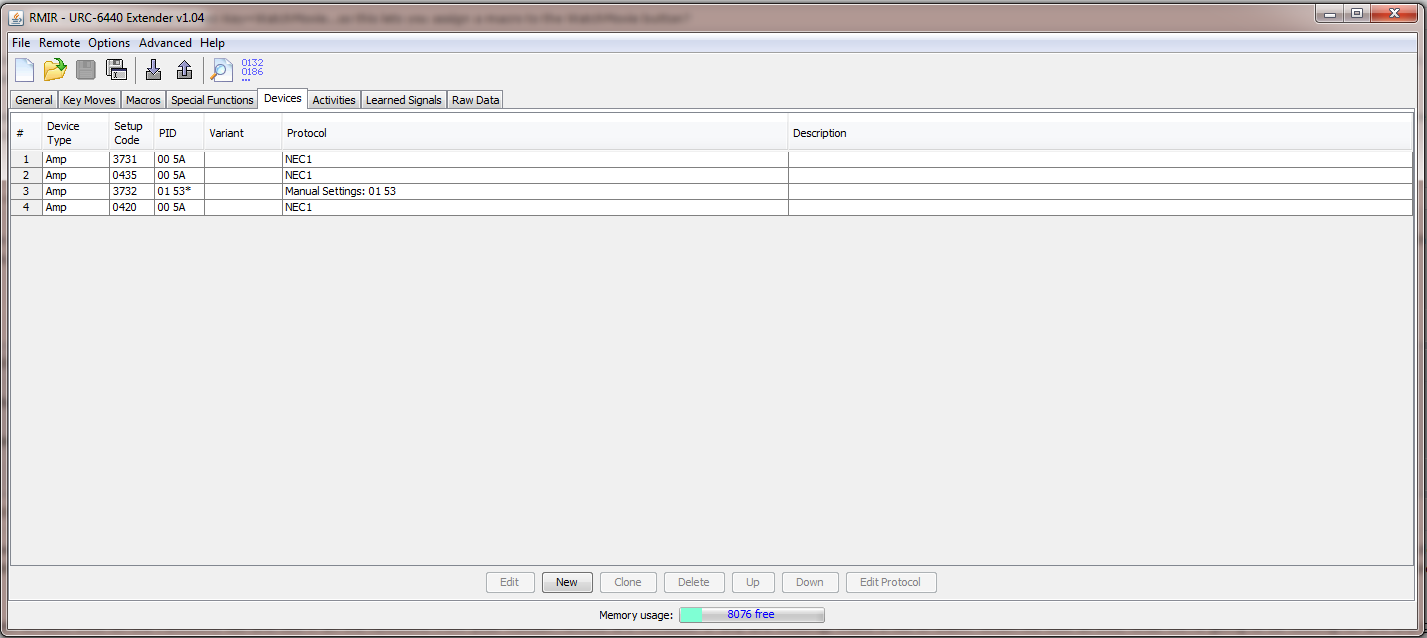
Also, in the devices tab, why does it show 4 amp devices? Are these other codes that the control downloaded from simpleset.com and would have tried until it got the correct one? (3731 I believe)
-
The Robman
- Site Owner
- Posts: 22056
- Joined: Fri Aug 01, 2003 9:37 am
- Location: Chicago, IL
- Contact:
Just FYI, as the other thread is getting very busy, I have split the discussion on the Roksan amp into this separate thread.
Rob
www.hifi-remote.com
Please don't PM me with remote questions, post them in the forums so all the experts can help!
www.hifi-remote.com
Please don't PM me with remote questions, post them in the forums so all the experts can help!
OBC's for missing keys:
Tape = 14
Mode = 7
Ch+ = 72
Ch- = 28
Why in the devices tab does the amp show up with 4 setup codes?
To install the device I had to download a settings.bin file from simpleset.com, enter the remote setup, press "Extra" (amp device), then point the control at my amp and hold down power until it turned off, and it took a few seconds. So are the three other codes ones that were unsuccessful?
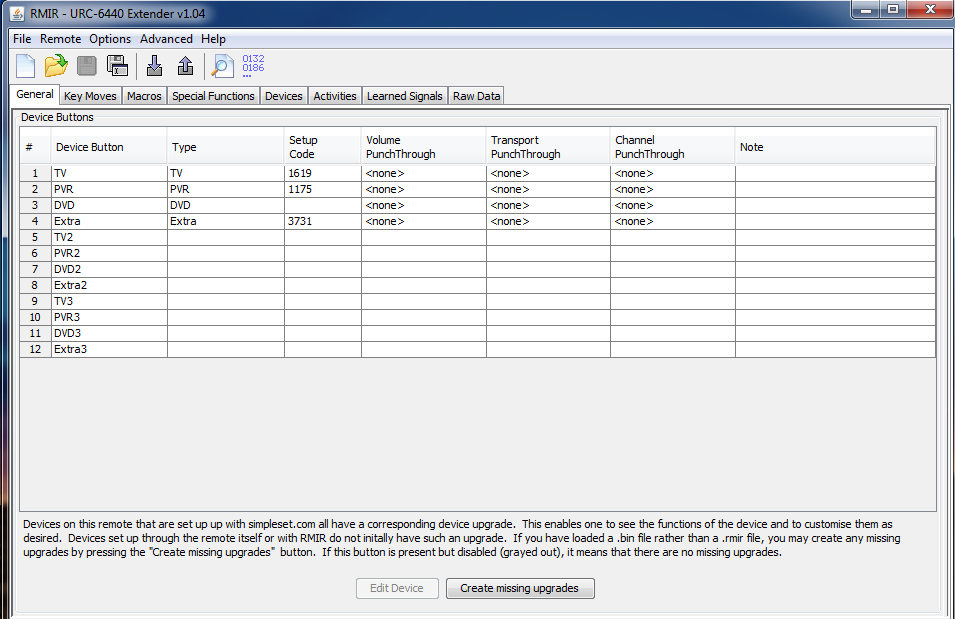
The general tab in RMIR shows 3731 as being the code which is stored, and it does work.
Tape = 14
Mode = 7
Ch+ = 72
Ch- = 28
Why in the devices tab does the amp show up with 4 setup codes?
To install the device I had to download a settings.bin file from simpleset.com, enter the remote setup, press "Extra" (amp device), then point the control at my amp and hold down power until it turned off, and it took a few seconds. So are the three other codes ones that were unsuccessful?
The general tab in RMIR shows 3731 as being the code which is stored, and it does work.
-
The Robman
- Site Owner
- Posts: 22056
- Joined: Fri Aug 01, 2003 9:37 am
- Location: Chicago, IL
- Contact:
Thanks for the OBCs, I have updated your original RM file.
As for the additional device upgrades that got added, my assumption is the same as yours, that they are other codes used by Roksan. If you load a copy of your RMIR file to the Diagnosis Area and post a link to it, I can take a look.
As for the additional device upgrades that got added, my assumption is the same as yours, that they are other codes used by Roksan. If you load a copy of your RMIR file to the Diagnosis Area and post a link to it, I can take a look.
Rob
www.hifi-remote.com
Please don't PM me with remote questions, post them in the forums so all the experts can help!
www.hifi-remote.com
Please don't PM me with remote questions, post them in the forums so all the experts can help!