Page 1 of 1
Newbie looking for Sony SLV-D950G
Posted: Tue Jun 28, 2005 5:21 am
by Ube_Astard
1. Device: D950G
2. Type of device: VCR/DVD
3. JP1 Remote model: URC7544
4. JP1 user? new
5. Still have original remote? yes
6. Checked the file section? yes
7. Checked Pronto file section (at R/C)? yes
8. Partially working setup code? yes
9. Learning remote question? no
I have bought a connector and downloaded recent RDF file. Now I want to program some of the other buttons on my 7544 from the origanal remote and am trying to get the above device codes. Hopefully I am going the right way about this if I'm not trying to run before I can walk.
I would also like code for the Mitsubishi CT-21A2STX please.
Re: Newbie looking for Sony SLV-D950G
Posted: Tue Jun 28, 2005 7:22 am
by johnsfine
Ube_Astard wrote:8. Partially working setup code? yes
I think the intent of that question is WHICH setup code did you find that partially works. If it only works a little, which functions work? If it mostly works, which functions are you looking for that it doesn't have working?
The best source for info on Sony commands is
http://www.hifi-remote.com/sony/
Once we know which setup code partially works for you, that will eliminate any guessing or research needed to know which Sony device numbers (from that site) apply to your device, and it tells us which extra commands from that site can be done as simple KeyMoves on the setup code you're using, vs. needing a different setup code or upgrade.
Posted: Tue Jun 28, 2005 3:50 pm
by Ube_Astard
Sorry, I dint really think about that question did I. Thanks for speedy reply though.
Any way, when I first got my Sony player I did a thorough code search on the 7544 but nothing worked. I contacted One for All who said the unit wasnt set up for the Sony which was on new codes so they asked me to send it off to them, and they would re-program the remote and also code it for all my devices. When it came back from them it had basic functions but wouldnt switch between DVD and VCR, nor when playing DVDs could it skip to the next or previous scenes. When I load the codes into IR it is showing the DVD as 0684. I wonder if besides finding a code that will let me do the above, if I could program the remote to use the VCR selection for the VCR, and the DVD for just the DVD instead of the DVD doing both.
Onto the Mitshubishi partially working, iR shows as 0108. As the original remote is broken, I need to code my 7544 to program and search channels.
Posted: Tue Jun 28, 2005 5:51 pm
by The Robman
I don't have any info on DVD/0684, so I would need to see your IR.exe dump in order to know what the code looks like. UEI often re-numbers their setup codes for the European market, so I suspect that there's an equivilent US code, and I also suspect that any Sony DVD/VCR combo upgrade from the file section will work.
As for the Mitsubishi CT-21A2STX, you really should have used a seperate template for this one. I assumed it was an audio receiver but after some Googling it appears that it's actually a television (is this correct?).
TV/0108 is "Mitsubishi" device code 71, which is an exact match for all but 1 of the device upgrades in the file section, so take your pick.
Posted: Tue Jun 28, 2005 5:53 pm
by whompus
You are sure it is 0684 and not 0864? What is the protocol id and fixed data for the upgrade ofa put on the remote for you?
Posted: Wed Jun 29, 2005 3:13 am
by Ube_Astard
Yes the Mitsubishi is a TV, but what do you mean I should have used a separate template?
I will check whether its 0684 and not 0864 when I get home tonight, could be my error.
Again thanks for helping.
Posted: Wed Jun 29, 2005 6:38 am
by Capn Trips
Ube_Astard wrote:... but what do you mean I should have used a separate template?
You have asked TWO Code Search questions. One is about the D950G, for which you used the template, and then an "add-on" request for the Mitsubishi CT-21A2STX for which a SECOND Code Search request would have been appropriate.
As it is now, you will have both mixed together in one thread and it will be hard to keep them separate and distinct.
Posted: Wed Jun 29, 2005 12:19 pm
by Ube_Astard
Your right, the code is 0864. I will open a new thread for my Mitsubishi if I need to, sorry. Thanks.
Posted: Wed Jun 29, 2005 12:30 pm
by johnsfine
Ube_Astard wrote: they would re-program the remote and also code it for all my devices. When it came back from them it had basic functions but wouldnt switch between DVD and VCR, nor when playing DVDs could it skip to the next or previous scenes. When I load the codes into IR it is showing the DVD as 0684.
I don't have any data on DVD/0864.
Please upload the .ir file (saved from IR.EXE after downloading from the remote) to the
diagnosis area. One of the other experts might know what DVD/0864 contains even without seeing that. But providing that file makes your question answerable by several experts who don't know what 0864 contains.
Posted: Wed Jun 29, 2005 1:07 pm
by whompus
0864 is sony20, p-id 222, dev 26. 83. The generic sony dvd/vcr combo on page 14 of dvd area is what you need.
file is here
Posted: Wed Jun 29, 2005 1:33 pm
by Ube_Astard
Thanks very much Whompus. Will have a look when I get chance.
Cor blimey, forgot bout time difference. Days over here and its just after midday there. Enjoy yafternoon guys.
Posted: Fri Jul 01, 2005 4:39 am
by Ube_Astard
My opologies for being ignorant. Now when I download those files it opens a web page. I have copied the contents to a txt file and tried to open with KM which tells me this is an error. What is the correct procedure?
Posted: Fri Jul 01, 2005 5:02 am
by johnsfine
Ube_Astard wrote:My opologies for being ignorant. Now when I download those files it opens a web page. I have copied the contents to a txt file and tried to open with KM which tells me this is an error. What is the correct procedure?
The correct method depends on which browser you are using, and probably on some hidden settings within the browser.
Based on the results you reported, I think the best method is to go back to the page that linked to the txt you want, then right click on that link and select save-as from the context menu.
Posted: Fri Jul 01, 2005 8:42 am
by The Robman
Ube_Astard wrote:My opologies for being ignorant. Now when I download those files it opens a web page. I have copied the contents to a txt file and tried to open with KM which tells me this is an error. What is the correct procedure?
When you say it opens a web page, does the web page in question look something like this...
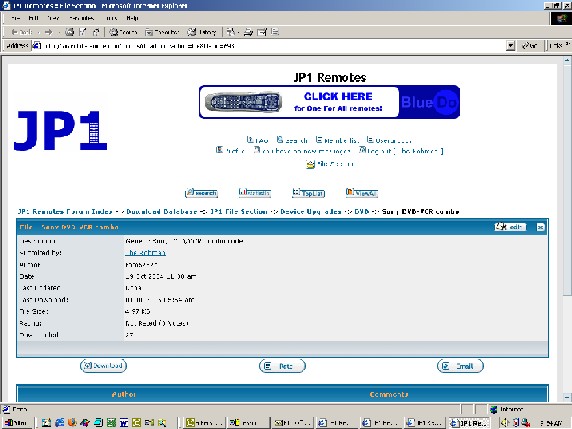
If so, may I draw your attention to the button in the lower left hand corner labelled "Download"...

If you click on this button it will initial the download process which will allow you to save the KM file on your local harddrive.