Page 1 of 4
Kaonmedia NA1610 on slingbox solo
Posted: Sat Oct 10, 2015 8:48 am
by Georgesling
Hi to all,
I have an Slingbox Solo and I've just recently got a new deco Kaonmedia NA1610 and I could not find any remotocontrol in Slingbox for this new deco.
Please help me to find one.
Kind Regards,
George
Posted: Sat Oct 10, 2015 11:34 am
by The Robman
Last time you asked for a Slingbox upgrade, one was provided but we never heard back from you to say whether you tried it and if it worked. We hate to waste our effort here, so I don't think anyone will help you until you confirm that you are actually monitoring this thread and confirm that you will report back after.
Posted: Sun Oct 11, 2015 2:27 am
by alanrichey
I would also like you to try the KaonMedia NA1600 Custom Remote and confirm if that works or not before I spend time on this.
Feedback
Posted: Mon Oct 19, 2015 9:00 pm
by Georgesling
The Robman wrote:Last time you asked for a Slingbox upgrade, one was provided but we never heard back from you to say whether you tried it and if it worked. We hate to waste our effort here, so I don't think anyone will help you until you confirm that you are actually monitoring this thread and confirm that you will report back after.
Dear Rob,
I'm sorry to hear that.It was not my intention not to recognize the efforts of each of the active members of this page. I searched my record and I just found a post for 3 years ago. micro C271 It was a success and I regret not having informed.
If you require more detailed feedback I will gladly answer any requiers about
REgards,
George
Posted: Mon Oct 19, 2015 9:51 pm
by The Robman
Hi George, please add an update to that thread to indicate that the bin files, so that others who find it will know.
Now that we know we have your attention, Al mentioned an existing file for a KaonMedia NA1600 that he suspects will work for you, have you tried it? If it doesn't work, please read the accompanying file which has details of the kind of info that Al needs to move forward.
Posted: Tue Oct 20, 2015 7:40 pm
by Georgesling
alanrichey wrote:I would also like you to try the KaonMedia NA1600 Custom Remote and confirm if that works or not before I spend time on this.
Dear Alan
As you can see i downloaded your file but doesn't work

This is the remote for your Custom A1600.
Please test it out.
Try pressing the buttons to be sure you're all set.
If it doesn't work correctly, or something doesn't look right, click back and try selecting a different device
waiting for a new update
Regards,
George
Posted: Wed Oct 21, 2015 1:17 am
by alanrichey
And you didn't even bother reading the instructions in full as I SPECIFICALLY ask people to do in the README file. (the part that says "...If you have any problems installing these files please do NOT just report back it ‘doesn’t work’, that is totally useless ..."
I will investigate the 1610 now but I will be VERY annoyed if it uses the codes and I have wasted my time.
Posted: Wed Oct 21, 2015 2:54 am
by alanrichey
Unfortunately the 1610 is not in the Logitech Harmony database so I cannot tell what the codes are.
Posted: Wed Oct 21, 2015 4:18 pm
by Georgesling
alanrichey wrote:Unfortunately the 1610 is not in the Logitech Harmony database so I cannot tell what the codes are.
Alan,
thanks for your prompt response
I think the remote control of this deco has the 6-pin connector terminals
I hope something can be done about it
Regards,
George
Posted: Wed Oct 21, 2015 5:08 pm
by The Robman
Georgesling wrote:I think the remote control of this deco has the 6-pin connector terminals. I hope something can be done about it
Hi George, does it look something like this...
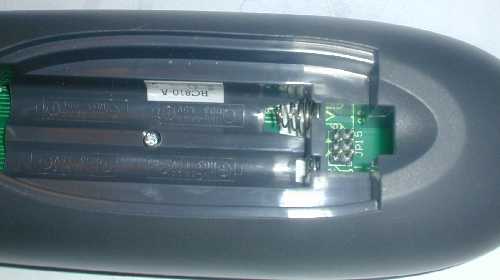
If so, then yes, you probably have a JP1 remote. If you can find a picture of your remote online, could you post it, otherwise could you take some pics of your remote. I want to see if we recognize it.
Posted: Fri Oct 23, 2015 12:04 am
by Georgesling
Hi Rob
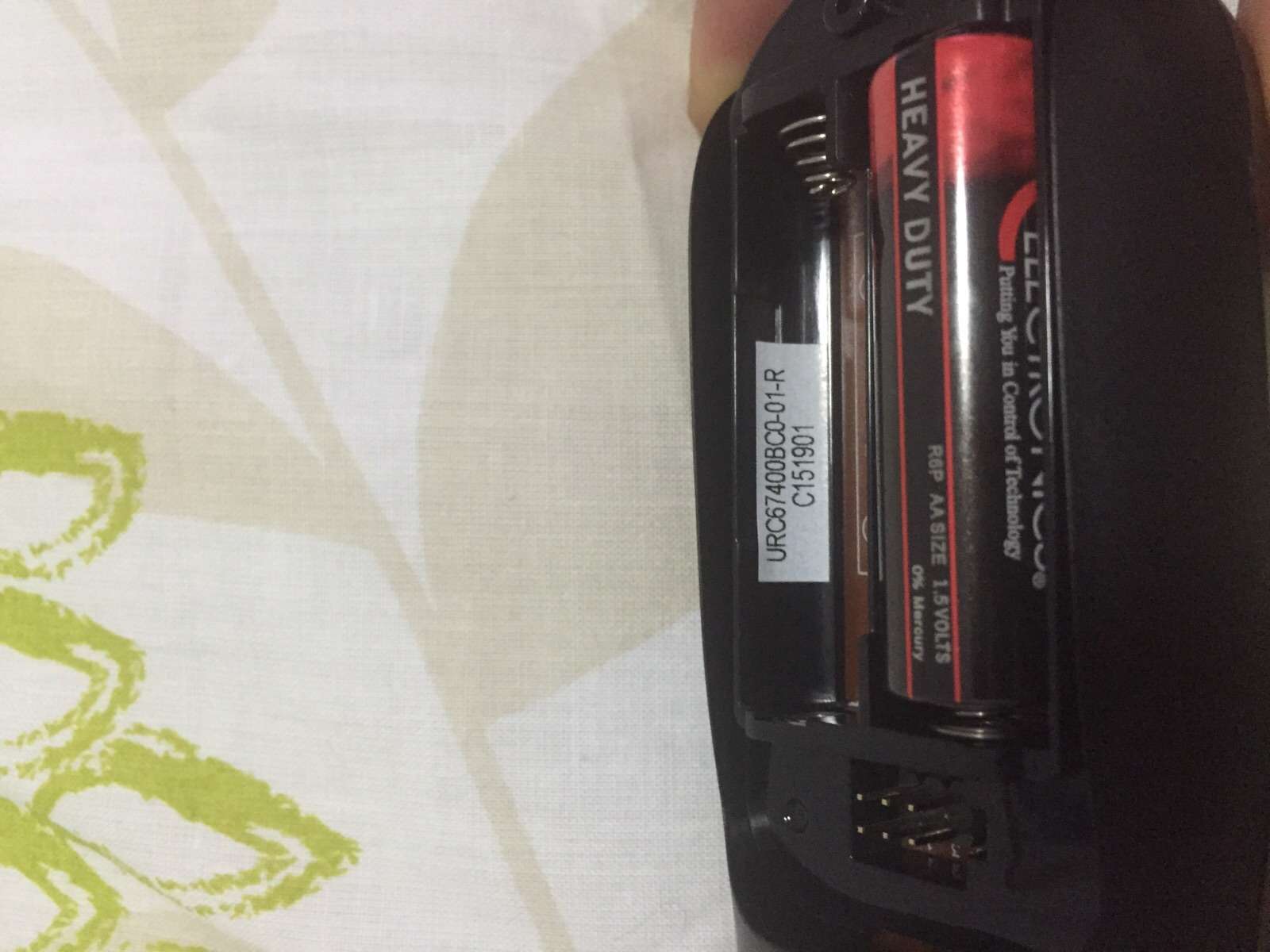
Please find attached pics:
pic 1 pic 2
Kind Regards,
George
Posted: Fri Oct 23, 2015 12:53 am
by Georgesling
Posted: Fri Oct 23, 2015 7:09 am
by The Robman
Cool, that's definitely a JP1 remote. I recognize it but don't recall which model it is, but maybe someone else can name it. So, if you were to get yourself a JP1 cable you would not only be able to get the details of NA1610 code, but you would be able to program this remote to work all of your gear and do a lot more too.
This ebay cable is by far the cheapest (at just $9 shipped) but you have to sort of finish the connector end yourself, as it has 6 individual connectors rather than 1, but you can just glue them together to make it work (info
here)
http://www.ebay.com/itm/261101529602
Posted: Fri Oct 23, 2015 10:23 am
by 3FG
It's a good idea to get a cable as Rob mentioned. In the shorter term, we can probably find out the details of your NA1610 by finding the setup code which is used with it.
Use the
990 command to blink back the setup code.
You can also help us to recognize the remote using the 983 command to blink back the signature.
Posted: Fri Oct 23, 2015 11:59 am
by Georgesling
3FG wrote:It's a good idea to get a cable as Rob mentioned. In the shorter term, we can probably find out the details of your NA1610 by finding the setup code which is used with it.
Use the
990 command to blink back the setup code.
You can also help us to recognize the remote using the 983 command to blink back the signature.
3FG
excellent contribution. I did not know that
Today I test and return with news