Hi
I am looking for a bin file to put in my sling player for the new zaap cloodtv 4u.
Please if you can help me .my e-mail is sghobra (at) hotmail (dot) com
Thanks
Ghobranios
ZaapTV CloodTV 4U
Moderator: Moderators
-
alanrichey
- Expert
- Posts: 3533
- Joined: Mon Mar 24, 2008 7:14 am
- Location: UK/USA
-
ghobranios
- Posts: 35
- Joined: Thu Oct 01, 2015 3:03 pm
- Location: Canada
bin file for the new zaap cloodtv 4u.
I tried the four bin files for ZAAPTV IPTV and ZAAPTV HD509N the old way by putting the files in SBAV folder and no button was working. After I followed your instruction I tried configuring through setup.slingbox.com but because all my computers are windows 10 Microsoft edge, Google Chrome and Safari all not supported by sling media. I installed Mozilla Firefox and I was successful to go through the configuration. I tried all four bin files but was no luck and no button was working.
-
alanrichey
- Expert
- Posts: 3533
- Joined: Mon Mar 24, 2008 7:14 am
- Location: UK/USA
I assume you have a European built Solo then ? I checked the Logitech IR Database and your box is not included but they recommended the ZAAPTV HD209N as an alternative. But that uses the same codes as the ZAAPTV IPTV, which tells me that they probably use the same codes for most of their Set Top Boxes.
You didn't answer the questions I pose in the instructions, so that means I cannot help any further.
Al
You didn't answer the questions I pose in the instructions, so that means I cannot help any further.
Al
-
ghobranios
- Posts: 35
- Joined: Thu Oct 01, 2015 3:03 pm
- Location: Canada
zaap cloodtv 4u bin file for the remot control.
When I tried the two ZaapTV Custom Remotes everything is fine until I press test the video becomes not clear then comes back and when I press next I get NO UPDATE FOUND PLEASE CLICK NEXT TO CONTINUE.
I did every thin in your instructions and all are ok.
My Solo sling box made in US but I don't know if it's European or not.
I really appreciate your help.
Thank you.
I did every thin in your instructions and all are ok.
My Solo sling box made in US but I don't know if it's European or not.
I really appreciate your help.
Thank you.
-
alanrichey
- Expert
- Posts: 3533
- Joined: Mon Mar 24, 2008 7:14 am
- Location: UK/USA

-
ghobranios
- Posts: 35
- Joined: Thu Oct 01, 2015 3:03 pm
- Location: Canada
zaap cloodtv 4u bin file for the remot control.
I tried PL and RV because you assumed that I have a European built Solo.
I try everything in your questions. The only thing I did not try is replacing the IR cable. I ordered one and I hope it will work.
Thank you again
I try everything in your questions. The only thing I did not try is replacing the IR cable. I ordered one and I hope it will work.
Thank you again
-
alanrichey
- Expert
- Posts: 3533
- Joined: Mon Mar 24, 2008 7:14 am
- Location: UK/USA
-
The Robman
- Site Owner
- Posts: 22063
- Joined: Fri Aug 01, 2003 9:37 am
- Location: Chicago, IL
- Contact:
ghobranios,
You need to understand that Al creates hundreds of Slingbox upgrades for people, so he has developed a list of questions that greatly help him to help you when things don't work. He is expecting you to list the questions and provide answers for each of them. Otherwise he would need to spend a lot more time with you playing the "20 questions" game. Even if you feel like you have answered some of the questions in general text, it is much easier for Al if you list them, as below.
Here are the questions...
You need to understand that Al creates hundreds of Slingbox upgrades for people, so he has developed a list of questions that greatly help him to help you when things don't work. He is expecting you to list the questions and provide answers for each of them. Otherwise he would need to spend a lot more time with you playing the "20 questions" game. Even if you feel like you have answered some of the questions in general text, it is much easier for Al if you list them, as below.
Here are the questions...
- What model Slingbox do you have?
- Was there any error message after you typed in the Code and tapped the Test button?
- Did you give the commands plenty of time to react? (I have a DVR that takes about 6-8 seconds to power up/down)
- If you are using a Solo did you try both BIN files?
- After completing the setup do any of the buttons work?
- If you are installing on a Solo or Pro-HD or older box that uses an external IR Blaster, have you used a Digital Camera or Mobile Phone Camera to confirm the IR Blaster is actually firing when you tap the Power button? (Watch the tip of the IR Blaster through the viewfinder while you tap a button. You should see a white (not red) flash. Test it on a real remote so you know what you are looking for). If you are using a 350/500 have you tried using the external blaster?
- Have you experimented with the placement of the IR Blaster? On some devices this is critical so don’t give up too quickly. Try shining a flashlight at the front of the receiver and see if you can see the IR receiver behind the smoked glass.
- Are you sure the device is working correctly using the real remote?
- Are you sure your device is set to use IR ? Many boxes can operate on RF or IR and if it is set to RF then the Slingbox will not affect it.
- If you have a device that supports multiple remote addresses (DirecTV, Dish Network, Tivo…) are you sure the remote address is set to the default ?
- Have you tried resetting the Slingbox. ? This has been found to help.
- Do you have access to a Logitech Harmony Universal Remote? If so let me know.
Rob
www.hifi-remote.com
Please don't PM me with remote questions, post them in the forums so all the experts can help!
www.hifi-remote.com
Please don't PM me with remote questions, post them in the forums so all the experts can help!
-
ghobranios
- Posts: 35
- Joined: Thu Oct 01, 2015 3:03 pm
- Location: Canada
Bin file for the new zaap cloodtv 4u.
I AM SORRY.
1. What model Slingbox do you have? SOLO.
2. Was there any error message after you typed in the Code and tapped the Test button? YES "NO UPDATE FOUND PLEASE CLICK NEXT TO CONTINUE".
3. Did you give the commands plenty of time to react? (I have a DVR that takes about 6-8 seconds to power up/down) YES.
4. If you are using a Solo did you try both BIN files? YES.
5. After completing the setup do any of the buttons work? NO.
6. If you are installing on a Solo or Pro-HD or older box that uses an external IR Blaster, have you used a Digital Camera or Mobile Phone Camera to confirm the IR Blaster is actually firing when you tap the Power button? (Watch the tip of the IR Blaster through the viewfinder while you tap a button. You should see a white (not red) flash. Test it on a real remote so you know what you are looking for). If you are using a 350/500 have you tried using the external blaster? NO I CAN NOT SEE ANY LIGHT.
7. Have you experimented with the placement of the IR Blaster? On some devices this is critical so don’t give up too quickly. Try shining a flashlight at the front of the receiver and see if you can see the IR receiver behind the smoked glass. I TRIED BUT THIS BOX YOU CAN NOT SEE BECAUSE IT HAS SOLID FRONT WITH 9 SMALL HOLES. 2 OF THEM HAVE BLUE LIGHT AND I AM ASSUMING THAT THE IR RECEIVER EYE IS BEHIND THESE HOLES.
8. Are you sure the device is working correctly using the real remote? YES.
9. Are you sure your device is set to use IR ? Many boxes can operate on RF or IR and if it is set to RF then the Slingbox will not affect it. I AM NOT SURE.
10. If you have a device that supports multiple remote addresses (DirecTV, Dish Network, Tivo…) are you sure the remote address is set to the default ? NO I DON'T HAVE.
11. Have you tried resetting the Slingbox. ? This has been found to help. YES.
12. Do you have access to a Logitech Harmony Universal Remote? If so let me know. NO.
THANK YOU.
1. What model Slingbox do you have? SOLO.
2. Was there any error message after you typed in the Code and tapped the Test button? YES "NO UPDATE FOUND PLEASE CLICK NEXT TO CONTINUE".
3. Did you give the commands plenty of time to react? (I have a DVR that takes about 6-8 seconds to power up/down) YES.
4. If you are using a Solo did you try both BIN files? YES.
5. After completing the setup do any of the buttons work? NO.
6. If you are installing on a Solo or Pro-HD or older box that uses an external IR Blaster, have you used a Digital Camera or Mobile Phone Camera to confirm the IR Blaster is actually firing when you tap the Power button? (Watch the tip of the IR Blaster through the viewfinder while you tap a button. You should see a white (not red) flash. Test it on a real remote so you know what you are looking for). If you are using a 350/500 have you tried using the external blaster? NO I CAN NOT SEE ANY LIGHT.
7. Have you experimented with the placement of the IR Blaster? On some devices this is critical so don’t give up too quickly. Try shining a flashlight at the front of the receiver and see if you can see the IR receiver behind the smoked glass. I TRIED BUT THIS BOX YOU CAN NOT SEE BECAUSE IT HAS SOLID FRONT WITH 9 SMALL HOLES. 2 OF THEM HAVE BLUE LIGHT AND I AM ASSUMING THAT THE IR RECEIVER EYE IS BEHIND THESE HOLES.
8. Are you sure the device is working correctly using the real remote? YES.
9. Are you sure your device is set to use IR ? Many boxes can operate on RF or IR and if it is set to RF then the Slingbox will not affect it. I AM NOT SURE.
10. If you have a device that supports multiple remote addresses (DirecTV, Dish Network, Tivo…) are you sure the remote address is set to the default ? NO I DON'T HAVE.
11. Have you tried resetting the Slingbox. ? This has been found to help. YES.
12. Do you have access to a Logitech Harmony Universal Remote? If so let me know. NO.
THANK YOU.
-
The Robman
- Site Owner
- Posts: 22063
- Joined: Fri Aug 01, 2003 9:37 am
- Location: Chicago, IL
- Contact:
Regarding question #9, if you are not sure that your Zaap remote uses IR, let's at least verify that one. Try using the same digital camera that you used for question 6 to verify if the Zaap remote is sending an IR signal.
This is what it should look like if it does send IR.
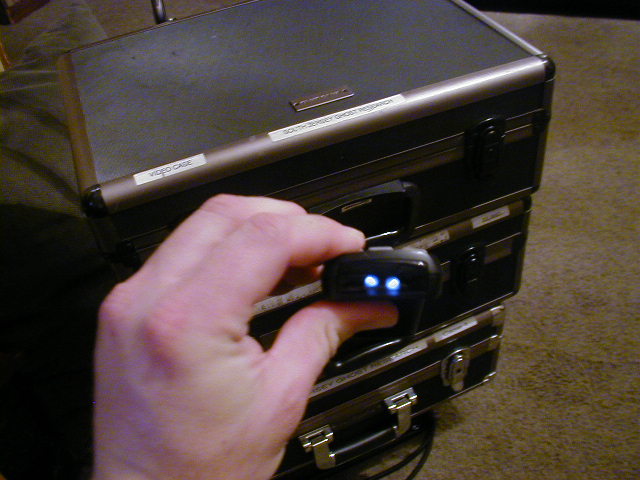
This is what it should look like if it does send IR.
Rob
www.hifi-remote.com
Please don't PM me with remote questions, post them in the forums so all the experts can help!
www.hifi-remote.com
Please don't PM me with remote questions, post them in the forums so all the experts can help!
-
ghobranios
- Posts: 35
- Joined: Thu Oct 01, 2015 3:03 pm
- Location: Canada
Bin file for the new zaap cloodtv 4u.
I have 9 small holes. 2 of them are permanently with a blue light. when I tap the Power button in the remote computer I can see blue lights coming from another holes.
-
The Robman
- Site Owner
- Posts: 22063
- Joined: Fri Aug 01, 2003 9:37 am
- Location: Chicago, IL
- Contact:
It sounded like maybe this device doesn't come with a conventional remote control, so I found a video of the device:
https://www.youtube.com/watch?v=oMbMGzkW5_I
It appears that when you describe "9 small holes" you are talking the Zaap box:
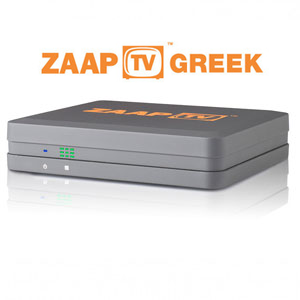
Whereas, what I was asking you is, have you confirmed that the remote control sends IR signals, this is the remote...
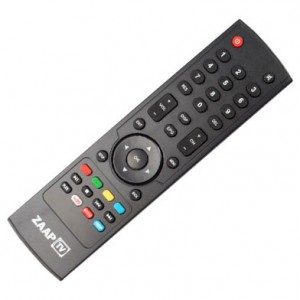
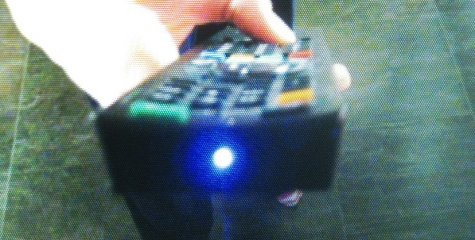
As I was trying to explain earlier, when you look at a remote that is sending an IR signal using a digital camera, you can actually see the IR signals. This is what you claim to have done in your answer to question 6 when you verified that the IR blasters were not sending a signal, and I was just asking you to repeat the process using the Zaap remote.
https://www.youtube.com/watch?v=oMbMGzkW5_I
It appears that when you describe "9 small holes" you are talking the Zaap box:
Whereas, what I was asking you is, have you confirmed that the remote control sends IR signals, this is the remote...
As I was trying to explain earlier, when you look at a remote that is sending an IR signal using a digital camera, you can actually see the IR signals. This is what you claim to have done in your answer to question 6 when you verified that the IR blasters were not sending a signal, and I was just asking you to repeat the process using the Zaap remote.
Rob
www.hifi-remote.com
Please don't PM me with remote questions, post them in the forums so all the experts can help!
www.hifi-remote.com
Please don't PM me with remote questions, post them in the forums so all the experts can help!
-
ghobranios
- Posts: 35
- Joined: Thu Oct 01, 2015 3:03 pm
- Location: Canada
Bin file for the new zaap cloodtv 4u.
Yes, that is what I have and when I tap the Power button on Zaap remote I can see the light behind the remote front cover.
Thank you.
Thank you.
-
alanrichey
- Expert
- Posts: 3533
- Joined: Mon Mar 24, 2008 7:14 am
- Location: UK/USA