Page 1 of 1
Canon Projectors
Posted: Mon Aug 25, 2014 6:25 pm
by mrrock11
Hi all I hope this is the right place to ask this but I am new to all of this. here is what I am doing I sell a lot of Canon and some NEC LCD projectors that I service. I sell them with the remote included but the original remotes cost a bit of money so my thinking is to program Comcast (red button) remotes and then print a water transfer to illustrate the projector buttons and cover the "Cable" with Projector and so on. But I am having a hard time finding files for any of them, I have found and successfully programed one to work with the NEC projectors that I sell but not the Canons. I have a harmony 880 with all of the projectors programed in it and inside it has 8 pads some of the labels I can remember are TX RX , Ground I can look and list them exactly if it would help. I want to know how can I get them Canon codes (.CCF files) for the projectors or hack my Harmony 880 and make it spit them out some how? Oh and I tried to work with Harmonizing and concordance but I don't quite understand the installation instructions and not any help on their website.
Posted: Mon Aug 25, 2014 6:46 pm
by mrrock11
I am having a hard time loading a picture but the pads on my Harmony 880 have these nomenclatures.
TP27 VCRADLE TP18 3V3
TP28 DGND TP22 +VBATT
T1 I59 VPP TP23 BATT TEMP
T2 RB7 TP25 RX
T3 RB6 TP26 TX
Posted: Tue Aug 26, 2014 12:06 am
by 3FG
We don't know anything about directly reading from a Harmony remote. The easiest think to do is to buy a JP1.3 or newer learning remote, learn the codes from the Harmony, and make an upgrade which can be uploaded to the Comcast remotes. For example a RCA RCRP05B should be less than $15 on eBay.
Posted: Tue Aug 26, 2014 5:32 am
by vickyg2003
I agree with 3fg, you need a jp1.3 learning remote & cable would help you do this fairly easily.
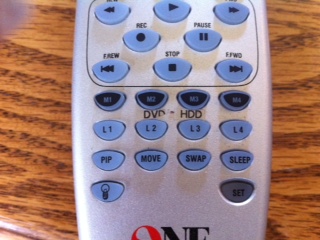
I just wanted to add that I used to use ink jet water transfer labels for my remotes, but then I got a brother label maker. When set to the smallest print I can make nice little laminated labels for my remotes. I have black on clear tape for my silver remotes and white on black tape for my black remotes. Also I create a word document with a nice line picture of my remote and then use call out boxes to show what the buttons do.
When you create your cannon upgrades remember to upload them to the file section
Good luck.
Posted: Tue Aug 26, 2014 9:25 am
by tranx
Hi Vicky, good solution. Could you say which model of brother label maker does such small labels?
Posted: Tue Aug 26, 2014 10:23 am
by vickyg2003
tranx wrote:Hi Vicky, good solution. Could you say which model of brother label maker does such small labels?
Good question. The DVD and HDD labels in the picture below were made on a PT-1290, but the Brother we have where I teach has a smaller font. I don't know what model that one is.
Posted: Tue Aug 26, 2014 10:27 pm
by mrrock11
Hi all
thanks for the replies I ordered the RCA remote suggested earlier in this post. I will post the files that I make in the file section. and post a final picture of the remotes when I am done ( but I still have to work on pic posting)
thanks again
....................
Posted: Sun Sep 07, 2014 1:40 pm
by tranx
vickyg2003 wrote:...The DVD and HDD labels in the picture below were made on a PT-1290, but the Brother we have where I teach has a smaller font....
Hi vicky, I got brother PT-D200 which might print just a bit smaller but anyway, amazingly, the text fits - thanks again

Posted: Sun Sep 07, 2014 3:12 pm
by vickyg2003
Looks great!