Using RM to create a new Device Upgrade file

This is the JP1 beginners forum. There's no such thing as a stupid question in here, so post away, but this forum is just for JP1 users and people considering JP1, non-JP1 users please use the appropriate forum above!

Moderator: Moderators

Post Reply
J Random Hacker
Posts: 16
Joined: Thu Dec 05, 2013 12:59 am
Location: Seattle

Using RM to create a new Device Upgrade file

Post by J Random Hacker »

I'm trying to create a new Device Upgrade file for a Vizio TV model SV421XVT. I searched the File Section and found 3FG's post entitled Vizio SV472XVT with discretes which seemed a good thing to start with. What 3FG provided was a link to a post containing a list of codes supplied to someone (pkeatley) who had corresponded with Vizio.

This pkeatley said: "We use NEC protocol with address 04FB for all of our TVs", and then provided a list of "Code"s provided by Vizio, which included entries such as:

Key Label Code
PWR ON 2A
PWR OFF 25
HDMI 1 81

etc.

3FG replied to pkeatley saying "you can use the AV Producer 8 with the below EFCs", providing a long list, which included entries such as:

Function EFC

power ON 087
power OFF 216
HDMI 1 193

etc.

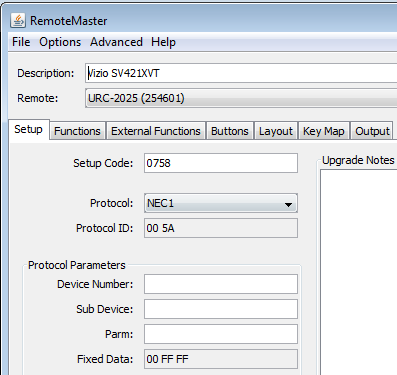
I opened up a copy of RM, and set it up to start with like this:
Image

I wondered at the Protocol ID RM came up with for the NEC1 protocol, but all choices RM provides in the way of NEC protocols do not cause this Protocol ID box to display 04FB.

I had no idea what to enter for Device Number, Sub Device, or Parm. RM came up with the Fixed Data: 00 FF FF

Cruising right along:

I went to the Functions tab to start entering data, assuming what Vizio provided to pkeatley were OBCs, i.e. what I take to be original manufacturer button codes. I found I couldn't enter hex numbers into the OBC column. That is, digits 0 - 9 were acceptable but letters A-F were not. I could enter "2A" in the column alright, but RM wouldn't accept it. The program wouldn't allow new entries until "2A" was deleted.

I then tried entering one of 3FG's EFC codes in the EFC column which produced this result:

Image

When I tried entering Vizio data into the Hex column this was the result:

Image

I've gone off the cliff somewhere. I don't understand what I'm looking at or what data or entry result I should use.
vickyg2003
Site Admin
Posts: 7109
Joined: Sat Mar 20, 2004 12:19 pm
Location: Florida
Contact:

Post by vickyg2003 »

Well the cliff you went off had to do with following the link. You should have clicked on the download button a little further down on the screen. 3FG already created the upgrade for you. Now you just need to select the correct remote and assign the functions to the buttons the way YOU want them assigned.
J Random Hacker
Posts: 16
Joined: Thu Dec 05, 2013 12:59 am
Location: Seattle

Post by J Random Hacker »

Duh. I see. Its a good thing stupid questions are allowed in this section. Thanks very much for your answer.

It seems had I converted the Vizio data from hex to decimal and entered it into the OBC column beside the correct function name, I would have been able to create a similar file to 3FCs.

Do all or most manufacturer's tend to think about OBC codes in hex?
vickyg2003
Site Admin
Posts: 7109
Joined: Sat Mar 20, 2004 12:19 pm
Location: Florida
Contact:

Post by vickyg2003 »

Some manufacturers provide the hex of the obcs even reversing the LSB for OuR use. Others provide a hexstring of the entire string, and then using our knowlege of the protocol we need to find the function portion and then reverse the bits to get the obc. One manufacturer even gave us a few pages of their firmwares source code to help us figure out the remote codes. The friendliest companies provide pronto hex. But only enlightened manufacturers publish specs. Most wont give you any information about the signals other than to offer you an expe$ive replacement remote. Its always an adventure!
J Random Hacker
Posts: 16
Joined: Thu Dec 05, 2013 12:59 am
Location: Seattle

Post by J Random Hacker »

So thanks again for the effort you and others have put in on this website making such information available and useful.
Post Reply