hey guys,
can anyone give me the hex codes for the vip1853?
would really be great, thanks!
Motorola vip 1853 - need pronto hex
Moderator: Moderators
-
vickyg2003
- Site Admin
- Posts: 7109
- Joined: Sat Mar 20, 2004 12:19 pm
- Location: Florida
- Contact:
What kind of hex are you looking for?
Remember to provide feedback to let us know how the problem was solved and share your upgrades.
Tip: When creating an upgrade, always include ALL functions from the oem remote, even if you never plan on assigning them to a button. Complete function lists makes an upgrade more helpful to others.
Tip: When creating an upgrade, always include ALL functions from the oem remote, even if you never plan on assigning them to a button. Complete function lists makes an upgrade more helpful to others.
I'm using Global cache wifi to ir with irule software. The motorola VIP1853 is nopt in their databases. I have tried to lern the IR signal with the build in learner. Other devices do work, looks like this: 0000 006D 0000 000C 0030 0010 0030 0010 0030 0010 0030 0010 0010 0030 0010 0030 0010 0030 0010 0030 0010 0030 0030 0010 0010 0030 0010 0ED7
But the vip is constantly canching the values. like this
1st time
sendir,1:1,1,56306,1,1,
18,18,36,36,18,7207
2nd time
18,36,36,36,18,18,36,36,36,36,18,18,18,18,18,18,18,18,18,18,18,18,18,18,18,18,36,18,18,36,18,18,36,36,18,4819,
18,36,36,36,18,18,36,36,36,36,18,18,18,18,18,18,18,18,18,18,36,36,18,18,36,18,18,36,18,18,36,36,18,4819,
18,36,36,36,18,18,36,36,36,36,18,18,18,18,18,18,18,18,18,18,36,36,18,18,36,18,18,36,18,18,36,36,18,4819,
18,36,36,36,18,18,36,36,36,36,18,18,18,18,18,18,18,18,18,18,36,36,18,18,36,18,18,36,18,18,36,36,18,4818,
1,53,1,71,1,35,1,71,1,71,1,35,1,35,1,35,1,35,1,35,1,71,1,35,1,53,1,53,1,35,1,71,1,4836,
3rd time
8,18,36,36,36,36,18,18,18,18,18,18,18,18,18,18,36,36,18,18,36,18,18,36,18,18,36,36,18,4819,
18,36,36,36,18,18,36,36,36,36,18,18,18,18,18,18,18,18,18,18,36,36,18,18,36,18,18,36,18,18,36,36,18,4820,
I was hoping u figured out the correct codes...
Thank you for your quick reply
But the vip is constantly canching the values. like this
1st time
sendir,1:1,1,56306,1,1,
18,18,36,36,18,7207
2nd time
18,36,36,36,18,18,36,36,36,36,18,18,18,18,18,18,18,18,18,18,18,18,18,18,18,18,36,18,18,36,18,18,36,36,18,4819,
18,36,36,36,18,18,36,36,36,36,18,18,18,18,18,18,18,18,18,18,36,36,18,18,36,18,18,36,18,18,36,36,18,4819,
18,36,36,36,18,18,36,36,36,36,18,18,18,18,18,18,18,18,18,18,36,36,18,18,36,18,18,36,18,18,36,36,18,4819,
18,36,36,36,18,18,36,36,36,36,18,18,18,18,18,18,18,18,18,18,36,36,18,18,36,18,18,36,18,18,36,36,18,4818,
1,53,1,71,1,35,1,71,1,71,1,35,1,35,1,35,1,35,1,35,1,71,1,35,1,53,1,53,1,35,1,71,1,4836,
3rd time
8,18,36,36,36,36,18,18,18,18,18,18,18,18,18,18,36,36,18,18,36,18,18,36,18,18,36,36,18,4819,
18,36,36,36,18,18,36,36,36,36,18,18,18,18,18,18,18,18,18,18,36,36,18,18,36,18,18,36,18,18,36,36,18,4820,
I was hoping u figured out the correct codes...
Thank you for your quick reply
-
vickyg2003
- Site Admin
- Posts: 7109
- Joined: Sat Mar 20, 2004 12:19 pm
- Location: Florida
- Contact:
We have a few tools that you can use to create pronto hex.
There is Makehex, and there is IRPMaster. I don't have the techical expertise to create the definiton for this protocol to use either one of these tools. I was hoping someone would hop in and create one.
The functions are defined in this RDMU
https://www.hifi-remote.com/forums/dload ... e_id=11198
If not, I can always load this into a remote and capture it in IRScope, but the code isn't nearly as clean.
There is Makehex, and there is IRPMaster. I don't have the techical expertise to create the definiton for this protocol to use either one of these tools. I was hoping someone would hop in and create one.
The functions are defined in this RDMU
https://www.hifi-remote.com/forums/dload ... e_id=11198
Can someone help fixxer out with makehex or IRPMaster?3FG wrote:Here's an upgrade for the VIP1853, tested on a RCA RCRP05B, which seems to decode to the same signals as learned by Alan.
Here's the entry for protocols.ini.The IRP is {56k,320,msb}<-1,1|1,-1>(T=0,(1,-1,D:7,S:6,T:1,0:1,F:6,~F:1,-85m,T=1)+)Code: Select all
[CanalSatLD]
PID=01 FF
DevParms=Device:7=37,Sub Device:6=0
DeviceTranslator=Translator(0,7,1) Translator(1,6,8) Translator(1,6,16)
CmdParms=OBC:6=0
CmdTranslator=Translator(0,6,0) Translator(comp,0,1,6,0)
FixedData=A5 00 02
Code.S3C80=2D 5E 31 8B 0F 8F 80 10 08 07 00 A0 00 92 00 A0 00 92 A6 04 00 10 68 05 E4 06 05 F6 01 46 F6 01 0A FB 08 46 29 01 69 04 8D 01 46 AF
If not, I can always load this into a remote and capture it in IRScope, but the code isn't nearly as clean.
Remember to provide feedback to let us know how the problem was solved and share your upgrades.
Tip: When creating an upgrade, always include ALL functions from the oem remote, even if you never plan on assigning them to a button. Complete function lists makes an upgrade more helpful to others.
Tip: When creating an upgrade, always include ALL functions from the oem remote, even if you never plan on assigning them to a button. Complete function lists makes an upgrade more helpful to others.
Use IrMaster to generate the ProntoHex. You'll need to add the following to IrpProtocols.ini Get the Device, Subdevice, and OBC (function numbers) from the RMDU file that Vicky linked.
Code: Select all
[protocol]
name=CanalSatLD
irp={56k,320,msb}<-1,1|1,-1>(T=0,(1,-1,D:7,S:6,T:1,0:1,F:6,~F:1,-85m,T=1)+)[D:0..127,S:0..63,F:0..63]-
vickyg2003
- Site Admin
- Posts: 7109
- Joined: Sat Mar 20, 2004 12:19 pm
- Location: Florida
- Contact:
In the cold light of day, I was afraid of what the T in this protocol meant. I thought it might be the type of toggle that we see in RC5 type signals, where the toggle varies by key press. Thankfully the toggle toggles between frames.
Here is the pronto for the power button, created from a learn. I
Power Protocol=CanalSatLD Device=37.0 OBC=11 (Pronto from signal)
0000 0049 0012 0011 0012 0024 0025 0023 0012 0012 0025 0023 0025 0023 0012 0012 0012 0012 0012 0012 0012 0012 0012 0012 0012 0012 0012 0012 0012 0012 0012 0012 0025 0023 0025 0012 0012 0024 0012 1286 0012 0024 0025 0023 0012 0012 0025 0023 0025 0023 0012 0012 0012 0012 0012 0012 0012 0012 0012 0012 0025 0023 0012 0012 0012 0012 0025 0023 0025 0012 0012 0024 0012 1286
As you can see there is a lot of variation in the timings that would be taken care of if someone provides the IRPmaster files.
Devuce 37, Subdevice 0
OBC, Function
1 1
2 2
3 3
4 4
5 5
6 6
7 7
8 8
9 9
10 0
11 power
12 up arrow
13 down arrow
14 left arrow
15 select
16 right arrow
19 last (prev ch)
19 Exit
20 TV
22 program guide
23 vol up
24 mute
25 channel up
26 vol down
27 play
27 pause
28 channel down
29 red
30 green
31 yellow
32 blue
33 rewind
34 stop
35 record
36 fast fwd
41 TeleText
43 Radio
45 menu
Here is the pronto for the power button, created from a learn. I
Power Protocol=CanalSatLD Device=37.0 OBC=11 (Pronto from signal)
0000 0049 0012 0011 0012 0024 0025 0023 0012 0012 0025 0023 0025 0023 0012 0012 0012 0012 0012 0012 0012 0012 0012 0012 0012 0012 0012 0012 0012 0012 0012 0012 0025 0023 0025 0012 0012 0024 0012 1286 0012 0024 0025 0023 0012 0012 0025 0023 0025 0023 0012 0012 0012 0012 0012 0012 0012 0012 0012 0012 0025 0023 0012 0012 0012 0012 0025 0023 0025 0012 0012 0024 0012 1286
As you can see there is a lot of variation in the timings that would be taken care of if someone provides the IRPmaster files.
Devuce 37, Subdevice 0
OBC, Function
1 1
2 2
3 3
4 4
5 5
6 6
7 7
8 8
9 9
10 0
11 power
12 up arrow
13 down arrow
14 left arrow
15 select
16 right arrow
19 last (prev ch)
19 Exit
20 TV
22 program guide
23 vol up
24 mute
25 channel up
26 vol down
27 play
27 pause
28 channel down
29 red
30 green
31 yellow
32 blue
33 rewind
34 stop
35 record
36 fast fwd
41 TeleText
43 Radio
45 menu
Remember to provide feedback to let us know how the problem was solved and share your upgrades.
Tip: When creating an upgrade, always include ALL functions from the oem remote, even if you never plan on assigning them to a button. Complete function lists makes an upgrade more helpful to others.
Tip: When creating an upgrade, always include ALL functions from the oem remote, even if you never plan on assigning them to a button. Complete function lists makes an upgrade more helpful to others.
To generate the said codes with IrMaster, download and install it, and add the three lines mentioned above to ItpProtocols.ini, for example at the very end. Then start it, select protocol = canalsatld, D = 37, S = 0, and F=0. Select the export pane, and fill in "Last F" by, e.g. 63. Screen should now look like this:
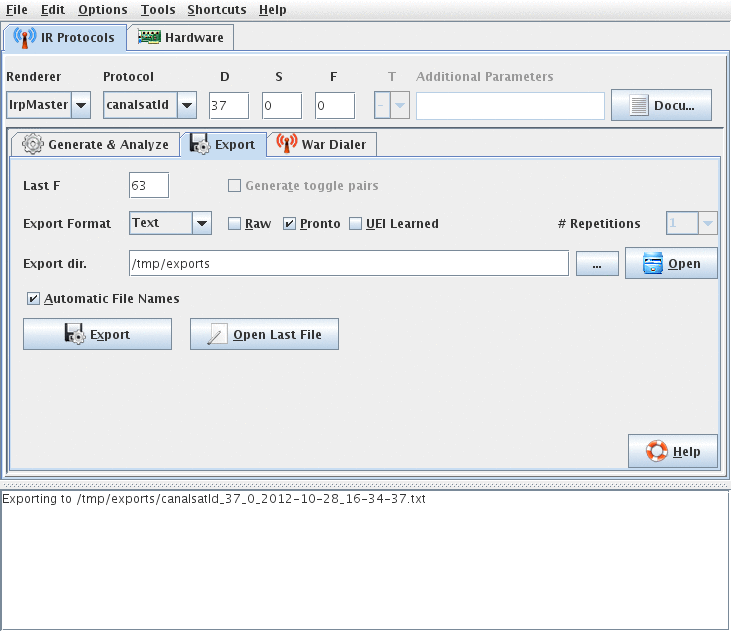
Press "Export" and the export will take place, unless you select otherwise, to a plain text file.
, the variable T is first assigned a value before it is used, just as in a normal programming language. There is nothing "togglish" about it, and the name "T" is possibly a bad name. T does not have to be assigned a value; actually doing so would be senseless. Note that T is grayed out in the IrMaster screen shot above. OTOH, consider the really toggling protocol rc5:
Here, T is being used, without having been assigned a value (normally a deadly sin (alternatively outright error) in programming), and, after the signal is over, T is assigned a new value, apparently useless! Apparently, the "rendering machine" (or remote, or what you call it) is supposed to supply some value before the first usage, and then store the finally computed value for the next usage. The IRP notation (in the sense of Chapter 1-13) contains a gap here. It is not clear what variables have a default value, and which ones retains their values between invocations. IrpMaster and its documentation tries to fill this gap: there is a "parameter specification" where these things are unambiguously defined. So, the full rc5 IRP reads
For the full meaning, see the IrpMaster documentation, distributed with IrMaster. Here, the parameters are given upper and lower limits, possible defaults are given after an equals sign, and persistancy of a variable (like a toggle) is indicated by the "@" sign.
In detail, for T@:0..1=0 it means that T is persistant (keeps its value between invocation), has lower limit 0 and upper limit 1, and the default value 0. Thus IrpMaster (and IrMaster) allows, but does not requre, it to be assigned.
@Fixxxer:
Also GlobalCache commands can be decoded, if you supply them completely. They look like
Press "Export" and the export will take place, unless you select otherwise, to a plain text file.
Let me try to explain: In the IRP for the present signal:In the cold light of day, I was afraid of what the T in this protocol meant. I thought it might be the type of toggle that we see in RC5 type signals, where the toggle varies by key press. Thankfully the toggle toggles between frames.
Code: Select all
... (T=0,(1,-1,D:7,S:6,T:1,0:1,F:6,~F:1,-85m,T=1)+)... Code: Select all
...((1:1,~F:1:6,T:1,D:5,F:6,^114m)+,T=1-T)Code: Select all
{36k,msb,889}<1,-1|-1,1>((1:1,~F:1:6,T:1,D:5,F:6,^114m)+,T=1-T)[T@:0..1=0,D:0..31,F:0..127]In detail, for T@:0..1=0 it means that T is persistant (keeps its value between invocation), has lower limit 0 and upper limit 1, and the default value 0. Thus IrpMaster (and IrMaster) allows, but does not requre, it to be assigned.
@Fixxxer:
Also GlobalCache commands can be decoded, if you supply them completely. They look like
Code: Select all
sendir,4:1,2,56000,1,39,18,36,36,36,18,18,36,36,36,36,18,18,18,18,18,18,18,18,18,18,
18,18,18,18,18,18,18,18,18,18,18,18,18,18,18,18,36,4778,18,36,36,36,18,18,36,36,36,
36,18,18,18,18,18,18,18,18,18,18,36,36,18,18,18,18,18,18,18,18,18,18,18,18,36,4778-
Leo Mekenkamp
- Posts: 4
- Joined: Tue Apr 09, 2013 2:08 pm
Hi all,
I came here looking for lirc codes for the Motorola VIP1853. I downloaded the latest version of IrMaster, added the "canalsatld" section in the IrpProtocols.ini file and generated a lirc export file for device 37, sub 0, f 0.
Unfortunately the generated lirc file does not work in my setup: the VIP1853 does not react to any commands. Does anyone here have any ideas on how to proceed?
I came here looking for lirc codes for the Motorola VIP1853. I downloaded the latest version of IrMaster, added the "canalsatld" section in the IrpProtocols.ini file and generated a lirc export file for device 37, sub 0, f 0.
Unfortunately the generated lirc file does not work in my setup: the VIP1853 does not react to any commands. Does anyone here have any ideas on how to proceed?
-
Leo Mekenkamp
- Posts: 4
- Joined: Tue Apr 09, 2013 2:08 pm
Code: Select all
#
# Generated by IrMaster
#
begin remote
	name	canalsatld
	flags	RAW_CODES
	eps	30
	aeps	100
	gap	85320
		begin raw_codes

			name d037f000s000
				320 640 640 640 320 320 640 640
				640 640 320 320 320 320 320 320
				320 320 320 320 320 320 320 320
				320 320 320 320 320 320 320 320
				320 320 320 320 640 85320 320 640
				640 640 320 320 640 640 640 640
				320 320 320 320 320 320 320 320
				320 320 640 640 320 320 320 320
				320 320 320 320 320 320 320 320
				640
			name d037f001s000
				320 640 640 640 320 320 640 640
				640 640 320 320 320 320 320 320
				320 320 320 320 320 320 320 320
				320 320 320 320 320 320 320 320
				320 320 640 640 320 85000 320 640
				640 640 320 320 640 640 640 640
				320 320 320 320 320 320 320 320
				320 320 640 640 320 320 320 320
				320 320 320 320 320 320 640 640
				320
(snip)
			name d037f063s000
				320 640 640 640 320 320 640 640
				640 640 320 320 320 320 320 320
				320 320 320 320 320 320 320 320
				640 320 320 320 320 320 320 320
				320 320 320 640 320 85000 320 640
				640 640 320 320 640 640 640 640
				320 320 320 320 320 320 320 320
				320 320 640 640 640 320 320 320
				320 320 320 320 320 320 320 640
				320
		end raw_codes
end remote
I do also own a Philips SRU6008, which can mimic the Motorola remote with its learning-mode, but I have no way to get those codes out of that SRU6008.
The timing information seems to be correct. However, at the least the file needs the line included, perhaps after flags.
If that doesn't work, post some learns, taken at both close and far distance from the IR sensor.
Code: Select all
frequency 56000If that doesn't work, post some learns, taken at both close and far distance from the IR sensor.
-
Leo Mekenkamp
- Posts: 4
- Joined: Tue Apr 09, 2013 2:08 pm

Ooops, IrMaster left out the frequency  . However, in the current development version, this bug is fixed, so the next release will be ok. Sorry for this.
 (If I am wrong, please correct me.) I have it on my TODO-list, but there is sooo much in front of it on said list...
. However, in the current development version, this bug is fixed, so the next release will be ok. Sorry for this.Cool. The bad news is that AFAIK no-one has written a driver, LIRC or non LIRC, for such a non-demodulating IR detectorI have got a Raspberry Pi with a Vishay TSMP58000 connected to one of its GPIO ports.
(If I am wrong, please correct me.) I have it on my TODO-list, but there is sooo much in front of it on said list...(You mean "kHz", not "MHz".) That will not help you read the 56kHz modulated signals.I also used a different IR receiver, an 38MHz PNA4602M from Panasonic.
-
Leo Mekenkamp
- Posts: 4
- Joined: Tue Apr 09, 2013 2:08 pm
Don't worry, I know what a 0.3 version generally means, and IrMaster is quite useful already. Thanks for putting it under the gpl.Barf wrote:Ooops, IrMaster left out the frequency
Owkayyy. I am quite new to this whole IR thing, so I thought one of those IR receivers could more or less be swapped for another one. From your reply I read that there are at least two types of receivers. Nice. I got the wrong one.Barf wrote:Cool. The bad news is that AFAIK no-one has written a driver, LIRC or non LIRC, for such a non-demodulating IR detector
Is it a lot of work to write such a driver? I take it should probably be written in c? My c is a tad rusty...
You are right. Brain has taken too many beatings these last couple of days.Barf wrote:(You mean "kHz", not "MHz".)
Sounds logical. It did give some signals though, and together with the erroneous Motorola docs this only added to my frustration.Barf wrote:That will not help you read the 56kHz modulated signals.
Thanx for the nice words.Leo Mekenkamp wrote: Don't worry, I know what a 0.3 version generally means, and IrMaster is quite useful already. Thanks for putting it under the gpl.
 Actually, I consider calling next version 1.0.0 or something such; I think the program is ready for it.
Not really wrong, just a different thingy, Well, probably not more than a few hundred lines, but.... I am not an expert either. Dealing with 56000 interrupts per seconds you do not do from Visual Basic or PHP ...From your reply I read that there are at least two types of receivers. Nice. I got the wrong one.
Is it a lot of work to write such a driver? I take it should probably be written in c? My c is a tad rusty...
There are demodulating receivers for 56 kHz too, e.g. TSOP34156.Sounds logical. It did give some signals though, and together with the erroneous Motorola docs this only added to my frustration.Barf wrote:That will not help you read the 56kHz modulated signals.
BTW, I have done some modifications to the http://aron.ws/projects/lirc_rpi/-driver, but not published it yet, it is planned. Let me know if you want it.