Page 1 of 1
Canon Rc5 (for EOS digital models)
Posted: Thu Jul 12, 2012 12:11 pm
by Zibri

UEI Learned code:
Code: Select all
27 10 09 00 F3 01 00 F3 0A 82 02 00
Pronto code:
Code: Select all
0000 007E 0002 0000 0010 00B1 0010 00B1
This code works with my Canon 550D but should work on all models like 400D 450D 1000D, etc etc
Posted: Thu Jul 12, 2012 12:40 pm
by mdavej
Thanks.
But for the record we prefer RMDU or KM files. We don't have much use for pronto hex or raw UEI learned codes. Those are mainly for helping out non-JP1ers or diagnosing problems. If you make and post an upgrade, then anyone searching for that device can easily find it in our file section and immediately adapt it to their own model remote. Plus it documents the protocol and other details.
Posted: Thu Jul 12, 2012 1:06 pm
by vickyg2003
Normally a single learn is useless, but in this case, isn't this the only key on the remote. Isn't this the Rebel Camera shutter code that we have in the upgrade area?
Posted: Thu Jul 12, 2012 2:01 pm
by Barf
There are actually two signals that the Canon react on, one for immediate trigger, and one for delayed (approximately 2 seconds) trigger. The latter one was shown by Zibri. Ir(p)Master also has IRP-codes in its IrpProtocols.ini, with the name of "canon". See the sceenshot, which also show the second command, immediate trigger (F=0, F=1 corresponds to delayed trigger).
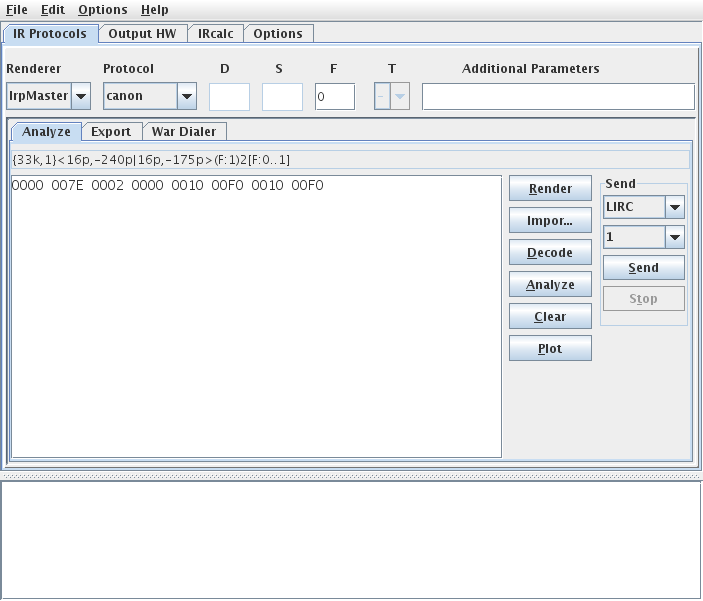
.
This is an extremely simple protocol, consisting of only two pulses, see plot (also from IrMaster):
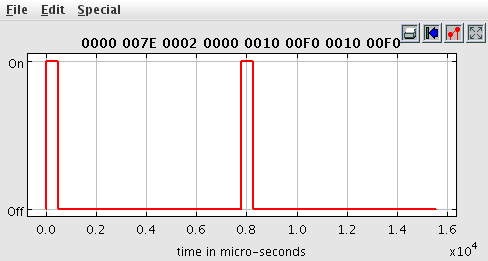
.
But for the record we prefer RMDU or KM files. We don't have much use for pronto hex or raw UEI learned codes.
Disagree. This "device" has exactly two commands, each consisting of exactly two pulses. Making a device upgrade in this case (possibly also including a custom executor (Vicky, are you ready to take up the challenge?)) is severe overkill.
Remark. RC5 is the name of the remote; it has nothing to do with the bi-phase protocol.
BTW, I have a Canon EOS450.

Posted: Thu Jul 12, 2012 4:51 pm
by Zibri
Yep..
Immediate shoot:

0000 007E 0002 0000 0010 00F0 0010 00F0
Delayed shoot:

0000 007E 0002 0000 0010 00AF 0010 00AF
I just programmed them as learned codes on the keys under the lid on my urc 7560 (I have letters from A to H and i use them for my camera and other appliances)
Since they are pulses at 0.6 and 0.8 I wonder if there are other "codes" putting the second pulse at 0.4 or 1.0.. I'll do some tests.
Edit: hmm there seems to be only those 2 codes.
Posted: Thu Jul 12, 2012 6:46 pm
by The Robman
Barf wrote:vickyg2003 wrote:But for the record we prefer RMDU or KM files. We don't have much use for pronto hex or raw UEI learned codes.
Disagree. This "device" has exactly two commands, each consisting of exactly two pulses. Making a device upgrade in this case (possibly also including a custom executor (Vicky, are you ready to take up the challenge?)) is severe overkill.
I'm sure people with non-learning remotes, or remotes using extenders, would disagree with you.
Posted: Fri Jul 13, 2012 9:19 am
by vickyg2003
Barf wrote:This is an extremely simple protocol, consisting of only two pulses, see plot (also from IrMaster):
But for the record we prefer RMDU or KM files. We don't have much use for pronto hex or raw UEI learned codes.
Disagree. This "device" has exactly two commands, each consisting of exactly two pulses. Making a device upgrade in this case (possibly also including a custom executor (Vicky, are you ready to take up the challenge?)) is severe overkill.
Remark. RC5 is the name of the remote; it has nothing to do with the bi-phase protocol.
I agree with mdavej, its normally easier to work with an RMIR or IR file, than with the individual learns, but the text in the post with only two signals isn't that bad. On the otherhand having to transcribe from diagrams is tough for me. I would have prefered UEI learns because I could have loaded them up into a similar remote and then shot both at the widget to make sure I got the timings right. Sometimes the devices are so finicky that the timings must be EXACT (read that the ME Tech draperies, sheesh). As you pointed out this is a 1 bit protocol, not any kind of challenge other than to make sure the timings are in tolerence.
two button upgrade can be found here.
https://www.hifi-remote.com/forums/dload ... e_id=11095
Posted: Mon Sep 14, 2020 1:39 pm
by StuartMW
I know this is an old thread but I wanted to thank "vickyg2003" for the KM setup (.txt) file that is in the file area.
https://www.hifi-remote.com/forums/dload ... e_id=11095
While I have learned signals in my OFA URC-8811 remote the ones posted in this thread did NOT work with my Canon EOS 6D Mark II camera (which supports the Canon RC-1, RC-5 and RC-6 remotes). No idea why not.
That said I loaded the KM file into the Keymap Master 9.22 Excel spreadsheet, changed a few minor things, imported the code into IR 8.03 and programmed my remote. That worked like a charm with my camera!
[As an aside it's been 9 years since I last used KM/IR so I had to relearn the basics.]
Although one can buy a genuine RC-6 on eBay for about $10 I now have a IR remote for my camera for free.

Not sure I'll use it much if at all.
BTW I just purchased a near new URC-8811 off eBay to replace my well worn (and failing) URC-8810 (which replaced my first URC-8811). JP1 remotes may be obsolete but they still do the job.