Page 1 of 2
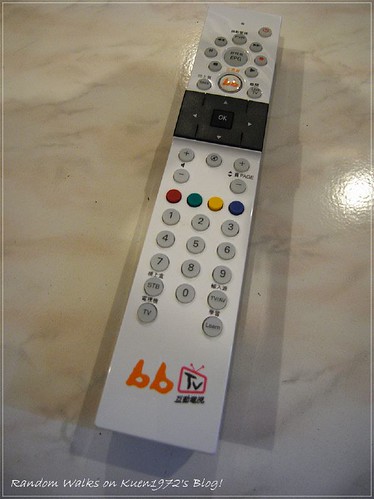
bin file for bbtv(Taiwan cable box)
Posted: Thu Dec 22, 2011 3:10 pm
by chuliu
I am based in Taiwan and I need bin file for the remote
http://farm3.static.flickr.com/2713/424 ... 1c4b8f.jpg
It is a digital cable stb.
On a side note, I read on a forum and some said they failed to learn the remote signal of this bbtv by using ofa remote and thus cannot generate bin file for this remote.
Is there some remote that the ofa remote cannot learn?
Re: bin file for bbtv(Taiwan cable box)
Posted: Thu Dec 22, 2011 4:54 pm
by eferz
Unless there's an modern miracle in technology, I don't think it is possible to create BIN files from that picture of the remote. Does the actual set-top box have a manufacturer and model number that we can reference?
Posted: Thu Dec 22, 2011 6:37 pm
by chuliu
It just says bbtv 7405.
Re: bin file for bbtv(Taiwan cable box)
Posted: Thu Dec 22, 2011 6:46 pm
by vickyg2003
chuliu wrote:
Is there some remote that the ofa remote cannot learn?
Some IR signals such as XMP signals are difficult to learn because of the complexity and the numerous timing pairs. Graham did some heavy duty correction to make sense of those signals, so that we can decode them and then create bin upgrades.
Posted: Thu Dec 22, 2011 8:12 pm
by eferz
chuliu wrote:It just says bbtv 7405.
There wasn't a match using the look-up tool for the Logitech Harmony Database (
http://www.logitech.com/harmony/components). So, there's no way for me to access the IR signals without the OEM remote.
You can try teaching the IR codes using the (
http://remotes.slingbox.com/) website then send us the XML links as explained in this guide (
http://slingbox.wikia.com/wiki/How_to_u ... s_website.). This will allow us to create the necessary files. Otherwise, you're going to have to buy yourself an
IR Widget to capture the signals from the original remote.
Posted: Sun Dec 25, 2011 4:49 am
by chuliu
I just learned that this particular stb is oem product by PRIME.
I also have tried the below bin file but in vain.
https://www.hifi-remote.com/forums/dload ... le_id=8398
the above file is suggested by someone from slingbox forum to use with stb made by PRIME.
Posted: Sun Dec 25, 2011 1:05 pm
by eferz
Would you mind pointing out where you've come upon this information? I looked up the technical support forums at answers.slingbox.com and only found two posts/threads relative to this file. Neither of them confirm your findings.
- http://answers.slingbox.com/message/2960#2960
- http://answers.slingbox.com/message/6944#6944
There hasn't been any activity in the respective threads in over six months. So, I can't tell if you're actually working with Alan Richey or your just grasping at straws. Also if this is your profile, "
chuliu", there then it appears you haven't even posted anything since you joined on December 4th, 2010.
Anyways, I took another look at the Logitech Harmony Database. Apparently, there's a new profile "Yahoo BBTV" which might be related. So, I recorded the IR signals with the JP1 tools to create the respective files.
BIN file Instructions.
Customization instructions:
I hope it works out for you. Merry Christmas and Happy Holidays!
Posted: Sun Dec 25, 2011 1:48 pm
by chuliu
Hi
the thread I referred to is the second link you found and is
http://answers.slingbox.com/message/6944
The stb in the thread is oem by PRIME, too.
But the bin suggested by alan is titled Kbro Hyundai Digital Technology digital set top box (DSTB)
But it is confirmed to work in the thread.
So I gave it a try but failed.
I do want to try remotes.slingbox.com but I currently do not have the remote on hand. I will definitely post the xml file if I get the remote.
Thanks for the bin file and I will try it later.
Posted: Sun Dec 25, 2011 2:53 pm
by eferz
chuliu wrote:the thread I referred to is the second link you found and is
http://answers.slingbox.com/message/6944
The stb in the thread is oem by PRIME, too.
But the bin suggested by alan is titled Kbro Hyundai Digital Technology digital set top box (DSTB)
But it is confirmed to work in the thread.
So I gave it a try but failed.
Ah, okay. I understand now. It is possible that Prime Electronics & Satellitics (PESI) manufacturers many OEM set-top boxes but uses different IR profiles for each of them. Where exactly did you get the correlation that the BBTV box is made by Prime. I do not see that referenced anywhere.
chuliu wrote:I do want to try remotes.slingbox.com but I currently do not have the remote on hand. I will definitely post the xml file if I get the remote.
If you do, I only need the GUID number not the file. I prefer to download it directly from Sling using the following URL, "
https://secure.sling.com/irservices/res ... rntremote/{guid}.xml". I use Firefox to connect to the respective URL and then use "
File >
Save Page As...". This allows me to open the downloaded file in RMIR and see your results in the "
Learn Signals" tab.
chuliu wrote:Thanks for the bin file and I will try it later.
You're welcome glad to help. I hope it works out for you, please give us feedback when you do.
Posted: Sun Dec 25, 2011 8:37 pm
by chuliu
It's from a news dated 2009 but it is in chinese:
http://cbit.pixnet.net/blog/post/289338 ... 0%E6%A8%82
It says that PRIME was the only stb provider for bbtv(cable tv company) and both hyundai and prime were providing stb for kbro(another cable tv company in Taiwan)
I see that I only need to post the url now. But judging from other people's post in chinese blog, the bbtv remote probably cannot be learned using remotes.slingbox.com because it is XMP protocol. I actually ordered an IR widget from Tommy at hifi-remotes the other day. Hopefully I can do it with the IR widget.
Posted: Mon Dec 26, 2011 2:13 am
by alanrichey
chuliu wrote:But judging from other people's post in chinese blog, the bbtv remote probably cannot be learned using remotes.slingbox.com because it is XMP protocol.
The XMP protocol has now been built so you should be able to build it using RemoteMaster.
Posted: Fri Jan 20, 2012 2:23 am
by chuliu
hi finally got the chance to use remotes.slingbox.com to learn the remote. however, i found that the site seems not able to learn the remote keys. for example, the numeric key would work individually but when i try to key in 54, it only turn the channel to 4 instead. also, the channel up and down will not be emulated. please help.
Posted: Fri Jan 20, 2012 2:34 am
by chuliu
https://secure.sling.com/irservices/res ... 92664/keys
here seems to be the xml file in my webslingplayer.txt
Posted: Fri Jan 20, 2012 5:49 am
by eferz
chuliu wrote:hi finally got the chance to use remotes.slingbox.com to learn the remote. however, i found that the site seems not able to learn the remote keys. for example, the numeric key would work individually but when i try to key in 54, it only turn the channel to 4 instead. also, the channel up and down will not be emulated. please help.
here seems to be the xml file in my webslingplayer.txt
https://secure.sling.com/irservices/res ... 92664/keys
Okay, from what you have so far it looks like this remote uses the MCE protocol and a toggle bit. This needs to be flipped any time a key is pressed. That explains why the learned signals aren't working after being pressed successively. Inside of a learned signal the toggle bit remains fixed and isn't being flipped appropriately.
Out of the twenty-three total commands; twelve were untested and four of them were malformed. But, at least I had enough to try and guess some of the commands. The number keys should work properly now. But, you'll need to reteach the keys which are missing or do not work.
Here are the commands that are included:
- Back (untested)
- ChannelUp/Page up (untested)
- ChannelDown/PageUp (Untested)
- DirectionDown (untested)
- DirectionLeft (untested)
- DirectionRight (untested)
- DirectionUp (untested)
- Guide (untested)
- Mute (untested)
- PowerToggle (untested)
- 0
- 1
- 2
- 3
- 4
- 5
- 6
- 7
- 8
- 9
I used the JP1 tools to create the respective files from the recorded the IR signals of your Guid.XML file.
BIN file Instructions.
Customization instructions:
Posted: Fri Jan 20, 2012 6:37 am
by chuliu
Hi the buttons now work flawlessly on my slingbox.
This is very impressive.
You guys are really helpful.
I will do the rest of the buttons once I have a chance again.