Page 1 of 3
URC 9960 Kameleon Extender Version 2 - Update
Posted: Thu Jan 22, 2004 6:37 pm
by Nils_Ekberg
I have uploaded a NEW Version 2 of the Extender for the URC9960 to the jp1 group Extender file section.
In addition to the features listed below I have added an option to disable the backlight motion detector from IR. This in effect is a software solution to clipping the motion sensor wires
URC9960 Extender 2
- This version includes:
Faster Macros
Macros on all buttons
Device Specific Macros
Long and Double Keypress
ToadTog
Pause protocol
Illumination of HT Icon
Smoother screen transitions
User control of backlight timer (in IR)
User defined control of what 1st button press does when backlight is off (in IR)
Smoother screen transitions
Please see the included ReadMe.txt file for instructions on all functions
NOTE: Just incase it isn't clearly documented, the way to activate this extender is different than others since the unextended remote does not allow keymoves on the Power button. After installing the IR file in the remote you will need to press the TV button then the FORMAT button. If it installed OK there will be 4 flashes of the lower LED bar.
Posted: Wed Dec 07, 2005 4:15 pm
by 2devnull
Would this work with the 9964? Thank you.
Posted: Wed Dec 07, 2005 6:58 pm
by Nils_Ekberg
I am not familiar with the 9964 other than thinking it is a new version of the 60 so I am not sure if it will work.
When you download with IR what RDF does it pick for you?
Posted: Thu Dec 08, 2005 9:41 am
by 2devnull
Nils,
I will get that information to you as soon as I receive the 9964 and the JP1 cable and pogo adapter to make the download. However, I am hoping that the 9964 is the same as the 9960 with just the RF extender included. Hope that helps for now.
Posted: Tue Dec 13, 2005 11:34 pm
by 2devnull
I have got the 9964, the back of the remote state it is URC-9964B00. However, I am unable to acquire a JP1 cable and pogo adapter. Emailed Hovis a few days now but no reply. Is there anywhere to acquire these? diygaget does not have pogo adapter. I am a bit lost on how to proceed now without it. Even though I can make uploads using WAVs, I would like to make an initial download from the 9964 and save it first but that cannot be done with the modem AFAIK. Any ideas?
Posted: Wed Dec 14, 2005 2:47 am
by Capn Trips
The Hovis site allows you to place orders without e-mail communications in advance. This is not his primary source of income, as one can readily imagine. He is notoriously slow, but ultimately honest and reliable. I would place the order and wait patiently.
Posted: Wed Dec 14, 2005 7:14 am
by underquark
Order the JP1 cable from diygadget and the pogo pin adapter from hovis; whilst waiting for the pogo pins to arrive why not give
"the springs" a try. Not as elegant as pogo pins, probably a bit fiddlier to use (don't know for sure as I haven't got pogo pins) an they might ultimately scratch your pads if you did manny uploads and downloads but if you have even mediocre soldering skills then you could make one in less than an hour.
Posted: Wed Dec 14, 2005 12:19 pm
by 2devnull
Thanks for "the springs" idea. I am looking here and would like to know what diameter I should get?
http://www.ofrei.com/page475.html
Posted: Wed Dec 14, 2005 7:14 pm
by underquark
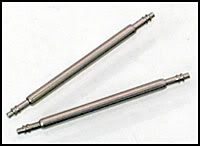
It's the thicker ones (1.8mm I think) but slightly narrower ones can stretch a little and slightly thicker ones ought to hold with a dab of solder. Short ones might be more manageable (less flexing or wobbling) but long ones could reach through small holes drilled into the case of the remote. Long ones can also be cut shorter but not vice versa!
Since you're going to rip them apart anyway then I'd go for the economy ones - $3.50 for a package of 100 gives you plenty to play with. I note that they have a minimum order of $15.00 plus shipping so if your budget is tight then you can also find these things on eBay (e.g.
here).
Why not buy 1000 mixed economy ones for $19.50, use what you need and re-sell the remainder at $2/pair plus postage? (Then PM me for details of where to send my commission

).
Posted: Wed Dec 14, 2005 7:49 pm
by 2devnull
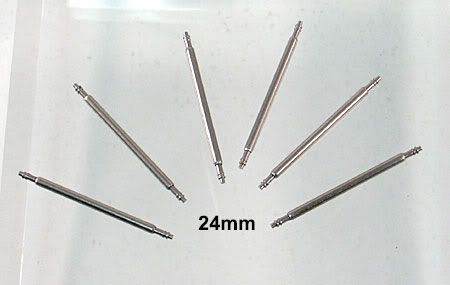
oh man! Because of the minimum order restriction, I ended up buying 6 x 1.5mm (24 mm length) from a company in the UK (on eBay). I hope they will work. Came up to $5.00 USD.
http://i16.photobucket.com/albums/b48/f ... mm-x-6.jpg
http://i16.photobucket.com/albums/b48/f ... g-bars.jpg
Posted: Wed Dec 14, 2005 7:56 pm
by 2devnull
BTW - what is perf board and where do you get it?
Posted: Wed Dec 14, 2005 11:13 pm
by greenough1
Posted: Thu Dec 15, 2005 8:12 am
by 2devnull
which one of these perf boards will line up with the JP1 pads on the 9960/9964? I guess it will also need to align with the male header. Thanks.
Posted: Thu Dec 15, 2005 9:32 am
by Nils_Ekberg
If you have a radio shack near you they will have the perf board si just take the male header with you to match up.
By the way, have you tried downloading with just the male header held against the pads/holes. If you are real steady it will work most times.
Posted: Thu Dec 15, 2005 3:19 pm
by underquark
2devnull wrote:which one of these perf boards will line up with the JP1 pads on the 9960/9964? I guess it will also need to align with the male header. Thanks.
Get a small (15x10mm) piece of fairly absorbent (i.e. not shiny) paper. Draw on the pads with a water-based felt-tip or marker pen. Carefully press paper against pads (and then wipe the pads clean). Take paper to shop and see if the holes on the perf board will line up with the marks on the paper. Alternatively just drill some holes in a small piece of plastic or something, see if they line up with the holes and fine-tune as necessary. Don't drill anywhere near your actual remote.
The perf board is only to facilitate the placement of either springs or pogo pins since both have a tendency to slide off the pads. As Nils says, if you hold the male header real steady on the pads you might manage a download (I managed it just the once and then came up with the springs idea because I couldn't easily get my hands on pogo pins).