Page 1 of 3
Actual OneForAll Smart Control Pro Remotes (URC 7981 / URC 7985) useable with RemoteMaster
Posted: Sun Jan 25, 2026 4:45 pm
by MacGyver_MUC
Dear All,
I recently got an OneForAll Smart Control Pro 8 (URC 7981 R00) and I`m wondering if this Remote could also be programmed locally through RemoteMaster.
(Today I have run in diffrent Problems with App-Programming; mostly that completly learned devices are not shown as device entry after learning them. Additionally I have problems with LEFT/RIGHT/UP/DOWN-Buttons of the learned remote (Dune HD Premier 4K - Google-Remote); I assume this is a result of any learning problem. So I hope that I could use RemoteMaster somehow for better programming.)
First challenge: The Remote (URC 7981 R00) does not have a PIN-Out soldered in; only blank PCB-Holes.


Devices/Remotes I plan to use:
TV: Samsung GU43TU6979
STB: Vu+ Duo 4K SE
Mediaplayer 1: Dune HD Premier 4K (Google-Android-Remote)
Mediaplayer 2: Kodi Libreelec / VDR Linux [
www.tvdr.de] (Generic-RC6-Windows-Remote should work)
Soundbar: Samsung Q995GF
HDMI-eARC-Switch: Feintech VAX04201 or VAX04101 or AX340
Any help / suggestions are greately appreciated!
Best regards,
MacGyver (from Munich, Germany)
Re: Actual OneForAll Smart Control Pro Remotes (URC 7981 / URC 7985) useable with RemoteMaster
Posted: Sun Jan 25, 2026 6:05 pm
by The Robman
We don't have an RDF for the 7981, but we do have one for the 7980. I don't know if these 2 remotes are similar.
Do you have soldering skills? If so, you should solder in a 6-pin connector into the spot where it is designed to go, and I am confident that we can get this remote working with JP1. Of course, you will also need a JP1 cable.
MacGyver_MUC wrote: Sun Jan 25, 2026 4:45 pmToday I have run in diffrent Problems with App-Programming; mostly that completly learned devices are not shown as device entry after learning them. Additionally I have problems with LEFT/RIGHT/UP/DOWN-Buttons of the learned remote (Dune HD Premier 4K - Google-Remote); I assume this is a result of any learning problem. So I hope that I could use RemoteMaster somehow for better programming.)
I think you have some misunderstanding of how learning and device creation work. You should probably start reading the Wiki.
MacGyver_MUC wrote: Sun Jan 25, 2026 4:45 pmDevices/Remotes I plan to use:
TV: Samsung GU43TU6979
STB: Vu+ Duo 4K SE
Mediaplayer 1: Dune HD Premier 4K (Google-Android-Remote)
Mediaplayer 2: Kodi Libreelec / VDR Linux [
www.tvdr.de] (Generic-RC6-Windows-Remote should work)
Soundbar: Samsung Q995GF
HDMI-eARC-Switch: Feintech VAX04201 or VAX04101 or AX340
We probably have ready-made upgrades for most of your devices, but as you have a learning remote, we can help you create upgrades, once you get everything working.
Re: Actual OneForAll Smart Control Pro Remotes (URC 7981 / URC 7985) useable with RemoteMaster
Posted: Sun Jan 25, 2026 11:39 pm
by MacGyver_MUC
The Robman wrote: Sun Jan 25, 2026 6:05 pm
We don't have an RDF for the 7981, but we do have one for the 7980. I don't know if these 2 remotes are similar.
Have seen that (7980) in the list of supported remotes in RemoteMaster. How to know if it will somehow work with the "7980"-Type in RemoteMaster? And if that will not work: What has to done to get a completely new remote - namely URC 7981- into Remote Master?
The Robman wrote: Sun Jan 25, 2026 6:05 pm
Do you have soldering skills? If so, you should solder in a 6-pin connector into the spot where it is designed to do, and I am confident that we can get this remote working with JP1. Of course, you will also need a JP1 cable.
Unfortunately I personally don`t have PCB-Soldering-Skills; but I hope that an "old" radio- and television technican and his company I know could help me with that.
For the JP1 Cable I found a FTDI FT232 RL-Cable at a german webshop:
https://www.welectron.com/FTDI-FT232RL- ... apterkabel
Does this look suitable?!
The Robman wrote: Sun Jan 25, 2026 6:05 pm
I think you have some misunderstanding of how learning and device creation work. You should probably start reading the Wiki.
I wonder what I might could have done wrong: I just used the official OFA Advanced Android App and completely manually learned in the source remote of the Dune HD Premier 4K (the one profile available in the OFA-Database has not work; I assume they only have the profile for non Android TV-Devices of Dune HD) by placing the source remote 2 cm before the OFA and learn each button press manually. After finishing that unfortunately the official Android OFA-App does not show the learned device (but has learned it and its working OK for most button presses).
As the remotes definition is publicly available
https://dune-hd.com/support/rc/dunehd_g ... codes.html with Pronto HEX Codes I assume it will be easy to import such a remote through RemoteMaster. (Also hoping that imported buttons will also work better as the manually learned ones!)
Best regards,
MacGyver
Re: Actual OneForAll Smart Control Pro Remotes (URC 7981 / URC 7985) useable with RemoteMaster
Posted: Mon Jan 26, 2026 8:16 am
by The Robman
When you previously mentioned the "app", I assumed you were talking about the JP1 app "RemoteMaster" (as you're on a JP1 forum), but now I see that you're talking about some "official OFA Advanced Android" app that I hadn't heard of before, so I don't know anything about it. Regardless, you say the OFA app "does not show the learned device" but then in the same sentence you say "but it has learned it and it's working OK" so I am confused, do the learns work or not, and if they do, what do you mean by "does not show the learned device"? If it doesn't show it, how did you confirm that it works? Can you see where I'm getting lost?
As for the 7980 vs. 7981, I have no idea if they are similar enough to share an RDF or now, we won't know that until you get JP1 set up and do a download from the remote. If the 7981 has a different signature to the 7980, we will need to create a new RDF for you.
In the JP1 world, the way "learning" and "devices" work together is like this. Assuming you have a new device for which there isn't a ready-made upgrade, you would "learn" the buttons from the OEM remote using the JP1 learning remote, then you would download the memory using your JP1 cable and the RMIR side of the "RemoteMaster" program. This would show you what the learns look like (ie, the protocol, device code and button codes). You would then use that information to create a device upgrade, which you would then use instead of the learned signals.
Re: Actual OneForAll Smart Control Pro Remotes (URC 7981 / URC 7985) useable with RemoteMaster
Posted: Mon Jan 26, 2026 3:40 pm
by MacGyver_MUC
The Robman wrote: Mon Jan 26, 2026 8:16 am
When you previously mentioned the "app", I assumed you were talking about the JP1 app "RemoteMaster" (as you're on a JP1 forum), but now I see that you're talking about some "official OFA Advanced Android" app that I hadn't heard of before, so I don't know anything about it.
Sorry, my mistake should have mentioned that at first!
The Robman wrote: Mon Jan 26, 2026 8:16 am
Regardless, you say the OFA app "does not show the learned device" but then in the same sentence you say "but it has learned it and it's working OK" so I am confused, do the learns work or not, and if they do, what do you mean by "does not show the learned device"? If it doesn't show it, how did you confirm that it works? Can you see where I'm getting lost?
In the OFA Advanced App you start with "Add a Device"; next you could select which Device you would like to add ("TV", "MEDIA", "STB", etc.); then you are presented with the "Database-Selection", where you would select your Device Manufacturer (for Example "Samsung") or you could choose "Learn from Remote"; if you select a Manufacturer Screen will change to next step - "Power Button Test", you will be presented with a virtual Power-Button in the OFA Advanced App and they will ask to point the OFA-Remote in the Direction of the Device and press the "In-App Power-Button", once you press that Button the App asks "Has it worked? - Device is ON?", if "Yes" than the App will download full set of remote codes to the OFA-Remote, if "No" the App will cycle through additional codes and ask you to try again.
For the Dune HD Android-Remote I selected "Learn from Remote" (as the only code available in "Database for "Dune" has not worked.
By learning you will press each Button on the Original Remote until OFA-Remote blinks twice. You do that for each of the buttons. After finishing normally the learned Device should be shown in OFA Advanced App Home-Screen (it previously has worked for me); unfortunately last saturday both times I tried the learned Device has not been shown in OFA App.
Nonetheless: If I use the OFA-Remotes-Buttons for this device (also device is selectable with the Device-Button on OFA-Remote!), they mostly work. For example: "Power" turns Device On or Off. So therefore I assume learning has worked fine and the OFA-Remote has this newly learned device in its internal storage.
The Robman wrote: Mon Jan 26, 2026 8:16 am
In the JP1 world, the way "learning" and "devices" work together is like this. Assuming you have a new device for which there isn't a ready-made upgrade, you would "learn" the buttons from the OEM remote using the JP1 learning remote, then you would download the memory using your JP1 cable and the RMIR side of the "RemoteMaster" program. This would show you what the learns look like (ie, the protocol, device code and button codes). You would then use that information to create a device upgrade, which you would then use instead of the learned signals.
Is it also possible to "import" known infrared-codes (based on Pronto-Hex and/or other codings) back to the OFA? (I hope/assume this way the codes will be more pecise than any really learned codes!?)
See example with the publicly available Dune HD Android-Remote posted earlier in this thread!
Question regardings JP1-Cable:
- Have you had any chance looking if the cable at Welectron-Shop would be suitable?
- Which JP1-Cable Version will be needed for URC 7981?
Best regards,
MacGyver
Re: Actual OneForAll Smart Control Pro Remotes (URC 7981 / URC 7985) useable with RemoteMaster
Posted: Mon Jan 26, 2026 4:45 pm
by The Robman
I will have to investigate this OFA app, just to see what it does, as I've never heard of it before.
Yes, we do use other sources of info on IR signals as sources for our upgrades, we have created many JP1 upgrades based off of Pronto hex obtained from Remote Central and other places. I just built an upgrade for your Dune here:
https://www.hifi-remote.com/forums/app. ... e_id=27283
Yes, the USB cable that you found looks like it would work perfectly, just be aware that it has 6 individual connectors, rather than the 2*3 connector that your remote would require (once you have soldered in a 6-pin header). You can either chose to connect them one at a time, or replace the individual connectors with a 2*3 connector. More info
here.
Re: Actual OneForAll Smart Control Pro Remotes (URC 7981 / URC 7985) useable with RemoteMaster
Posted: Tue Jan 27, 2026 6:36 am
by mathdon
I have installed the OFA Advanced app on my Android phone and will get a URC 7981 so that I can investigate this. It looks identical to the URC 7980, which I have. However, the 7980 is not supported by the OFA Advanced app but it does have the 6-pin connector fitted. I do not like either soldering or dismantling remotes to install a connector, but I will see what I can do.
Re: Actual OneForAll Smart Control Pro Remotes (URC 7981 / URC 7985) useable with RemoteMaster
Posted: Tue Jan 27, 2026 8:20 am
by The Robman
I would be interested to know how the OFA app communicated with the remote.
Re: Actual OneForAll Smart Control Pro Remotes (URC 7981 / URC 7985) useable with RemoteMaster
Posted: Tue Jan 27, 2026 8:40 am
by MacGyver_MUC
The OFA Advanced App seems to use bluetooth to pair with the OFA Remote.
At least it describes a pairing process (Press DEVICES + ACTIVITYS together until TV-LED blinks).
Re: Actual OneForAll Smart Control Pro Remotes (URC 7981 / URC 7985) useable with RemoteMaster
Posted: Tue Jan 27, 2026 2:32 pm
by MacGyver_MUC
Speaking of Bluetooth: Maybe I managed to get an overpriced BLED112-V1 from eBay-UK.
As seen in other thread / posts on this board this should be also a possible method of access withe RemoteMaster > Correct?
(I wonder why it only work with the discontinued BLED112: Whats the background reason for that?)
Re: Actual OneForAll Smart Control Pro Remotes (URC 7981 / URC 7985) useable with RemoteMaster
Posted: Fri Jan 30, 2026 6:35 am
by mathdon
As you know, there are two possible ways for RMIR to interact with the URC-7981. One is with Bluetooth, the other is with the 6-pin connector. Both present considerable problems. The Bluetooth access is designed for use with the OfA Advanced Setup phone app, not for general Bluetooth access, and uses the Bluetooth Low Energy (BLE) interface. UEI (Universal Electronics Inc), of which OfA (One for All) is a trade name, has implemented only that part of the BLE specification that it needs for the app. As a result, the Bluetooth implementation built into Windows 10 and 11 will not recognise the BLE interface of the remote. The BLED112 dongle is more forgiving, however, and will recognise it. That is why you need the BLED112.
I wrote the Bluetooth support for RMIR based on the BLE interface used by the URC-7980 for the earlier OfA (non-advanced) Setup phone app. Although this interface is recognised by the BLED112, that does not mean that it will immediately work with RMIR. RMIR had no Bluetooth interface. I had to write both a new RMIR interface (JP2BT) and an extender for the URC-7980. An extender is a piece of software that needs to be installed in the remote to extend its capabilities. It is specific to the model of remote concerned. There are three OfA remotes that used the original OfA Setup app, the URC-7980, URC-7955 and URC-7880. Each required a different version of the extender.
The URC-7981 will also require an extender to work in full with the BLED112. Extenders are difficult and time-consuming things to write. At present, RMIR will recognise the URC-7981 and go part way towards connecting with it before giving an error message. If you want to try this, here is what to do. First you must have the BLED112 installed in the remote. To check this, open the Device Manager on Windows 10 or 11 and select the Ports (COM & LPT) entry. The list it shows should include "Bluegiga Bluetooth Low Energy (COM3)". Make a note of the COM number, which may not be 3. If that is OK then:
1. Open RMIR and go to the Remote > Interface menu item.
2. Select JP2BT.. which opens a Port Selection dialog.
3. Select the port "COMx" where x is the COM number reported by the Device Manager.
4. Select the Options > Advanced menu on the RMIR menu bar and select "Find all Bluetooth".
5. Press the Bluetooth symbol on the RMIR toolbar. This opens a Remote chooser dialog. Be sure to read the first paragraph of the notes.
6. Press the Search button. If this is the first time you are searching, press the Devices and Activity buttons on the remote and hold them until the LED starts to flash. The "Select remote:" panel will display a list that should include an entry like "OFA Smart Control 38:c9:7c". The numbers will be different, as they are specific to your particular remote. Select that entry.
7. Press the Connect button. The Progress Bar should go up to 20 before you get an error message that says "Please note that this remote requires an extender in order to support uploading via its Bluetooth interface."
8. Press OK. You then get another error message, "Error connecting to remote OFA Smart Control 38:c9:7c" (but with the numbers for your remote).
This is as far as you can get at present. The reason for selecting "Find all Bluetooth", which has to be selected every time, is that this remote is currently unknown to RMIR. At least it confirms that RMIR is recognising the URC-7981 through its Bluetooth interface.
The other interface to the URC-7981 is through the 6-pin connector. This needs pins soldered into the holes. This too is not straightforward as they need to be soldered from UNDERNEATH, which requires opening the casing. In a post in 2016, 3FG reported on his experience of opening a URC-7980, which is essentially identical to the URC-7981. He wrote:
"I disassembled the case of the remote. At the bottom of the remote, there are two rectangular 3x4mm holes under the battery cover. I could insert a small screwdriver and lever the keypad half of the case to open up a small gap at the center bottom of the remote. I used old feeler gauge blades of 0.006 and 0.009 inches thickness. Then working to one of the bottom corners, the clips at the bottom of the remote released. That gave a big enough gap to insert a plastic spudger and work around all of the remote. The remote suffered no cosmetic damage nor broken clips."
I have not tried this and don't even know if I have the tools to try. But soldering in pins is necessary for two reasons. For me, to extract the data I would need to develop an extender, and for you because any extender has to be installed without Bluetooth, using the 6-pin connector.
If all this is not bad enough, I have changed my computer since my original work with the BLED112. I will have to install the BLED Software Development Kit on my new computer before I can do anything else. I have started to do that but found problems. I am not sure if everything is still available since the BLED112 is obsolete as far as the manufacturer is concerned.
At present I have the interest and enthusiasm to start on all the necessary tasks. This is not really for your benefit, it is because it is an interesting challenge. I don't know how long I will continue with it, though. I may meet some insuperable obstacle or lose interest or enthusiasm. I will report on progress, or lack of it, here. Keep watching.
Re: Actual OneForAll Smart Control Pro Remotes (URC 7981 / URC 7985) useable with RemoteMaster
Posted: Sat Feb 07, 2026 2:45 pm
by MacGyver_MUC
Dear Rob,
Dear Graham,
I received back my remote today with socket soldered in.

In the meantime I changed to the
Waveshare USB to TTL (C)-Adapter.
I connected
Pin 1 = Empty
Pin 2 = Yellow (RTS)
Pin 3 = Black (GND)
Pin 4 = Green (TXD)
Pin 5 = Empty
Pin 6 = Blue (RXD)

Tried to Download from attached remote but unfortunately I only get the error "No remotes found!".
I tried the download with a factory reset remote as well as one with the TV set-up.
Is there still any chance to make it work somehow?
Re: Actual OneForAll Smart Control Pro Remotes (URC 7981 / URC 7985) useable with RemoteMaster
Posted: Sat Feb 07, 2026 3:45 pm
by The Robman
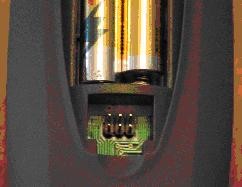
I wish I could see exactly how they soldered in the pins, because usually the pins come as part of a "header" strip, help together by black plastic, that should be visible when you look at the pins. I'm afraid they entered the pins from the other side and then soldered them on this side, which would mean the pins are not long enough and might not be making contact with the connectors that you have on them.
This is what the 6-pin normally looks like. Notice the black base, which is missing from yours?
- 6-pin.jpg (11.06 KiB) Viewed 27012 times
Re: Actual OneForAll Smart Control Pro Remotes (URC 7981 / URC 7985) useable with RemoteMaster
Posted: Sat Feb 07, 2026 4:07 pm
by MacGyver_MUC
Rob I assume this has been done intentionally to ensure that the battery compartment could be closed without any problem.
I just dry-fitted the raw-cabeling (have not turned on in this state to avoid any shorts!) without their plastic encasings and I think they in fact reach the socket correctly.

Re: Actual OneForAll Smart Control Pro Remotes (URC 7981 / URC 7985) useable with RemoteMaster
Posted: Sat Feb 07, 2026 4:27 pm
by The Robman
OK, can RMIR read it, connected like that?