Page 1 of 2
Two hopefully simple questions
Posted: Sun Sep 10, 2017 7:29 am
by sti491
Hi all. Have not been on this site much for 2 years after jumping into JP1 with both feet with the help of Mdavej and others. After I got my JP1 remotes working at our condo, all has been good. However we just moved to a new house. Same Visio TV, same Polk Soundbar, switched from a Charter DVR/box to Spectrum, and the nice guy I bought the place from left me his Apple TV, which is one version newer than the one I have at the condo. It is a Gen 3, mine in the condo is a version 2.
So I have two challenges:
1. My previously JP1 extended RCA RCRPO5B remote does everything right on my new set-up, except it does not control the newer gen 3 Apple TV. I am using set-up code 2615 for my Apple TV that worked great on my older one, but not this one. Does anyone know what code I should try on this one?
2. Not a JP1 question. Should be simple, but I can't seem to program the volume control on my new Spectrum remote. It defaults to "TV" for volume, when using CBL. My Polk 9500BTSound bar doesn't have a code listed in the Spectrum remote directions that works, so I used the sound bar learning features for "Aux" on the Spectrum remote. It will operate the soundbar volume when you push Aux.
Then I tried several times following the Spectrum remote instructions to change the remote volume from TV to Aux, when in Cbl mode. I failed each time??? It always went back to the default TV button for volume. So I worked around it by using the Polk sound bar learn feature for the Spectrum remote TV button, which works great... But, if I want to access my TV smart features, the TV button won't do it because it now controls the soundbar. I could program the Aux button for the TV, but it seems silly to have the TV button work the soundbar and the Aux button work the TV. I wonder why I can't get the remote in Cbl mode to use the Aux button, when the Aux is learned for the Polk soundbar? Any thoughts?
Posted: Thu Sep 14, 2017 10:16 am
by vickyg2003
I guess these questions were not as easy as you thought.
I thought all the appletv gens used the same code. Perhaps you clobbered something when you changed things around.
As far as a nonjp1 remote can't help you there. We've seen a few jp1 remotes come through here with bad instructions for this procedure.
If you suspect the cable remote is a uei remote try the various vpunch through techniques detailed in the wiki.
Re: Two hopefully simple questions
Posted: Thu Sep 14, 2017 11:50 am
by The Robman
sti491 wrote:1. My previously JP1 extended RCA RCRPO5B remote does everything right on my new set-up, except it does not control the newer gen 3 Apple TV. I am using set-up code 2615 for my Apple TV that worked great on my older one, but not this one. Does anyone know what code I should try on this one?
You should probably create a dedicated Code Search forum post for this one.
sti491 wrote:So I worked around it by using the Polk sound bar learn feature for the Spectrum remote TV button, which works great... But, if I want to access my TV smart features, the TV button won't do it because it now controls the soundbar.
Your terminology is confusing, did you re-program the soundbar to respond to the TV remote signal, or did you re-program the Spectrum remote to send the soundbar signal instead of the TV signal (for the volume buttons)?
If it's the former, the remote should still work the TV even though it also controls the soundbar, no?
Like Vicky said, have you determined if the Spectrum remote is a UEI remote? If not, can you try to find a user manual for it online and then post a link to it, we can usually spot the UEI remotes from the user manuals.
Posted: Thu Sep 14, 2017 12:14 pm
by mdavej
All ATVs use the same codes. My guess is the ATV itself was taught different codes in the past (it can learn any arbitrary codes, sort of like your soundbar). Must be a way to reset it.
Posted: Fri Sep 15, 2017 9:14 am
by sti491
Thanks for all the input. I recognize most of you from several years ago! The Spectrum remote is a "UR5U-8780-TWC". I'll mess with it some more, try more "TV" codes. It works the TV volume and to clarify, I used the Polk Sound Bar Learning method on the TWC remote "TV" button, because that is the ONLY button I can seem get the TWC remote to work volume from when the remote is operating Cable (from cbl button).... I can't get the TWC remote to use any other button than TV (such as "aux", my preference) to run volume when it's controlling cable.
I restored the Apple TV. Now my JP1 remotes work perfectly! Thank you so much!
Eventually as I get all my other new house move-in stuff accomplished, I will fine tune my JP1 programming for some of the button sequence differences bwteen Charter and Spectrum. So I'll be back on with more questions I' sure. I got pretty decent with all the JP1 lingo and methods, Toad togs, etc... but after several years of not using my JP1 brain, I'm really rusty!
Posted: Fri Sep 15, 2017 10:15 am
by The Robman
sti491 wrote:I used the Polk Sound Bar Learning method on the TWC remote "TV" button
I'm still not quite understanding your terminology here, are you making the TWC remote learn the soundbar signal, or are you teaching the soundbar to respond to the TV signal from the TWC remote.
Posted: Fri Sep 22, 2017 7:11 am
by sti491
The sound bar teaches the remote.
Posted: Fri Sep 22, 2017 10:07 am
by mdavej
I've never heard of such a thing. Can you please post the model number of the sound bar?
Posted: Fri Sep 22, 2017 11:33 am
by sti491
It's a Polk 9500bt I believe. Not home right now. That's not my issue though I don't think. It's getting my nonjp1 Spectrum remote to use the aux button for volume while it's operating cable. I tried following the instructions. The only button that will operate sound when in cable is the tv button. I am doing something wrong. I'll figure it out eventually.
Posted: Fri Sep 22, 2017 12:42 pm
by The Robman
sti491 wrote:The sound bar teaches the remote.
I wish you wouldn't keep changing the terminology because that makes this confusing for us, and eventually people will stop trying to help.
So, are you saying that you put the TWC remote (which is not a JP1 remote) into learning mode, and then you press buttons on the sound bar remote to teach the TWC remote the signals?
Posted: Fri Sep 22, 2017 2:18 pm
by sti491
Robman, thanks for your efforts on my behalf. I regret my terminology is frustrating. I have not communicated here in a long time. Terminology can be tricky if you are unaccustomed to it. I assure you it is unintentional.
The TWC remote (which is not a JP1 remote) is NOT in learning mode for the soundbar. The soundbar has a sequence of button pushes that tells it to learn whatever remote buttons you are pushing at the time until you cancel it's learning..
Lets see if this image of my soundbar manual will link:
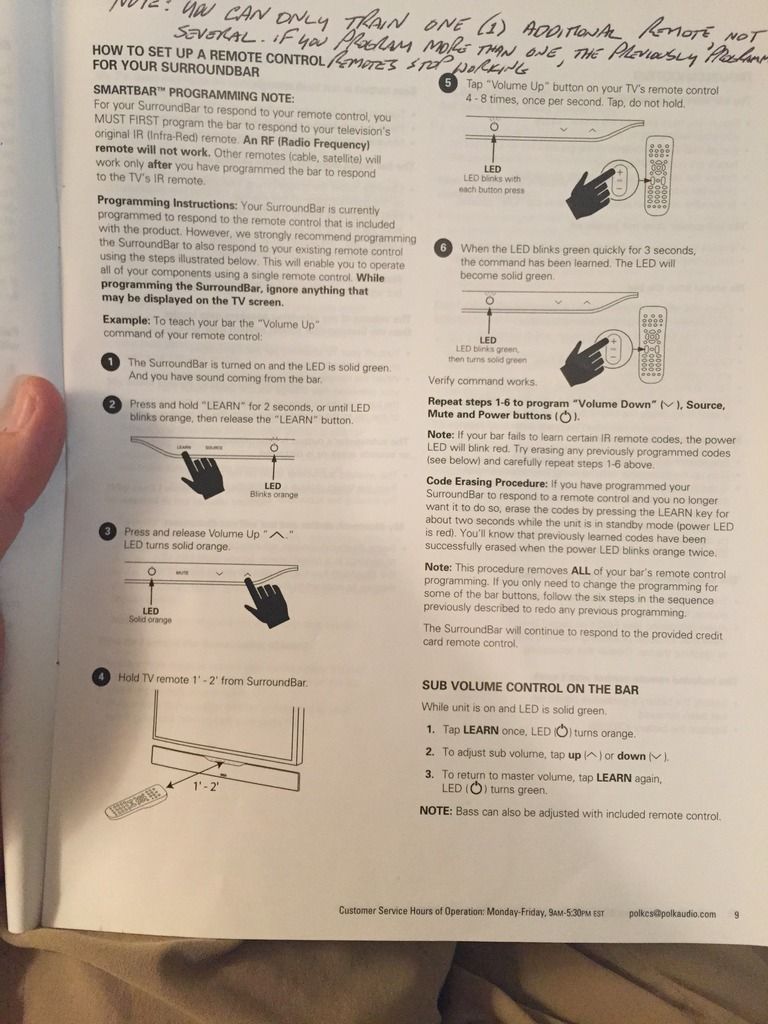
But, the good news is I figured it all out! So I am good. If out of curiosity the soundbar protocol is still a question for you, please post up a question and I will try to answer it.
Thanks!
Posted: Fri Sep 22, 2017 2:45 pm
by The Robman
So it's the soundbar that is doing all the learning? It's not teaching the TWC remote anything, right?
So, if that's the case, when you press the volume buttons, wouldn't you get both the TV and the soundbar responding?
Posted: Fri Sep 22, 2017 2:54 pm
by sti491
Yes. if you you "learn" the soundbar with the TV button on the Time Warner remote. No, if you do it with the Aux button, which is what I eventually did.
The only small issue I have now with the TWC non JP1 remote is, I can get it to turn my Vizio TV on and off using the code they provided. But, if I push the TV button, and then any other button on the remote, the remote still operates the Cable box, not the TV. It would be nice if it operated the TV functions after pressing the TV button
There has to be a way to do that with the TWC remote. I'll play with it some more. Or, I'll just program my JP1 remote, but just moving I have not had time.
Thank you again.
Posted: Fri Sep 22, 2017 3:06 pm
by gfb107
The sound bar learned from your TWC remote. You used the TWC remote to teach the sound bar which signals to respond to for volume control.
Posted: Fri Sep 22, 2017 3:08 pm
by sti491
That's it! Sorry I could not communicate that as correctly. Makes sense.
