Page 3 of 5
Posted: Mon Nov 30, 2015 11:17 am
by JezW
mathdon wrote:JezW wrote:What was wrong with it before?
Somehow the default entries for the extra activities were missing. Is this a file that you modified with the faulty installation of RMIR? That might have done it, as we don't know what was wrong with it. Otherwise, I can think of no way that RMIR acting correctly could have deleted these entries, whatever the user might have done. I feel sure that faulty software rather than user error must have been to blame

.
Got a new remote now

When I was saying what was wrong with it before, I meant to say how did you rectify it?
Maybe with the new remote I should just start from scratch? Or are you confident that the current settings file (on that link) has no problems now?
Posted: Mon Nov 30, 2015 11:29 am
by mathdon
JezW wrote:When I was saying what was wrong with it before, I meant to say how did you rectify it?
That's a bit too technical for you at this stage, I think

.
Maybe with the new remote I should just start from scratch? Or are you confident that the current settings file (on that link) has no problems now?
I am 99% confident, but you might find it instructive to start again, armed now with the experience you have gained. So the choice is yours.
Posted: Mon Nov 30, 2015 11:40 am
by JezW
mathdon wrote:
That's a bit too technical for you at this stage, I think
.
Agreed

mathdon wrote:
I am 99% confident, but you might find it instructive to start again, armed now with the experience you have gained. So the choice is yours.
Ok, I think I'll start again, it's all still new to me so is good practice.
Another couple things I was asking earlier -
When editing the device upgrade (either from "create missing upgrades" or from downloading the samsung device upgrade that 3FG provided), is it equivalent when you assign functions to buttons in the button tab or the layout tab? One is just a pictoral representation but they have exactly the same result?
When using the simpleset auto coding to find my TV (it's number 9 lol), the TV setup code in the general tab of RMIR showed as 1619. When using the device upgrade that 3FG provided, it seemed to overule this code, and then showed as 2004. Should this be the case? What effect does it have when the setup code is changed, because they both seemed to work?
Many thanks
Posted: Mon Nov 30, 2015 11:51 am
by JezW
Also, I assume I can use any micro USB cable, and not the ridiculously short one that came with the remote?
Posted: Mon Nov 30, 2015 11:57 am
by mathdon
JezW wrote:When editing the device upgrade (either from "create missing upgrades" or from downloading the samsung device upgrade that 3FG provided), is it equivalent when you assign functions to buttons in the button tab or the layout tab? One is just a pictorial representation but they have exactly the same result?
Yes.
When using the simpleset auto coding to find my TV (it's number 9 lol), the TV setup code in the general tab of RMIR showed as 1619. When using the device upgrade that 3FG provided, it seemed to overule this code, and then showed as 2004. Should this be the case? What effect does it have when the setup code is changed, because they both seemed to work?
A setup code is just a name for a device setup. It's an internal reference used by the remote. The data on the General tab is used to tell the remote what device type and setup code to look for when you press a particular device button. It looks first in the device upgrades, and if it doesn't find one there, it looks in its internal database. So all that matters is that the number on the General tab is the same as the number on the Device Upgrade tab. They have no absolute significance, and indeed can be changed with RMIR (though if I were you, I wouldn't try that yet
). The number 2004 was simply chosen at will by the upgrade writer.
Also, I assume I can use any micro USB cable, and not the ridiculously short one that came with the remote?
Yes.
Posted: Mon Nov 30, 2015 12:02 pm
by JezW
Wow I'm really learning now, that all makes complete sense

TV, Sky box and amp all installed on new remote. Here we go with the extender...
Posted: Mon Nov 30, 2015 12:32 pm
by JezW
Just want to check something during the extender installation. This may be what went wrong the first time I did it...and I think has gone wrong again.
All of this was fine
If you have not already done so, download your remote to RMIR and save its present setup as a .rmir file (NOT as a .bin file).
Rename the file “Settings_reset_6440extender104(2570A1).bin” in the extender package as simply “settings.bin”.
Connect your remote to your PC and use standard file copying to copy the settings.bin file of step 2 to the remote. (Do NOT do this by loading settings.bin into RMIR and uploading it — this will NOT work, you MUST use standard file copying to the external drive created when you connect your remote.) Your remote is now in the factory reset state for Extender v1.04.
Then I went on to this step
Open RMIR and load the saved .rmir file of step 1. From the File menu, select “Install Extender... ", which opens a dialog for you to choose a file with a .hex extension. Navigate to where you have stored the unzipped extender package and select the file
And it comes up with this:
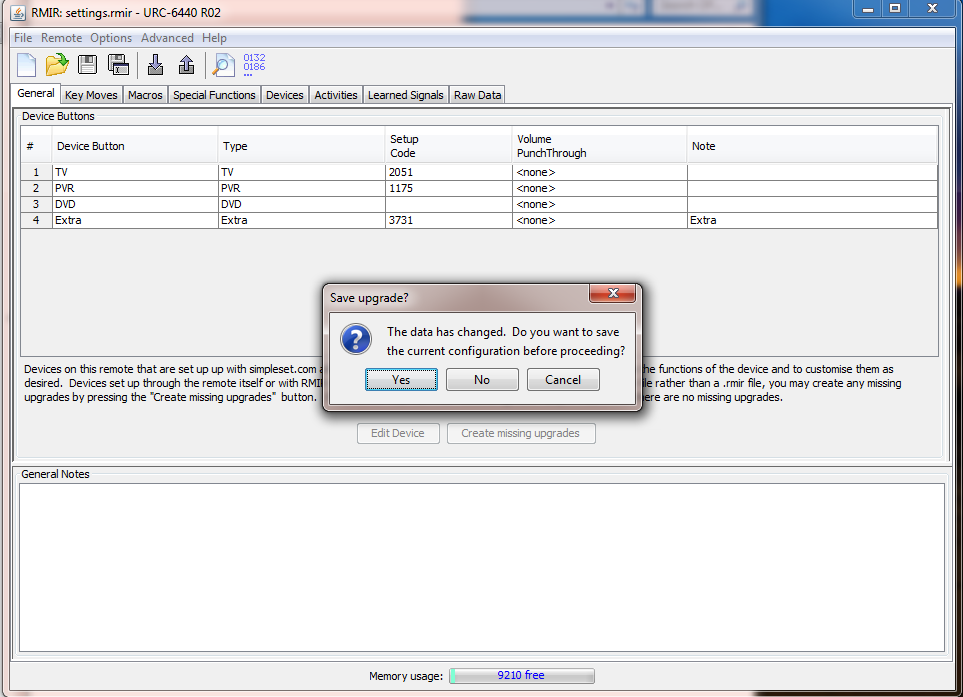
I clicked yes. Then selected the extender hex file.
Then clicked "upload to the attached remote".
At this point, the extender functions do not show up in RMIR? Should they?
I then unplugged the remote and plugged it in again (probably not necessary though) and clicked "download from the attached remote).
The time duration boxes are there within the special functions tab, however in the activities tab there are only two activities showing, like before.
I have uploaded the settings.bin file to the diagnosis area. I'm just going to make dinner and I'll be back soon.
https://www.hifi-remote.com/forums/dload ... e_id=13734
Posted: Mon Nov 30, 2015 12:54 pm
by mathdon
JezW wrote:Navigate to where you have stored the unzipped extender package and select the file
Did you read to the end of the sentence? It says:
Navigate to where you have stored the unzipped extender package and select the file “URC-6440Extender104.hex”.
Selecting that file should not produce a "Save upgrade?" message. If you select the file named in the sentence, the RMIR display should change to one with 12 devices and 6 activities. So I suspect you chose a different file and it went wrong. It's not really clear from your description at what point the "Save upgrade?" message appeared.
I suggest you repeat the extender installation. I hope you still have a copy of the .rmir file you were using, and didn't overwrite it when you did "save". Otherwise you will have to start again, I'm afraid.
Dinner time for me now, too.
Posted: Mon Nov 30, 2015 12:56 pm
by tranx
or perhaps this is the step which you might have missed:-
"Save this as a .rmir file with a new filename."
...it is just before:-
"Use RMIR to upload this (my italics)converted file to your extended remote. The installation is now complete."
Posted: Mon Nov 30, 2015 1:06 pm
by JezW
The save upgrade message appeared when I clicked File-->Install extender.
I'll try again but I really can't see what I'm doing wrong.
Update:
Just tried again and I'm still getting that dialog box. It's not when I select the hex file, but before that when it comes up. As soon as I click "Install extender"
Posted: Mon Nov 30, 2015 1:15 pm
by JezW
Think I better make a video and post it here
Posted: Mon Nov 30, 2015 1:32 pm
by The Robman
JezW wrote:Think I better make a video and post it here
I don't know if you and Graham are both on Skype, but in other forums I have seen people use Skype to get to the bottom of things like this. Fortunately you're both in the UK so you're in the same timezone.
Posted: Mon Nov 30, 2015 1:47 pm
by JezW
The Robman wrote:JezW wrote:Think I better make a video and post it here
I don't know if you and Graham are both on Skype, but in other forums I have seen people use Skype to get to the bottom of things like this. Fortunately you're both in the UK so you're in the same timezone.
I've made a video now so everyone can see what I'm doing wrong lol. But that would've been good too.
Posted: Mon Nov 30, 2015 2:12 pm
by JezW
Ok...so here's a video of my installation (and high speed mouse skills lol)
One thing I said which I realised was not correct - I said that there were extra devices in the device tab of RMIR because I had clicked the "Create missing upgrades" button. This is not the case; there were extra devices in there which were created when I downloaded the amplifier codes from simpleset.com. I had not pressed the "Create missing upgrades", otherwise extra devices would have shown up for my TV and PVR (sky box).
I sound horrible on a mic
No laughing allowed!
https://www.youtube.com/watch?v=nZadLIkH4J8
Going out now but I'll be around later.
Thanks guys
Posted: Mon Nov 30, 2015 5:23 pm
by mathdon
Thanks for the video, Jez. I cannot see what you are doing wrong, but there are a couple of things that happen that I have not seen before. One is the prompt to save, when you select "Install extender...", the other is that when you select the hex file, that window closes without you having to press the "Open" button.
There was something wrong yesterday with your RMIR installation that we never did understand. I am wondering if it is still wrong, in some other way, or if there is something odd about your .rmir file that is causing this behaviour. Please post that .rmir file for me to try on my 6440. I want the one that you load before selecting "Install extender".
When you have posted your .rmir file, I will see if I can reproduce any of your odd behaviour. I am starting to wonder for a second time if there is something odd about your Java installation.
Edit: That closure of the File Chooser box when you select the extender .hex file, without pressing the "Open" button, definitely looks like an issue with Java to me, as that is a built-in Java dialog box. I would still like to see your .rmir file as above, but I do wonder if it is worth you doing a reinstallation of Java 8.