Page 3 of 3
Posted: Mon Jul 29, 2019 1:49 pm
by Thedemon007
mdavej wrote:Restart RMIR and try again. It scans the RDF files on startup.
or yes i forget try restart RMIR..
Donwload Raw
Posted: Mon Jul 29, 2019 1:59 pm
by mdavej
Opens fine for me. Only error is "no map" which is expected since there is no map. Here's the RMIR version:
https://www.hifi-remote.com/forums/dload ... e_id=25635
I can send you a half dozen DirecTV RF remotes for the cost of postage, including a couple of RC64s.
Posted: Mon Jul 29, 2019 10:00 pm
by The Robman
It looks like we never created an official RDF for this one, I had to download the development RDF from here to get it to open:
https://www.hifi-remote.com/forums/dload ... le_id=8019
This RDF still needs the button names.
How add the others buttons?... pinout..
Posted: Tue Jul 30, 2019 6:17 pm
by Thedemon007
How to map the other buttons?
Pinout, solder in resistence is more easy:
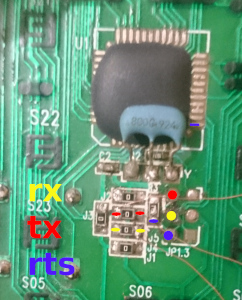
Posted: Tue Jul 30, 2019 6:38 pm
by mdavej
All the buttons are in the button maps section. I'd add whatever is missing from the buttons section with names like b1, b2, etc. Then make a device that has some functions assigned to each, like number functions, for example. Then press each button and see what happens. So if, for example you added b21=$2A, and in your device assigned digit 9 to b21, then pressing the PLAY button send the command for 9, then you know PLAY is b21 is $2A. Then go into your RDF and replace b21 with PLAY. Repeat for all the unknown buttons.
We normally discover buttons by making macros that use lots of buttons. But I don't think this remote does macros. If it does, then you can take some shortcuts by making some macros with known functions on the unknown buttons and see what happens.
Re: How add the others buttons?... pinout..
Posted: Tue Jul 30, 2019 6:50 pm
by The Robman
Thedemon007 wrote:How to map the other buttons?
Pinout, solder in resistence is more easy:
I can tell from your PCB pic that a version of the button codes are printed on it, all those S06, S07 type codes are a version of the button code in Octal. Could you take a full length pic of the PCB and also one of the front of the remote, so I can tell which button each button code refers to?
Posted: Tue Jul 30, 2019 8:54 pm
by mdavej
There's a good shot of the whole board on the first page of this thread. Looks like they're all octal like you said, but the hex versions are plus 1, i.e., S05 is button $06.
Posted: Tue Jul 30, 2019 9:52 pm
by The Robman
Those PCB shots start at around the arrow keys, so they're missing the codes for all the buttons on the top half of the remote.
I have updated the RDF with the buttons that I could see on the PCB and some that I guessed at from other sources.
https://www.hifi-remote.com/forums/dload ... le_id=8019
Re: How add the others buttons?... pinout..
Posted: Tue Jul 30, 2019 11:09 pm
by Thedemon007
The Robman wrote:Could you take a full length pic of the PCB and also one of the front of the remote, so I can tell which button each button code refers to?
s63=tv input, s56=format

Great thanks The Robman...
Posted: Wed Jul 31, 2019 9:29 am
by The Robman
I have just updated the RDF with all the button names. Please delete your old copy first as I have slightly changed the file name (I removed the dash).
It appears that CABLE mode includes shifted versions of most buttons (including the numeric buttons, but excluding the power, volume, channel and arrow buttons). I don't know how you would access the shifted buttons on this remote.
It also includes a bunch of button codes that I don't understand, I've called these Phantom-$F0, etc.
The TV_Input button isn't in any of the button maps, but there is a phantom code in most of them, which I labeled Phantom1.
So, please try making some upgrades to see if everything works. First, try assigning functions to all the normal buttons and check that they do what they're supposed to do. Then please try creating some special upgrades with functions on the shifted buttons and the Phantom buttons and see if you can figure out how to access them.
Posted: Mon Jan 06, 2025 5:42 pm
by The Robman
I have completed the 2 RDFs and added an ImageMap here:
https://www.hifi-remote.com/forums/dload ... le_id=8019

