Page 2 of 3
Re: URC-1210 & CT-9908
Posted: Fri Aug 30, 2024 1:02 pm
by The Robman
HamburgerHelper1 wrote:Rob What I see on the learned signals is NEC1 DEV 64 No Sub Device
Your upgrade has NEC1 DEV 64 Sub Device 191
How did you come up with the Sub Device ?
Which tool is showing yousub device 191?
Do you know how NEC device codes work? In the old days, there was only 1 device code, and the 2nd byte was the complement of the 1st, just like with the OBCs, but eventually they ran out of device codes, so they re-purposed the 2nd byte as the sub-device, which means it no longer needs to be the complement of the 1st byte. If you look closely, you'll notice that 64+191=255
URC-1210 & CT-9908
Posted: Fri Aug 30, 2024 1:25 pm
by HamburgerHelper1
I opened Toshiba CT-9908 remote With RMIR v 3.0.15 and went to edit your Mystery Toshiba Device upon edit I noticed Dev 64 Sub Dev 191
Your explanation makes sense of it
Posted: Fri Aug 30, 2024 3:32 pm
by adrianomartins
The Robman wrote:Well, I was curious about that, because from what I can tell, this is a service remote that you use for some special configuration purposes on projectors. You have a Toshiba rear projection TV, which isn't the same thing.
Would I be correct in assuming that you are just trying to create a working remote for your Toshiba rear projection TV, you're not trying to hack it or re-configure it? I don't think you've mentioned the model number of your TV yet either, which is normally the first step for such a request.
As best as I can tell, all Toshiba TVs use the same codeset, I'm not aware of rear projection TVs being any different but I don't know for sure, and it's not like there are that many rear projections still in service. But regardless, it looks like the URC-1210 has 5 TV setup codes that use this codeset, so give these a try, and if they work, you could try any Toshiba TV upgrade from the file section if you want to fine tune it:
1457
1508
2197
3434
4291
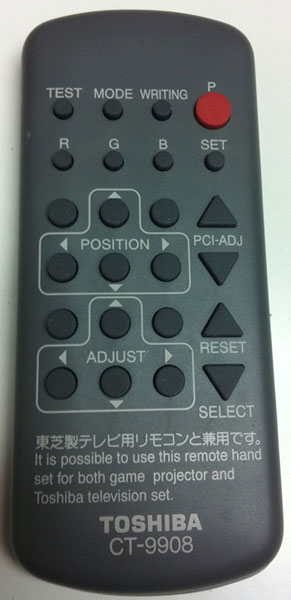
It is a 50" Toshiba P5032SG Rear Projection TV, which was used in various Sega Deluxe Cabinets. This model number says little, as it was used specifically for these cabinets. The original remote control is the Toshiba CT-9908.
http://www.arcademonitor.com/images/ct-9908_toshiba.jpg
Unfortunately, none of the standard Toshiba remote controls work. I have already tried them.
Yes, I want a normal working remote control, no hacking or anything. Just like it is described in this thread.
https://forums.arcade-museum.com/thread ... de.331040/
Thanks.
Re: URC-1210 & CT-9908
Posted: Fri Aug 30, 2024 4:08 pm
by The Robman
HamburgerHelper1 wrote:I opened Toshiba CT-9908 remote With RMIR v 3.0.15 and went to edit your Mystery Toshiba Device upon edit I noticed Dev 64 Sub Dev 191
Your explanation makes sense of it
Actually, I see what happened now. When I first looked at the learns, I had the decoder set to IrpTransmogrifier and that showed 64 and 191, so I did create the RMDU like that because I didn't notice that 191 is the complement. I just switched it back to DecodeIR and it displays as just device 64 now.
Posted: Fri Aug 30, 2024 4:24 pm
by The Robman
I'm trying to picture what a "Sega Deluxe Cabinet" is, is it something like this:

If so, I can see why you're stuck with an old projection TV rather than a more modern flat screen. If that original rmir file is valid, the previous file that I created should have re-created that, the only difference is that I was using an upgrade rather than learned signals. Just for the hell of it, I have created a file of learns that you can try:
https://www.hifi-remote.com/forums/dload ... e_id=26948
URC-1210 & CT-9908
Posted: Fri Aug 30, 2024 4:31 pm
by HamburgerHelper1
Another quirk of using IrpTransmogrifier vs DecodeIR is that when i copy and pasted the original learns into a new learn DecodeIR will display is as NEC2 if that would make any difference in a service remote
Re: URC-1210 & CT-9908
Posted: Fri Aug 30, 2024 4:46 pm
by The Robman
HamburgerHelper1 wrote:Another quirk of using IrpTransmogrifier vs DecodeIR is that when i copy and pasted the original learns into a new learn DecodeIR will display is as NEC2 if that would make any difference in a service remote
That's interesting. I tried doing that, but it still showed as NEC1, however it made me look more closely at the Pronto code offered up. This isn't really NEC1 or NEC2.
Here's the code for POWER:
0000 006D 0000 0024 0155 00B2 0016 0016 0016 0016 0016 0016 0016 0016 0016 0016 0016 0016 0016 0042 0016 0016 0016 0042 0016 0042 0016 0042 0016 0042 0016 0042 0016 0042 0016 0016 0016 0042 0016 0016 0016 0042 0016 0016 0016 0016 0016 0042 0016 0016 0016 0016 0016 0016 0016 0042 0016 0016 0016 0042 0016 0042 0016 0016 0016 0042 0016 0042 0016 0042 0016 05A8 0155 005A 0016 0E4A
If this was really NEC1, it would look like this:
0000 006D 0022 0002 0155 00B2 0016 0016 0016 0016 0016 0016 0016 0016 0016 0016 0016 0016 0016 0042 0016 0016 0016 0042 0016 0042 0016 0042 0016 0042 0016 0042 0016 0042 0016 0016 0016 0042 0016 0016 0016 0042 0016 0016 0016 0016 0016 0042 0016 0016 0016 0016 0016 0016 0016 0042 0016 0016 0016 0042 0016 0042 0016 0016 0016 0042 0016 0042 0016 0042 0016 05A8 0155 005A 0016 0E4A
If it was really NEC2, it would look like this:
0000 006D 0000 0022 0155 00B2 0016 0016 0016 0016 0016 0016 0016 0016 0016 0016 0016 0016 0016 0042 0016 0016 0016 0042 0016 0042 0016 0042 0016 0042 0016 0042 0016 0042 0016 0016 0016 0042 0016 0016 0016 0042 0016 0016 0016 0016 0016 0042 0016 0016 0016 0016 0016 0016 0016 0042 0016 0016 0016 0042 0016 0042 0016 0016 0016 0042 0016 0042 0016 0042 0016 05A8
The original Pronto hex is closer to NEC2 than NEC1, so @adrianomartins, here's yet another version of the 1210 file this time with the upgrade using NEC2 instead of NEC1:
https://www.hifi-remote.com/forums/dload ... e_id=26949
And can you also confirm just HOW you're testing these RMIR files? I know you're loading them up into your remote, but are you then testing every button in TV mode?
URC-1210 & CT-9908
Posted: Fri Aug 30, 2024 5:01 pm
by HamburgerHelper1
I guess given the date of the original file as 2014 it's worth
switching between IrpTransmogrifier and DecodeIR after all
Posted: Sat Aug 31, 2024 1:29 am
by adrianomartins
The Robman wrote:I'm trying to picture what a "Sega Deluxe Cabinet" is, is it something like this:
If so, I can see why you're stuck with an old projection TV rather than a more modern flat screen. If that original rmir file is valid, the previous file that I created should have re-created that, the only difference is that I was using an upgrade rather than learned signals. Just for the hell of it, I have created a file of learns that you can try:
https://www.hifi-remote.com/forums/dload ... e_id=26948
Yes exactly, not this game but similar, thanks.
Re: URC-1210 & CT-9908
Posted: Sat Aug 31, 2024 1:31 am
by adrianomartins
The Robman wrote:HamburgerHelper1 wrote:Another quirk of using IrpTransmogrifier vs DecodeIR is that when i copy and pasted the original learns into a new learn DecodeIR will display is as NEC2 if that would make any difference in a service remote
That's interesting. I tried doing that, but it still showed as NEC1, however it made me look more closely at the Pronto code offered up. This isn't really NEC1 or NEC2.
Here's the code for POWER:
0000 006D 0000 0024 0155 00B2 0016 0016 0016 0016 0016 0016 0016 0016 0016 0016 0016 0016 0016 0042 0016 0016 0016 0042 0016 0042 0016 0042 0016 0042 0016 0042 0016 0042 0016 0016 0016 0042 0016 0016 0016 0042 0016 0016 0016 0016 0016 0042 0016 0016 0016 0016 0016 0016 0016 0042 0016 0016 0016 0042 0016 0042 0016 0016 0016 0042 0016 0042 0016 0042 0016 05A8 0155 005A 0016 0E4A
If this was really NEC1, it would look like this:
0000 006D 0022 0002 0155 00B2 0016 0016 0016 0016 0016 0016 0016 0016 0016 0016 0016 0016 0016 0042 0016 0016 0016 0042 0016 0042 0016 0042 0016 0042 0016 0042 0016 0042 0016 0016 0016 0042 0016 0016 0016 0042 0016 0016 0016 0016 0016 0042 0016 0016 0016 0016 0016 0016 0016 0042 0016 0016 0016 0042 0016 0042 0016 0016 0016 0042 0016 0042 0016 0042 0016 05A8 0155 005A 0016 0E4A
If it was really NEC2, it would look like this:
0000 006D 0000 0022 0155 00B2 0016 0016 0016 0016 0016 0016 0016 0016 0016 0016 0016 0016 0016 0042 0016 0016 0016 0042 0016 0042 0016 0042 0016 0042 0016 0042 0016 0042 0016 0016 0016 0042 0016 0016 0016 0042 0016 0016 0016 0016 0016 0042 0016 0016 0016 0016 0016 0016 0016 0042 0016 0016 0016 0042 0016 0042 0016 0016 0016 0042 0016 0042 0016 0042 0016 05A8
The original Pronto hex is closer to NEC2 than NEC1, so @adrianomartins, here's yet another version of the 1210 file this time with the upgrade using NEC2 instead of NEC1:
https://www.hifi-remote.com/forums/dload ... e_id=26949
And can you also confirm just HOW you're testing these RMIR files? I know you're loading them up into your remote, but are you then testing every button in TV mode?
I upload the file and try then all the buttons on the RC. Is there a better way to test?
And thanks a lot for your support and files.
I test and let you know of course.
Re: URC-1210 & CT-9908
Posted: Sat Aug 31, 2024 1:32 am
by adrianomartins
HamburgerHelper1 wrote:I guess given the date of the original file as 2014 it's worth
switching between IrpTransmogrifier and DecodeIR after all
I don't understand anything, but thank you also for your support

Posted: Sat Aug 31, 2024 10:44 am
by mdavej
While there's no reason Rob's upgrades shouldn't work since it's a perfect match of the learns, here's every Toshiba TV upgrade from UEI. There are some NEC combo ones that use various subdevices 191, 255, 190, None, etc. that may be worth a try. To try one on your remote open the bin file, go to the devices tab, double click the desired device, then save as it's own file. In a second RMIR session, open your 1210 file, go to the devices tab, click new, and open the file you just saved.
https://www.hifi-remote.com/forums/dload ... e_id=26950
Another thing worth trying is on the General tab of RMIR, pick TV for the punch thru device on volume, channel and transport. I don't know if that's really necessary on the 1210 or not.
I see from the manual from a similar TV that the IR sensor is actually behind the screen, so make sure you aim at the screen, not too far down, and that nothing is blocking the lower part of the screen.
https://usermanual.com/support/toshiba/ ... h82-manual
Posted: Sat Aug 31, 2024 12:13 pm
by The Robman
I replaced the bin file with and rmir file
Posted: Sat Aug 31, 2024 3:50 pm
by MaskedMan
There was Toshiba model of DLP tv that used the LG tv code:
https://www.remotecentral.com/cgi-bin/m ... Toshiba|LG
Posted: Sat Aug 31, 2024 5:11 pm
by The Robman
Here's an example of an LG TV that uses NEC1 dev 4 (to match TV/0178)
https://www.hifi-remote.com/forums/dload ... e_id=14205