Out of Ideas - Sony RM-PJM1001

If you're not a JP1 user, but would like help from the JP1 experts, post your question here.

Moderator: Moderators

oppor
Posts: 19
Joined: Mon May 03, 2010 12:58 am

Out of Ideas - Sony RM-PJM1001

Post by oppor »

Ive got a couple of Sony LCD Projectors (VPLX2000U)circa 2000-2002

The remote commander that works with these projectors is
the Sony RM-PJM1001 model.

I cant find anywhere that has any version of remote codes that matches for these remotes

Im posting as a long shot if anyone has these remotes and can capture the codes for:

LCD Lens Control Keys:
Zoom Focus Shift

Operation is by pressing an option key then the Up/Down Arrows for adjustment.

I have Psiloc IR Remote app on my Phone which can take Pronto discrete code format.

Thanks In Advance.

See the original remote as below....it was used for many different Sony Projectors CRT and LCD including

VPD-LE100
VPL-FX200U
vpl-fe100u
VPL-FE110
VPH-G70
VPH-G90
VPH-D50
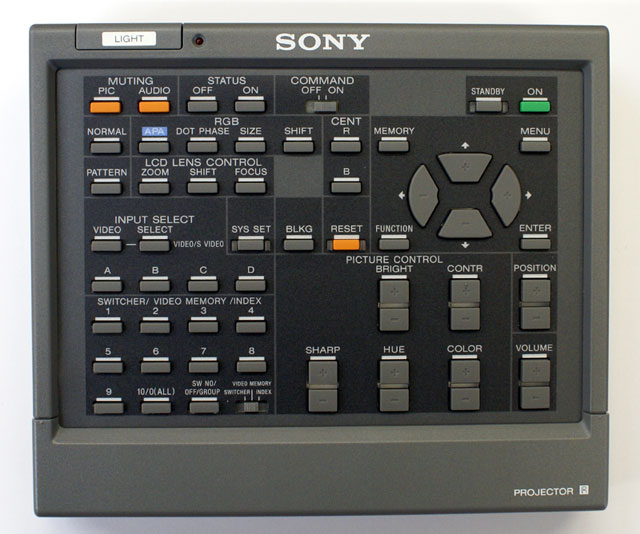

Image
Last edited by oppor on Mon May 03, 2010 6:22 am, edited 1 time in total.
3FG
Expert
Posts: 3442
Joined: Mon May 18, 2009 11:48 pm

Post by 3FG »

Have you tried these? Nearly all Sony codes are listed here. You can convert these device and function numbers to Pronto Hex by using mdavej's MakeHex GUI. Download it and MakeHex (link included in the previous link). Taken together, you should be able to enter Pronto Hex for any Sony Projector function. Use Sony 15 protocol. Sample output:

Code: Select all

RGB Shift +  Device Code: 84 Function: 114
0000 0068 0000 0010 0060 0018 0018 0018 0030 0018 0018 0018 0018 0018 0030 0018 0030 0018 0030 0018 0018 0018 0018 0018 0030 0018 0018 0018 0030 0018 0018 0018 0030 0018 0018 032D
RGB Shift -  Device Code: 84 Function: 115
0000 0068 0000 0010 0060 0018 0030 0018 0030 0018 0018 0018 0018 0018 0030 0018 0030 0018 0030 0018 0018 0018 0018 0018 0030 0018 0018 0018 0030 0018 0018 0018 0030 0018 0018 0315
Focus +      Device Code: 84 Function: 116
0000 0068 0000 0010 0060 0018 0018 0018 0018 0018 0030 0018 0018 0018 0030 0018 0030 0018 0030 0018 0018 0018 0018 0018 0030 0018 0018 0018 0030 0018 0018 0018 0030 0018 0018 032D
Focus -      Device Code: 84 Function: 117
0000 0068 0000 0010 0060 0018 0030 0018 0018 0018 0030 0018 0018 0018 0030 0018 0030 0018 0030 0018 0018 0018 0018 0018 0030 0018 0018 0018 0030 0018 0018 0018 0030 0018 0018 0315
Zoom +       Device Code: 84 Function: 119
0000 0068 0000 0010 0060 0018 0030 0018 0030 0018 0030 0018 0018 0018 0030 0018 0030 0018 0030 0018 0018 0018 0018 0018 0030 0018 0018 0018 0030 0018 0018 0018 0030 0018 0018 02FD
Zoom -       Device Code: 84 Function: 120
0000 0068 0000 0010 0060 0018 0018 0018 0018 0018 0018 0018 0030 0018 0030 0018 0030 0018 0030 0018 0018 0018 0018 0018 0030 0018 0018 0018 0030 0018 0018 0018 0030 0018 0018 032D
oppor
Posts: 19
Joined: Mon May 03, 2010 12:58 am

Post by oppor »

Thanks for your reply 3FG

I tried those codes ..didnt work...the Sony projector code listed is for a Sony Qaulia... it does not appear to be the same same as the RM-PJ1001

...so close :eek:
vickyg2003
Site Admin
Posts: 7109
Joined: Sat Mar 20, 2004 12:19 pm
Location: Florida
Contact:

Post by vickyg2003 »

3FG wrote:Have you tried these? Nearly all Sony codes are listed here. You can convert these device and function numbers to Pronto Hex by using mdavej's MakeHex GUI. Download it and MakeHex (link included in the previous link). Taken together, you should be able to enter Pronto Hex for any Sony Projector function. Use Sony 15 protocol. Sample output:
Its nice to see the new features of daves new gui interface put to practical use. The new features of the JP1 tools has really made life a lot easier.

The very first Sony Projector km (RM-1271) upgrade in the projector folder seemed to have totally different OBC's for device 84 than the site listed above.
Remember to provide feedback to let us know how the problem was solved and share your upgrades.

Tip: When creating an upgrade, always include ALL functions from the oem remote, even if you never plan on assigning them to a button. Complete function lists makes an upgrade more helpful to others.
3FG
Expert
Posts: 3442
Joined: Mon May 18, 2009 11:48 pm

Post by 3FG »

Here's a CCF file for the VPH-G70, which you say should be controlled by the same remote.

You can turn this file into device and function codes using DecodeCCF and DecodeIR.dll

Then use MakeHexGUI to generate the Pronto Hex.

However, it looks like the device and function numbers match those in the above link. Have you gotten any codes to work with the Psiloc app?
vickyg2003
Site Admin
Posts: 7109
Joined: Sat Mar 20, 2004 12:19 pm
Location: Florida
Contact:

Post by vickyg2003 »

Good news, this CCF was also device 84, so through trial and error you really ought to be able to get this.

While there was nothing that CCF labeled zoom, focus, and the shift that's in the command wasn't labeled to tell us which "shift" it was, RGB or Lens, there are 2 size commands, and size might be a another term for zoom.

zoom(Size) command might be 71, 76,

There was also a Lens command which might be something someone would used to be focus. That was command 86.

The only Shift command in the file was 72 but no indication on wheter that wass the RGB or Lens control shift.

Hope that helps.

Code: Select all

Key		Protocol	Device	SubDev	OBC
AUD		Sony15	84		20
BB+		Sony15	84		24
BB-		Sony15	84		25
BD+		Sony15	84		26
BD-		Sony15	84		27
B9+		Sony15	84		30
B9-		Sony15	84		31
Hue+		Sony15	84		32
Hue-		Sony15	84		33
Sharp+		Sony15	84		34
Sharp-		Sony15	84		35
PIC		Sony15	84		36
PIC		Sony15	84		36
Ons		Sony15	84		37
Offs		Sony15	84		38
Menu		Sony15	84		41
VIDEO		Sony15	84		42
A		Sony15	84		43
B		Sony15	84		44
Cent		Sony15	84		45
On		Sony15	84		46
Off		Sony15	84		47
Pos+		Sony15	84		49
Pos-		Sony15	84		50
Right_Arrow	Sony15	84		51
Left_Arrow		Sony15	84		52
Up_Arrow		Sony15	84		53
Down_Arrow	Sony15	84		54
Adj R		Sony15	84		65
Adj G		Sony15	84		66
Adj B		Sony15	84		67
Hue+		Sony12	10		68
R Off		Sony15	84		68
G Off		Sony15	84		69
B Off		Sony15	84		70
Size		Sony15	84		71
Adj G		Sony12	10		72
Shift		Sony15	84		72
Skew		Sony12	10		73
Ctr R		Sony15	84		73
Ctr B		Sony15	84		75
Size		Sony15	84		76
Lin		Sony15	84		77
Skew		Sony15	84		78
Bow		Sony15	84		79
Key		Sony15	84		80
Pin		Sony15	84		81
GAIN		Sony15	84		82
BIAS		Sony15	84		83
MG/F		Sony15	84		84
Mem		Sony8			84
MG/F		Sony8			84
LENS		Sony15	84		85
Zone		Sony15	84		86
Blank		Sony15	84		88
Enter		Sony15	84		90
Mem		Sony15	84		94
SELECT		Sony15	84		95
sw 0		Sony15	84		96
sw 1		Sony15	84		97
sw 2		Sony15	84		98
sw 3		Sony15	84		99
sw 4		Sony15	84		100
sw 5		Sony15	84		101
sw 6		Sony15	84		102
sw 7		Sony15	84		103
sw 8		Sony15	84		104
sw 9		Sony15	84		105
C		Sony15	84		111
D		Sony15	84		112
Reset		Sony15	84		123
Normal		Sony15	84		125
pattern		Sony15	84		126
Last edited by vickyg2003 on Mon May 03, 2010 10:56 am, edited 2 times in total.
Remember to provide feedback to let us know how the problem was solved and share your upgrades.

Tip: When creating an upgrade, always include ALL functions from the oem remote, even if you never plan on assigning them to a button. Complete function lists makes an upgrade more helpful to others.
The Robman
Site Owner
Posts: 22064
Joined: Fri Aug 01, 2003 9:37 am
Location: Chicago, IL
Contact:

Post by The Robman »

It might be easier to use CCF2EFC as that programs gives you the complete Pronto hex, eliminating the need to use MakeHex to re-generate it.

I think it might be a good idea to test a known good code, to eliminate the possibility that this projector simply doesn't support the functions in question.

Here's some code for some regular buttons...

"On"
0000 0066 0000 0010 0060 0019 0019 0018 0031 0018 0031 0018 0031 0018 0019 0018 0031 0018 0019 0018 0019 0018 0019 0018 0031 0018 0019 0018 0031 0018 0019 0018 0031 0018 0019 032E

"Off"
0000 0066 0000 0010 0061 0018 0031 0018 0031 0018 0031 0018 0031 0018 0019 0018 0031 0018 0019 0018 0019 0018 0019 0018 0031 0018 0019 0018 0031 0018 0019 0018 0031 0018 0019 0315

"Menu"
0000 0066 0001 0010 000A 0346 0061 0018 0031 0018 0019 0018 0019 0018 0031 0018 0019 0018 0031 0018 0019 0018 0019 0018 0019 0018 0031 0018 0019 0018 0031 0018 0019 0018 0031 0018 0019 0347
Rob
www.hifi-remote.com
Please don't PM me with remote questions, post them in the forums so all the experts can help!
oppor
Posts: 19
Joined: Mon May 03, 2010 12:58 am

Post by oppor »

Guys 3FG, Vickyg2003 and Rob

Thanks for your time and help.!!!!!!!! Its Much apppreciated !!

I think the problem with the G70 CCF is that its missing the "LCD LENS CONTROL" buttons codes...whom ever made the CCF didnt need to capture these LCD codes as the buttons would do nothing for his G70 CRT Projector.

So close !
I guess Im looking at some of those missing lines in device 84 that are likely the ones I need ?

Just to reiterate that the normal RM-PJ1001 remote operation is to press any one of the "LCD Lens Control Buttons" (Shift, Focus or Zoom) and then use the up/Down arrow buttons as seen on the remote.

This operation is different to the later LCD remotes where some have got seperate Zoom + and Zoom - buttons etc and some have just a LENS button to take you to the other options via onscreen menu.

The RM-PJ1001 was a hybrid Remote for both CRT and LCD Projectors...and some buttons would not work for either option.

I guess I need someone to capture from the original Remote the codes form the buttons "Shift Focus & Zoom" ?

If I can find someone with the original remote...how could they capture the 3 buttons and their codes for me..what would they need too do so for me.?

Thanks again for your help ! :)
vickyg2003
Site Admin
Posts: 7109
Joined: Sat Mar 20, 2004 12:19 pm
Location: Florida
Contact:

Post by vickyg2003 »

oppor, did you try the lens commands and the size commands from that G70 CCF file?

If you noticed most of the commands from the G70 CCF file were sony15, 84 commands. The beauty of make hex, is you can generate a complete set of sony15 84 commands to try.

So look for missing numbers 0 and 127, and see if any of them are the missing numbers for your projector.
Remember to provide feedback to let us know how the problem was solved and share your upgrades.

Tip: When creating an upgrade, always include ALL functions from the oem remote, even if you never plan on assigning them to a button. Complete function lists makes an upgrade more helpful to others.
oppor
Posts: 19
Joined: Mon May 03, 2010 12:58 am

Post by oppor »

Just to add

The APA and DOT PHASE Keys are not found in Device 84 !
Why I asked myself !

So I had another look at the Sony Qualia codes....they can be found in device 26.42 !

Found here:
http://hifi-remote.com/sony/Sony_proj.htm

Sony:26.42 Command Code Command(s)
8 RCP
9 Adjust Picture
60 MS Slide
62 Keystone +
63 Keystone –
75 Color Mode (Space)
80 Video Memory Off
81 Video Memory 1, Dynamic
82 Video Memory 2, Standard
83 Video Memory 3, Cinema
84 Video Memory 4, User 1
85 Video Memory 5, User 2
86 Video Memory 6, User 3
87 Video Memory 7
88 Video Memory 8
89 Video Memory 9
90 Video Memory 10
91 Toggle Video Memory On/Off
92 Color Temp
93 S Direct
94 Gamma
95 Iris Cont
96 APA
97 Dot Phase
102 Help
104 Function 1
105 Function 2
106 Digital Zoom +
107 Digital Zoom –
110 Wide Mode
120 Focus, Lens, Lens Cont < close but no seperate keys for Focus/Shift/Zoom ?!

So perhaps those seperate key codes I seek(Focus Shift Zoom) are somewhere in this set..!
Last edited by oppor on Tue May 04, 2010 6:45 am, edited 1 time in total.
oppor
Posts: 19
Joined: Mon May 03, 2010 12:58 am

Post by oppor »

Hi Vickyg2003

Thanks for your help !!

Yeah I tried the Device 84's Lens and size ...but no go...psiloc App is working as I can get it turn on/menu etc as Rob asked me to try.

Ive just made pronto hex using makehex for both device 84 and 26.42 (sony20)

But soooo mannnny possibles...its gonna take me an age to go through them all especially 26.42.

Sure would be great if someone had this Remote RM-PJ1001 who would be kind enough to capture the missing key codes for me !

:)
vickyg2003
Site Admin
Posts: 7109
Joined: Sat Mar 20, 2004 12:19 pm
Location: Florida
Contact:

Post by vickyg2003 »

oppor, Since your projector reacted to Rob's codes, I'd start with the sony15, 84 commands. These are the most likely codes to have your missing functions.

As you've noted, it sure would be nice if someone could capture them for you, but the reverse of this is also true. If you figure out your codes it is very important that you share your results.
Remember to provide feedback to let us know how the problem was solved and share your upgrades.

Tip: When creating an upgrade, always include ALL functions from the oem remote, even if you never plan on assigning them to a button. Complete function lists makes an upgrade more helpful to others.
oppor
Posts: 19
Joined: Mon May 03, 2010 12:58 am

Post by oppor »

Sure will share Vickyg !!

Ive been trying to find an answer for this for sooo longgg..so close now !!


If someone can help it would save a lot of heartache...its not easy to test all these keys with a projector...as one has to turn it on and keep it on losing lamp life while trying all the keys.. also the fear of some unkown reaction to an undocumented command. :eek:
oppor
Posts: 19
Joined: Mon May 03, 2010 12:58 am

Post by oppor »

Last before I go try a few things (will have to wait till tomorrow now)

I may have found Gold !
Found these pronto hex codes for a Sony FX200 LCD Projector..which used the same RM-PJ1001 Remote Commander found from
http://www.remotecentral.com/cgi-bin/co ... 00/page-2/

Lens Focus
0000 0066 0000 0015 0060 0018 0018 0018 0018 0018 0031 0018 0018 0018 0018 0018 0031 0018 0031 0018 0018 0018 0031 0018 0018 0018 0031 0018 0031 0018 0018 0018 0031 0018 0018 0018 0031 0018 0018 0018 0031 0018 0018 0018 0018 01fd

Lens Shift
0000 0066 0000 0015 0061 0018 0031 0018 0031 0018 0018 0018 0018 0018 0018 0018 0031 0018 0031 0018 0018 0018 0031 0018 0018 0018 0031 0018 0031 0018 0018 0018 0031 0018 0018 0018 0031 0018 0018 0018 0031 0018 0018 0018 0018 01e5

Lens Zoom
0000 0066 0000 0015 0061 0018 0018 0018 0031 0018 0018 0018 0018 0018 0018 0018 0031 0018 0031 0018 0018 0018 0031 0018 0018 0018 0031 0018 0031 0018 0018 0018 0031 0018 0018 0018 0031 0018 0018 0018 0031 0018 0018 0018 0018 01fd


So wil try them tomorrow...what I dont get is that none of these codes can be found in the makehex generated list for Device 84 and 26.42 ????
Makes me wonder if they bonafide ...will find out tomorrow

Cheers
oppor
Posts: 19
Joined: Mon May 03, 2010 12:58 am

Post by oppor »

I think I may have spoken too soon ! lol

From Remote Central...I have found 3 DIFFERENT sets of code for the RM-PJ1001 Remote Commander and the three keys 'Shift Focus and Zoom'....which one if any are correct...? and why are they all different can anyone explain ? are they for different Pronto models or ? TIA

X2000U FIRST

Zoom
0000 0066 0000 0015 0060 0018 0018 0018 0031 0018 0018 0018 0018 0018 0018 0018 0031 0018 0031 0018 0018 0018 0031 0018 0018 0018 0031 0018 0031 0018 0018 0018 0031 0018 0018 0018 0031 0018 0018 0018 0031 0018 0018 0018 0018 01ff

Shift
0000 0066 0000 0010 0060 0018 0018 0018 0018 0018 0018 0018 0031 0018 0018 0018 0018 0018 0031 0018 0018 0018 0018 0018 0031 0018 0018 0018 0031 0018 0018 0018 0031 0018 0018 035b

Focus
0000 0066 0000 0015 0060 0018 0018 0018 0018 0018 0031 0018 0018 0018 0018 0018 0031 0018 0031 0018 0018 0018 0031 0018 0018 0018 0031 0018 0031 0018 0018 0018 0031 0018 0018 0018 0031 0018 0018 0018 0031 0018 0018 0018 0018 01ff


X2000U VERSION SECOND
Focus
0000 006D 0000 0015 0000 0060 0000 0060 0000 0060 0000 0060 0000 0060 0000 0060 0000 0060 0000 0060 0000 0060 0000 0060 0000 0060 0000 0060 0000 0060 0000 0060 0000 0060 0000 0060 0000 0060 0000 0060 0000 0060 0000 0060 0000 0BCC

Zoom
0000 006D 0000 0015 0000 0060 0000 0060 0000 0060 0000 0060 0000 0060 0000 0060 0000 0060 0000 0060 0000 0060 0000 0060 0000 0060 0000 0060 0000 0060 0000 0060 0000 0060 0000 0060 0000 0060 0000 0060 0000 0060 0000 0060 0000 0BCC

Shift
0000 006D 0000 0010 0000 0060 0000 0060 0000 0060 0000 0060 0000 0060 0000 0060 0000 0060 0000 0060 0000 0060 0000 0060 0000 0060 0000 0060 0000 0060 0000 0060 0000 0060 0000 0D6C


VERSION FX200
Lens Focus
0000 0066 0000 0015 0060 0018 0018 0018 0018 0018 0031 0018 0018 0018 0018 0018 0031 0018 0031 0018 0018 0018 0031 0018 0018 0018 0031 0018 0031 0018 0018 0018 0031 0018 0018 0018 0031 0018 0018 0018 0031 0018 0018 0018 0018 01fd

Lens Shift
0000 0066 0000 0015 0061 0018 0031 0018 0031 0018 0018 0018 0018 0018 0018 0018 0031 0018 0031 0018 0018 0018 0031 0018 0018 0018 0031 0018 0031 0018 0018 0018 0031 0018 0018 0018 0031 0018 0018 0018 0031 0018 0018 0018 0018 01e5

Lens Zoom
0000 0066 0000 0015 0061 0018 0018 0018 0031 0018 0018 0018 0018 0018 0018 0018 0031 0018 0031 0018 0018 0018 0031 0018 0018 0018 0031 0018 0031 0018 0018 0018 0031 0018 0018 0018 0031 0018 0018 0018 0031 0018 0018 0018 0018 01fd
Post Reply