I am trying to program the SPA infrared buttons on my Balboa Waterproof remote. There is no device type in RM or KM called 'SPA'. Ideally, I have been trying to find information on the device code '1315' identified in IR.exe using devices4, etc. but it is never available. Any help (or basic direction) would be greatly appreciated.
IR.exe file: https://www.hifi-remote.com/forums/dload ... le_id=1251
Spa buttons on Balboa Waterproof remote
Moderator: Moderators
Both IR and RM get their information from the RDF file, but apparently they use that information differently. There is an entry in the rdf saying SPA and OEM device types are the same. IR seems to call it SPA and RM calls it OEM.
It won't be in devices4.xls because the 15-1994 has nothing similar.
I assume there is no specific support for this protocol in KM or RM. It uses pid 017B, which is built-in on the Balboa remote only and is used in no other setup code than 1315.
So you could make an upgrade using KM's manual mode. But why do you want to? What is missing from 1315?
It won't be in devices4.xls because the 15-1994 has nothing similar.
I assume there is no specific support for this protocol in KM or RM. It uses pid 017B, which is built-in on the Balboa remote only and is used in no other setup code than 1315.
So you could make an upgrade using KM's manual mode. But why do you want to? What is missing from 1315?
Thanks John.
My SPA does not have an IR receiver. I basically use the Balboa to control each of six other non-spa devices. I thought it was a waste that the remote has 6+ keys right in the middle that remained unused that I could possible used for basic functions (i.e. TV volume, Stereo volume).
Is there a good thread in this forum on KM's manual mode?
John
My SPA does not have an IR receiver. I basically use the Balboa to control each of six other non-spa devices. I thought it was a waste that the remote has 6+ keys right in the middle that remained unused that I could possible used for basic functions (i.e. TV volume, Stereo volume).
Is there a good thread in this forum on KM's manual mode?
John
-
The Robman
- Site Owner
- Posts: 22056
- Joined: Fri Aug 01, 2003 9:37 am
- Location: Chicago, IL
- Contact:
The Spa buttons in the middle of the remote are always Spa buttons, they don't change when you change the device mode of the remote itself.
You can certainly re-use them if you want by creating an upgrade using KM with "SPA" as the device mode. Ignore the fact that it looks like you can program functions to the numeric, volume and channel buttons because you can't. It's a side effect of the way these remotes are programmed that there are slots for those buttons in the upgrade.
Don't worry about the "Manual Settings" mode for now, John was just mentioning that because he thought you wanted to create a new upgrade, based on the 1315 code, to operate your SPA.
You can certainly re-use them if you want by creating an upgrade using KM with "SPA" as the device mode. Ignore the fact that it looks like you can program functions to the numeric, volume and channel buttons because you can't. It's a side effect of the way these remotes are programmed that there are slots for those buttons in the upgrade.
Don't worry about the "Manual Settings" mode for now, John was just mentioning that because he thought you wanted to create a new upgrade, based on the 1315 code, to operate your SPA.
Rob
www.hifi-remote.com
Please don't PM me with remote questions, post them in the forums so all the experts can help!
www.hifi-remote.com
Please don't PM me with remote questions, post them in the forums so all the experts can help!
Hopefully this isn't a stupid question. My problem initially started because the device mode pull-down in KM does not have 'SPA' as a choice. I tried to use each of the other device types available but none actually worked. I searched quite a bit throughout the forum to see if anyone had a similar problem (either 'spa', 'balboa' or 'new device' - related) but could not find anything. As you can tell I'm new to this.
John
John
-
The Robman
- Site Owner
- Posts: 22056
- Joined: Fri Aug 01, 2003 9:37 am
- Location: Chicago, IL
- Contact:
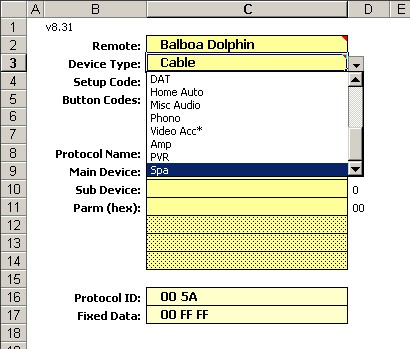
Rob
www.hifi-remote.com
Please don't PM me with remote questions, post them in the forums so all the experts can help!
www.hifi-remote.com
Please don't PM me with remote questions, post them in the forums so all the experts can help!