Merry Christmas dear Alan and everyone!
Could you please help me build a PL Bin file for Sony TV KDL55HX850? Want to help my mom remotely when she has TV problems. Thank you so much!
BIN file for SONY TV KDL55HX850
Moderator: Moderators
-
vickyg2003
- Site Admin
- Posts: 7109
- Joined: Sat Mar 20, 2004 12:19 pm
- Location: Florida
- Contact:
Butting in here . . .
I'm not sure that a slingbox is the best solution for this. You can shoot commands at the tv, but you won't have any visual feedback, or is there something here that I'm not understanding?
I have a Sony kdl something or other tv. I know that menu can get you into lots of trouble if you don't know where you are. On the other hand, most Sony TVs have lots of discrete codes making it a great candidate for jp1 remotes. Even my DH has a hard time getting into trouble. Macros with discrete codes rarely misfire and if by chance something crosses in between the remote and the tv, pressing the macro button again takes care of the problem.
I'd build you a bin except my Comcast service is down again and so I am stuck using the phone.
I'm not sure that a slingbox is the best solution for this. You can shoot commands at the tv, but you won't have any visual feedback, or is there something here that I'm not understanding?
I have a Sony kdl something or other tv. I know that menu can get you into lots of trouble if you don't know where you are. On the other hand, most Sony TVs have lots of discrete codes making it a great candidate for jp1 remotes. Even my DH has a hard time getting into trouble. Macros with discrete codes rarely misfire and if by chance something crosses in between the remote and the tv, pressing the macro button again takes care of the problem.
I'd build you a bin except my Comcast service is down again and so I am stuck using the phone.
Remember to provide feedback to let us know how the problem was solved and share your upgrades.
Tip: When creating an upgrade, always include ALL functions from the oem remote, even if you never plan on assigning them to a button. Complete function lists makes an upgrade more helpful to others.
Tip: When creating an upgrade, always include ALL functions from the oem remote, even if you never plan on assigning them to a button. Complete function lists makes an upgrade more helpful to others.
-
alanrichey
- Expert
- Posts: 3533
- Joined: Mon Mar 24, 2008 7:14 am
- Location: UK/USA
As Vicky says, not the ideal solution, but here is the BIN file anyway:
https://www.hifi-remote.com/forums/dload ... e_id=13006
Any good ?
https://www.hifi-remote.com/forums/dload ... e_id=13006
Any good ?
Thank you Vicky and Alan for your response.
I have set up a cheap RCA camera pointed at the TV screen so I get video feedback.
Other than that, I would just like to control the TV using my mobile device similar to Harmony Home Control. I thought I have unused inputs and IR blasters on my Slingbox, so why not make use of it? My mom oftentimes fall asleep while watching TV, and I have to quietly and carefully make my way towards her remote control so I don't wake her up. I think Sling can help me skip that inconvenience and gain control of TV directly.
Alan, the bin file works great, but it seems to be missing a few commands:
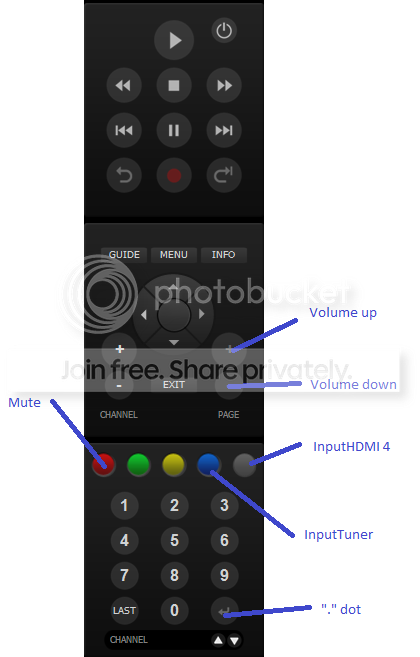
There is no "." (dot) button, for example I can't seem to press 7.1 for broadcast channels.
It would be wonderful if you could also add "Mute," "Volume Up," "Volume Down," "InputTuner," and "InputHDMI 4," since these are the 2 inputs we use most commonly. I understand these are nontraditional Sling commands, so feel free to assign them to the colored buttons or other grayed out ones. Following is something I pictured in my head, and maybe for you to consider.
 [/URL]
I hope its not too much trouble for you. Thank you all again for all of your help.
-AK
I have set up a cheap RCA camera pointed at the TV screen so I get video feedback.
Other than that, I would just like to control the TV using my mobile device similar to Harmony Home Control. I thought I have unused inputs and IR blasters on my Slingbox, so why not make use of it? My mom oftentimes fall asleep while watching TV, and I have to quietly and carefully make my way towards her remote control so I don't wake her up. I think Sling can help me skip that inconvenience and gain control of TV directly.
Alan, the bin file works great, but it seems to be missing a few commands:
There is no "." (dot) button, for example I can't seem to press 7.1 for broadcast channels.
It would be wonderful if you could also add "Mute," "Volume Up," "Volume Down," "InputTuner," and "InputHDMI 4," since these are the 2 inputs we use most commonly. I understand these are nontraditional Sling commands, so feel free to assign them to the colored buttons or other grayed out ones. Following is something I pictured in my head, and maybe for you to consider.
[/URL]I hope its not too much trouble for you. Thank you all again for all of your help.
-AK
-
alanrichey
- Expert
- Posts: 3533
- Joined: Mon Mar 24, 2008 7:14 am
- Location: UK/USA
-
alanrichey
- Expert
- Posts: 3533
- Joined: Mon Mar 24, 2008 7:14 am
- Location: UK/USA