Canon Projectors
Moderator: Moderators
Canon Projectors
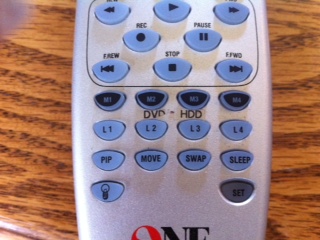
Hi all I hope this is the right place to ask this but I am new to all of this. here is what I am doing I sell a lot of Canon and some NEC LCD projectors that I service. I sell them with the remote included but the original remotes cost a bit of money so my thinking is to program Comcast (red button) remotes and then print a water transfer to illustrate the projector buttons and cover the "Cable" with Projector and so on. But I am having a hard time finding files for any of them, I have found and successfully programed one to work with the NEC projectors that I sell but not the Canons. I have a harmony 880 with all of the projectors programed in it and inside it has 8 pads some of the labels I can remember are TX RX , Ground I can look and list them exactly if it would help. I want to know how can I get them Canon codes (.CCF files) for the projectors or hack my Harmony 880 and make it spit them out some how? Oh and I tried to work with Harmonizing and concordance but I don't quite understand the installation instructions and not any help on their website.
-
vickyg2003
- Site Admin
- Posts: 7109
- Joined: Sat Mar 20, 2004 12:19 pm
- Location: Florida
- Contact:
I agree with 3fg, you need a jp1.3 learning remote & cable would help you do this fairly easily.
I just wanted to add that I used to use ink jet water transfer labels for my remotes, but then I got a brother label maker. When set to the smallest print I can make nice little laminated labels for my remotes. I have black on clear tape for my silver remotes and white on black tape for my black remotes. Also I create a word document with a nice line picture of my remote and then use call out boxes to show what the buttons do.
When you create your cannon upgrades remember to upload them to the file section
Good luck.
I just wanted to add that I used to use ink jet water transfer labels for my remotes, but then I got a brother label maker. When set to the smallest print I can make nice little laminated labels for my remotes. I have black on clear tape for my silver remotes and white on black tape for my black remotes. Also I create a word document with a nice line picture of my remote and then use call out boxes to show what the buttons do.
When you create your cannon upgrades remember to upload them to the file section
Good luck.
Remember to provide feedback to let us know how the problem was solved and share your upgrades.
Tip: When creating an upgrade, always include ALL functions from the oem remote, even if you never plan on assigning them to a button. Complete function lists makes an upgrade more helpful to others.
Tip: When creating an upgrade, always include ALL functions from the oem remote, even if you never plan on assigning them to a button. Complete function lists makes an upgrade more helpful to others.
-
vickyg2003
- Site Admin
- Posts: 7109
- Joined: Sat Mar 20, 2004 12:19 pm
- Location: Florida
- Contact:

-
vickyg2003
- Site Admin
- Posts: 7109
- Joined: Sat Mar 20, 2004 12:19 pm
- Location: Florida
- Contact:
Looks great!
Remember to provide feedback to let us know how the problem was solved and share your upgrades.
Tip: When creating an upgrade, always include ALL functions from the oem remote, even if you never plan on assigning them to a button. Complete function lists makes an upgrade more helpful to others.
Tip: When creating an upgrade, always include ALL functions from the oem remote, even if you never plan on assigning them to a button. Complete function lists makes an upgrade more helpful to others.