Hello
I've adhered to Digital TV and my service provider provided me with a HD+DVR box that uses a
URC-6025R01-03
S3F80JBBUF-COCB
SIO:1808-3070
remote.
I noticed that it can control other devices but the main problem is that I cant access all the functions of other remotes I have. So I cant lock them away.
I started seaching on the Internet about other remotes. Philips remotes looked good.
Then I started to search specific information for my remote and came to this website.
Is this remote any good ? I foud almost none information about it.
Should I use this remote or buy other JP1 remote ?
Can I control more devices that the three supported by the remote ?
My remote has the six pins accessible with the 1.3 version printed.
I want to control my SaMSUNG WX28w6vn and a Yamada DVD6700X and if possible other devices.
I also know that I have to make/buy a cable for connecting to the PC.
Thanks in advance.
30703070 URC-6025
I don't think there is any information about the 6025 remote on this website. Here is one source of information that may be pertinent: http://www.telstraclear.co.nz/residenti ... manual.pdf. Perhaps there are more codes listed in the link than you already have, and one of them may be closer to your components.
You've listed a Yamada DVD player, and a Samsung something (TV?). The Samsung model number seems to be for the remote rather than the TV. This website has an upgrade for a Yamada 6100 DVD, and likely the EFCs listed there will control your player.
You can learn about EFCs and a lot of other stuff in https://www.hifi-remote.com/forums/viewtopic.php?t=1009. Look specifically at the WHAT and WHY of JP1. See also https://www.hifi-remote.com/forums/dload ... le_id=5425 for instructions on how to manually program some aspects of the remote without a cable.
I suppose, but don't know, that the 6025 remote has support for 4 devices. The Comcast remotes that I own have three device buttons, but a fourth device is available, and I use the fourth device by using keymoves. I needed a JP1.3 cable to set that up however.
You've listed a Yamada DVD player, and a Samsung something (TV?). The Samsung model number seems to be for the remote rather than the TV. This website has an upgrade for a Yamada 6100 DVD, and likely the EFCs listed there will control your player.
You can learn about EFCs and a lot of other stuff in https://www.hifi-remote.com/forums/viewtopic.php?t=1009. Look specifically at the WHAT and WHY of JP1. See also https://www.hifi-remote.com/forums/dload ... le_id=5425 for instructions on how to manually program some aspects of the remote without a cable.
I suppose, but don't know, that the 6025 remote has support for 4 devices. The Comcast remotes that I own have three device buttons, but a fourth device is available, and I use the fourth device by using keymoves. I needed a JP1.3 cable to set that up however.
Thanks for your reply 3FG
I saw already the PDF you send me. I have all the supported codes for the remote. But some specific functions just dont work and I would like to remap the keys at my own way
My TV is a Samsung Super Hitron WiDE and her factory model is WX28w6vn. What you see when you google it, its places to buy remotes for this TV.
I disassembled the remote and took some pictures. With your expertise I would like to know if you can conclude anything about the hardware.

Front

Back (We can see 1.3 printed version near the connector)
So the final questions are: Is it worth to use it as a general remote fom my devices or its better to buy a new one ?
If I buy a new one, can I copy the cable TV settings to the new remote ?
Thanks
I saw already the PDF you send me. I have all the supported codes for the remote. But some specific functions just dont work and I would like to remap the keys at my own way
My TV is a Samsung Super Hitron WiDE and her factory model is WX28w6vn. What you see when you google it, its places to buy remotes for this TV.
I disassembled the remote and took some pictures. With your expertise I would like to know if you can conclude anything about the hardware.

Front

Back (We can see 1.3 printed version near the connector)
So the final questions are: Is it worth to use it as a general remote fom my devices or its better to buy a new one ?
If I buy a new one, can I copy the cable TV settings to the new remote ?
Thanks
Last edited by Thorak on Wed Jun 17, 2009 2:53 pm, edited 1 time in total.
We can't tell you whether you need a different remote or not-- we don't really know the capabilities of the one you have, nor can we really know how many devices you may want to control.
However, the one you have almost certainly can control all aspects of a Samsung TV and very likely will control your Yamada DVD. Both of those components apparently use the most common of IR protocols (NEC). You don't need a JP1.3 cable to add whatever functions are missing from your remote, although it would make adding the functions more convenient. You just need to read how to test EFCs, and how to implement them in your remote via keymoves. You can find the necessary EFCs in the upgrades that are available in the file section (look at the top of this page). It is easiest to install RemoteMaster 1.93 in order to extract the EFC and function names from *.rmdu files. You can find the RM executable in the JP1-Software Forum.
You also could buy a different JP1 remote. It is highly likely that you would be able to control your Cable box/DVR with the new remote.
There are at least three ways:
1. Get a learning remote and teach it all the functions from your existing remote. In this case you don't even need a JP1 style remote.
2. Perhaps the setup code you use with your existing remote for the cable box is standard. You could check this by "blinking out" the actual setup code you are now using, and see if it matches a standard setup code. If so, you should be able to buy a new remote with the same setup code. Two of the links I provided above give instructions on reading out the existing setup code.
3. Perhaps your cable company supports the cable box via an upgrade. That means that they uploaded, using a JP1.3 cable, a custom page of EFCs and assigned it a custom setup code in the remote. If so, you can, with a JP1.3 cable, download the upgrade from your existing remote and then upload it to the new one. If the button names of the two remotes don't match, you can re-assign the various EFCs to different buttons. (Note that in general you can't download the pages of EFCs that are provided as standard.) You'll need to get the program IR.exe to use with the JP1.3 cable.
My advice is to start by trying to control all of the functions on your TV and DVD using your existing remote. That will give you some idea of what kind of keys you need in a universal remote. I'd guess that a remote which has the keys to control a DVR could also control a DVD easily.
However, the one you have almost certainly can control all aspects of a Samsung TV and very likely will control your Yamada DVD. Both of those components apparently use the most common of IR protocols (NEC). You don't need a JP1.3 cable to add whatever functions are missing from your remote, although it would make adding the functions more convenient. You just need to read how to test EFCs, and how to implement them in your remote via keymoves. You can find the necessary EFCs in the upgrades that are available in the file section (look at the top of this page). It is easiest to install RemoteMaster 1.93 in order to extract the EFC and function names from *.rmdu files. You can find the RM executable in the JP1-Software Forum.
You also could buy a different JP1 remote. It is highly likely that you would be able to control your Cable box/DVR with the new remote.
There are at least three ways:
1. Get a learning remote and teach it all the functions from your existing remote. In this case you don't even need a JP1 style remote.
2. Perhaps the setup code you use with your existing remote for the cable box is standard. You could check this by "blinking out" the actual setup code you are now using, and see if it matches a standard setup code. If so, you should be able to buy a new remote with the same setup code. Two of the links I provided above give instructions on reading out the existing setup code.
3. Perhaps your cable company supports the cable box via an upgrade. That means that they uploaded, using a JP1.3 cable, a custom page of EFCs and assigned it a custom setup code in the remote. If so, you can, with a JP1.3 cable, download the upgrade from your existing remote and then upload it to the new one. If the button names of the two remotes don't match, you can re-assign the various EFCs to different buttons. (Note that in general you can't download the pages of EFCs that are provided as standard.) You'll need to get the program IR.exe to use with the JP1.3 cable.
My advice is to start by trying to control all of the functions on your TV and DVD using your existing remote. That will give you some idea of what kind of keys you need in a universal remote. I'd guess that a remote which has the keys to control a DVR could also control a DVD easily.
-
The Robman
- Site Owner
- Posts: 21928
- Joined: Fri Aug 01, 2003 9:37 am
- Location: Chicago, IL
- Contact:
The good news is that if you do get a JP1.3 cable and we need to create a new RDF for this remote, the button codes are printed on the PCB, and the button names are printed on the other side of the PCB, so that's one piece that's already taken care of.
Rob
www.hifi-remote.com
Please don't PM me with remote questions, post them in the forums so all the experts can help!
www.hifi-remote.com
Please don't PM me with remote questions, post them in the forums so all the experts can help!
-
vickyg2003
- Site Admin
- Posts: 7109
- Joined: Sat Mar 20, 2004 12:19 pm
- Location: Florida
- Contact:
-
The Robman
- Site Owner
- Posts: 21928
- Joined: Fri Aug 01, 2003 9:37 am
- Location: Chicago, IL
- Contact:
Here's a link to the home page for this remote:

And here's the button list for the future RDF:
options=1,
power=2,
dtv=3,
tv=4,
dvd=5,
1=6,
2=7,
3=8,
4=9,
5=10,
6=11,
7=12,
8=13,
9=14,
0=15,
text,-/--=16,
sub/av=17,
vol+=18,
vol-=19,
mute=20,
info=21,
ch+=22,
ch-=23,
skip-=25,
up=26,
down=27,
left=28,
right=29,
ok=30,
epg=31,
tv/radio=32,
RED=33,
GREEN=34,
YELLOW=35,
BLUE=36,
rewind=37,
pause=38,
stop=39,
ffwd=40,
skip+=41,
menu=42,
lib=43,
record=44,
timer=45,
back=46,
clock=47,
play=48,
ppv=48
And here's the button list for the future RDF:
options=1,
power=2,
dtv=3,
tv=4,
dvd=5,
1=6,
2=7,
3=8,
4=9,
5=10,
6=11,
7=12,
8=13,
9=14,
0=15,
text,-/--=16,
sub/av=17,
vol+=18,
vol-=19,
mute=20,
info=21,
ch+=22,
ch-=23,
skip-=25,
up=26,
down=27,
left=28,
right=29,
ok=30,
epg=31,
tv/radio=32,
RED=33,
GREEN=34,
YELLOW=35,
BLUE=36,
rewind=37,
pause=38,
stop=39,
ffwd=40,
skip+=41,
menu=42,
lib=43,
record=44,
timer=45,
back=46,
clock=47,
play=48,
ppv=48
Rob
www.hifi-remote.com
Please don't PM me with remote questions, post them in the forums so all the experts can help!
www.hifi-remote.com
Please don't PM me with remote questions, post them in the forums so all the experts can help!
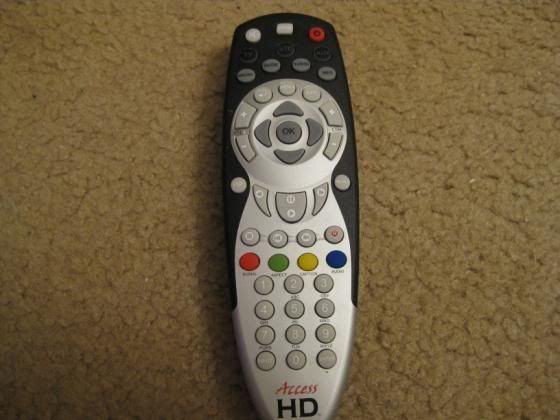
URC6025R01-12
Hi all,
This is an amazing site! And some of this stuff can be quite intimidating as well
When I started to read some of the information I thought it would be only a matter of getting a serial interface, connect the remote to the pc and specify which buttons would do what but I was wrong
So I built the Tommy's interface (thanks Tommy), connected it to the remote via IR only to learn that I would need the appropriate RDF file which does not seam to exist yet. So I am here hopping that some kind soul would produce one for this remote if it is possible at all. After that I think I can proceed to mess around with it until I learn how to customize the buttons to control all the functions of my mini audio system Sony DHC-MD595 for which I don't have the original remote. Is this possible?
This remote is provided with a Thomson Digital TV HD+DVR SAT receiver/decoder and there must be thousands if not millions of these out there.
Here are some photos I took of an identical unit (the only difference seams to be the version number at the end, R01-03 instead of mine, R01-12):
http://imageshack.us/photo/my-images/53 ... 15944.jpg/
http://imageshack.us/photo/my-images/85 ... 15955.jpg/
This is the complete information printed in the label found at the rear of the battery cover:
URC6025R01-12
S3FB0JBBUF-C0CB
SIO: 1808-3070
The signature I got from the jp1xtest.exe:
jp1xtest version 0.00
*** FOUND A JP1.2/3 COMPATIBLE REMOTE ON COM4! ***
Signature is 30703070
Memory address is $0600
Memory size is $2100 (8448)
I have posted the file I got from IR raw download in the file section, Diagnosis Area:
https://www.hifi-remote.com/forums/dload ... e_id=10962
The signature I got from the command 983 (signature blink back) is 3070.
There is also a screen dump from Audacity showing the power button ir blink pointed at an ir receiver diode plugged in the MIC of the pc:
http://imageshack.us/photo/my-images/84 ... r0112.jpg/
I can make more screen dumps of any other buttons, if it helps.
So if I am asking too much please be gentle with the beginner here
Thanks in advance for your help.
This is an amazing site! And some of this stuff can be quite intimidating as well
When I started to read some of the information I thought it would be only a matter of getting a serial interface, connect the remote to the pc and specify which buttons would do what but I was wrong
So I built the Tommy's interface (thanks Tommy), connected it to the remote via IR only to learn that I would need the appropriate RDF file which does not seam to exist yet. So I am here hopping that some kind soul would produce one for this remote if it is possible at all. After that I think I can proceed to mess around with it until I learn how to customize the buttons to control all the functions of my mini audio system Sony DHC-MD595 for which I don't have the original remote. Is this possible?
This remote is provided with a Thomson Digital TV HD+DVR SAT receiver/decoder and there must be thousands if not millions of these out there.
Here are some photos I took of an identical unit (the only difference seams to be the version number at the end, R01-03 instead of mine, R01-12):
http://imageshack.us/photo/my-images/53 ... 15944.jpg/

http://imageshack.us/photo/my-images/85 ... 15955.jpg/

This is the complete information printed in the label found at the rear of the battery cover:
URC6025R01-12
S3FB0JBBUF-C0CB
SIO: 1808-3070
The signature I got from the jp1xtest.exe:
jp1xtest version 0.00
*** FOUND A JP1.2/3 COMPATIBLE REMOTE ON COM4! ***
Signature is 30703070
Memory address is $0600
Memory size is $2100 (8448)
I have posted the file I got from IR raw download in the file section, Diagnosis Area:
https://www.hifi-remote.com/forums/dload ... e_id=10962
The signature I got from the command 983 (signature blink back) is 3070.
There is also a screen dump from Audacity showing the power button ir blink pointed at an ir receiver diode plugged in the MIC of the pc:
http://imageshack.us/photo/my-images/84 ... r0112.jpg/

I can make more screen dumps of any other buttons, if it helps.
So if I am asking too much please be gentle with the beginner here
Thanks in advance for your help.
This remote was mentioned here before. In that thread, Rob speculated that we could read the button numbers from the PCB, but I know of other instances where the numbers on the PCB don't match the internal ones.
So, to start, a couple of things would be useful.
1) Can you provide a link to the manual?
2) Try to program some macros using the 995 command and then do another raw download. Make sure to keep track of the buttons programmed into the macros, and the button(s) to which the macros are assigned. The idea is to include every button on the remote in a macro. That will allow us to determine the button numbers.
So, to start, a couple of things would be useful.
1) Can you provide a link to the manual?
2) Try to program some macros using the 995 command and then do another raw download. Make sure to keep track of the buttons programmed into the macros, and the button(s) to which the macros are assigned. The idea is to include every button on the remote in a macro. That will allow us to determine the button numbers.
URC6025R01-12
Hi
Thanks 3FG.
The link for the manual is here but Im afraid wont do much good because it is only in Portuguese. Nevertheless, I could translate some part of it if it could be usefull.
http://www.zon.pt/Suporte/TV/Manuais/Co ... oMaxim.pdf
For the macros I will do it, It will take some days however, because I will have to learn it first . I will report back on that.
Thanks again for your help.
Thanks 3FG.
The link for the manual is here but Im afraid wont do much good because it is only in Portuguese. Nevertheless, I could translate some part of it if it could be usefull.
http://www.zon.pt/Suporte/TV/Manuais/Co ... oMaxim.pdf
For the macros I will do it, It will take some days however, because I will have to learn it first
. I will report back on that.Thanks again for your help.
-
The Robman
- Site Owner
- Posts: 21928
- Joined: Fri Aug 01, 2003 9:37 am
- Location: Chicago, IL
- Contact:
The English manual is here:
http://www.hifi-remote.com/files/manuals/URC-6025.pdf
http://www.hifi-remote.com/files/manuals/URC-6025.pdf
Rob
www.hifi-remote.com
Please don't PM me with remote questions, post them in the forums so all the experts can help!
www.hifi-remote.com
Please don't PM me with remote questions, post them in the forums so all the experts can help!
Setup code list for URC6025R01-R12
Thanks Robman. There seams to be some minor differences in some less used keys but it is close enough.
Here is the setup code list for the "Maxim" remote, that seams to be the name Zon gives it . Its not included in the Portuguese manual and it seams to contain more codes than the manual in English you found.
http://www.zon.pt/Suporte/TV/Faqs/Docum ... zonbox.pdf
rgds
Here is the setup code list for the "Maxim" remote, that seams to be the name Zon gives it
. Its not included in the Portuguese manual and it seams to contain more codes than the manual in English you found.http://www.zon.pt/Suporte/TV/Faqs/Docum ... zonbox.pdf
rgds